Introduction
Building a DataOps project is exactly like building a brand new house. If you want a strong, safe home that lasts for years, you need the right materials and the most reliable tools. If you choose cheap or incorrect tools, your walls might crack, the roof could leak, and the whole house might eventually collapse. The exact same rule applies to handling your company’s daily numbers, customer details, and business facts. When you pick the right software, your business stands strong. When you pick the wrong ones, everything falls apart, and your team gets very frustrated.
Many teams struggle because they do not know where to start when picking the software they need. To make this process easier and to help you build a solid foundation, you can learn more at Dataopsschool.com. Having a trusted, easy-to-understand guide ensures you do not waste your time and your money on confusing software that simply does not fit your true, everyday needs.
The Danger of the “Shiny Object Syndrome”
Have you ever bought a fancy new kitchen gadget just because everyone else on the internet was talking about it, only to leave it hidden in a drawer because it was too hard to clean? In the software world, this exact mistake is called the “shiny object syndrome.” Many companies make this huge mistake when they try to build their information projects. They see a famous, incredibly expensive tool on social media and buy it immediately. They think buying an expensive brand name will magically fix all their messy files and broken spreadsheets.
The reality of this situation is usually much sadder. The company spends thousands of dollars on this super advanced software. But when the everyday office workers actually try to use it, they realize it is way too complicated. Nobody knows how to set it up, the buttons do not make sense, and the daily tasks become harder instead of easier. Instead of speeding things up, the new tool slows everyone down. Workers end up secretly going back to their old, slow ways of doing things just to get their work done on time.
This hype-based buying ruins company budgets and destroys the team’s confidence. When business managers force their team to use a tool that does not fit their daily habits, the team stops trusting the entire process. The information remains messy, the expensive software sits unused, and the company has to start all over again a year later. It is a very painful and expensive lesson that many businesses learn the hard way.
To avoid this painful trap, you must completely ignore the internet hype and the flashy advertisements. You should always look closely at what your specific team actually needs to do their jobs well today. Buying a simple, effective tool that your team understands and loves using is always a thousand times better than buying a famous, complicated tool that nobody knows how to operate.
The Core Tool Categories Every DataOps Team Needs
Before you go shopping for software, you need to understand the different basic jobs these tools do. You do not need one massive, confusing tool that claims to do everything at once. Instead, you need a few specific, easy-to-use tools that do their unique jobs perfectly. Let us look closely at the three main categories you will need to run a smooth project.
Data Ingestion (Collecting Data)
Think of data ingestion as gathering all the raw materials for a factory. Information is constantly coming from many different places, like your company website, your sales applications, and your customer feedback forms. You need a tool that can safely collect all this scattered information and bring it into one central storage room. A good collecting tool does this automatically every single day, so your team does not have to waste hours copying and pasting numbers by hand. It works exactly like a strong, secure set of pipes that smoothly moves fresh water from a lake directly into a city water tank.
Data Transformation (Cleaning Data)
Once all the information is sitting safely in your central storage room, it is usually very messy. You might have customer names spelled wrong, missing phone numbers, or dates written in the wrong format. This is where data transformation tools come in. Their main job is to wash, organize, and neatly arrange the facts. They filter out the junk and fix the spelling mistakes so that the information is actually correct and useful. If you skip this crucial cleaning step, your business leaders will end up making terrible decisions because they will be looking at bad, confusing, or false numbers.
Data Observability (Checking for Errors)
Even after you correctly collect and carefully clean your information, things can still break. A software pipe might leak, or a bad piece of information might slip through the cracks. Data observability tools act like security guards or automatic alarm systems. They constantly watch your information flowing through the system. If something goes wrong—like a sudden drop in daily sales numbers because a website button stopped working—this tool will immediately send a warning message to your team. This way, you can fix the problem right away before your customers or bosses even notice it.
Comparing How to Choose: Hype vs. Reality
| Decision Factor | Choosing Tools Based on Hype | Choosing Tools Based on Real Needs |
| Why we buy it | Because famous tech companies or popular internet blogs talk about it. | Because it perfectly fixes a specific problem the team struggles with today. |
| Team Training Required | Takes many months of hard training, often requiring expensive outside experts to teach the team. | Very little training. The tool is easy to use and makes total sense to the office workers right away. |
| Long-Term Value | Usually very low. Teams stop using it because it is too hard, which completely wastes the company’s money. | Very high. The team uses it happily every day, making their daily work faster, smoother, and much more accurate. |
Looking at this simple table, it is incredibly clear why chasing the newest software trends is a terrible idea. When you choose software purely based on popularity, you are guessing that what works for a giant, billion-dollar tech company will also work perfectly for your smaller team. This is almost never true. Your team might just need a simple, sturdy wagon to carry their supplies, but you bought them a complicated rocket ship that they do not know how to fly.
On the other hand, choosing tools based on real needs means you sit down and actually listen to your workers. You find out what daily tasks take up most of their time, and you buy software specifically designed to speed up those exact tasks. The focus shifts entirely from asking, “What is the coolest software on the market?” to asking, “What is the most helpful software for our people?”
This realistic, calm approach saves a massive amount of money and keeps your team very happy. When software is easy to learn and magically fixes a real headache, your workers will gladly use it every single day. This leads to a smoother, faster, and much more successful information project overall, building a system everyone can trust.
A Step-by-Step Guide to Selecting Your Tools
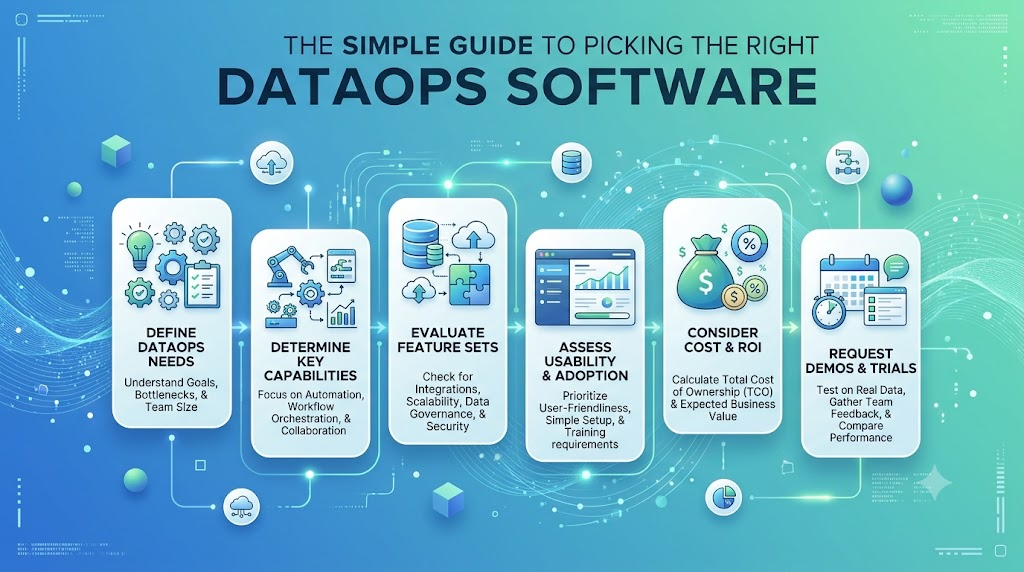
Now that you know what to look for, how do you actually make the final choice without getting overwhelmed? The very first step is to sit down and honestly judge your team’s current computer skills. If your team is mostly made of beginners who are used to simple spreadsheets, you absolutely cannot buy a tool that requires advanced computer coding knowledge. You must match the software directly to the everyday people who will press the buttons. A tool is only valuable if the people holding it know how to use it safely.
The second step is setting a strict, realistic budget and sticking to it no matter what. Software costs can grow very fast, especially if the company charges you a fee based on how much information you collect. You need to calculate not just the initial upfront price, but exactly how much it will cost you every single month for the next two years. Make sure you read the fine print to avoid hidden fees. Never buy more capacity or fancier features than you actually need right now.
Next, you must always test the software on a small scale before you make a final promise to buy it. Almost all good software companies offer a free trial period or allow you to do a tiny test project. Take a small, safe piece of your company’s daily numbers and run it through the new tool. Did it work smoothly? Did the team understand the menus? If it fails this simple small test, it will definitely be a disaster when you try to use it for the whole company.
Finally, you must make absolutely sure the new tool plays nicely with your old systems. It does not matter how great a new piece of software is if it refuses to connect to the email programs or sales computers you already use every day. A good tool should easily plug into your current office setup, acting as a helpful new addition rather than forcing you to throw everything away and rebuild your office from scratch.
Future-Proofing Your DataOps Toolkit
Picking a great, affordable tool for today is very important, but you also have to think carefully about tomorrow. This smart planning concept is known as future-proofing. When your company is small, handling your daily customer numbers might be quite easy. But what happens when your business is incredibly successful and doubles in size over the next two years? You need to be ready for success.
If you buy a cheap piece of software that only handles a tiny amount of information, it will completely crash when your business grows and gets busier. You will be forced to throw it away, buy a brand new system, move all your saved files, and retrain everyone in the building. This is a massive waste of time, energy, and money, and it causes a lot of stress. To prevent this, you should ask the software provider exactly how their product handles sudden, large growth. Can you simply upgrade your monthly plan to handle more work, or does the tool have strict limits that you cannot pass?
A truly good tool grows right alongside you. It starts small and cheap when you are small, and it smoothly expands its power and features as you add more customers and hire more team members. You want a flexible system that naturally adapts to your success without breaking down or causing panic.
Always remember to check if the tool is regularly updated by the people who built it. Technology moves very fast, and you want to use software that gets regular safety checks and new, helpful updates. A software tool that has not been updated or improved in two years is a dead tool, and it will eventually hold your growing company back from reaching its full potential.
FAQs
1. What is DataOps in simple words?
DataOps is simply a set of good habits and easy tools that help office teams collect, clean, and use business facts faster and more reliably.
2. Why do I need special software for my business numbers?
Without special software, handling large amounts of daily information manually takes way too long and leads to many costly human mistakes.
3. How much money should a small company spend on these tools?
There is no fixed price for everyone, but a small company should always start with free or low-cost basic tools and only pay more money as their business grows.
4. What does the term “data ingestion” actually mean?
It simply means collecting raw information from different places, like your websites and mobile apps, and securely bringing it into one main storage space.
5. Can I just use one single, large tool for everything my business needs?
It is usually much better to pick a few specialized, simple tools that do their specific jobs perfectly rather than buying one massive tool that does everything poorly.
6. How do I know if a new software tool is too complicated for my team?
If your team members cannot figure out how to do their basic daily tasks during a short, free trial run, the tool is definitely too complicated for your office.
7. What is the biggest mistake business owners make when buying software?
The biggest mistake is buying famous, incredibly expensive software based on internet hype instead of checking if it matches the team’s actual, everyday skill level.
8. Why is cleaning up business information so important?
If you do not clean your information by fixing spelling mistakes and missing numbers, your business managers will end up making terrible decisions based on false facts.
9. What does it mean to “future-proof” my company software?
It simply means picking flexible tools that can easily handle more work and grow smoothly as your company gets bigger and busier over the years.
10. Do my workers need to know how to write computer code to use these tools?
No, many modern software tools are built specifically for beginners and allow your team to manage complex information using very simple buttons and clear menus.
Conclusion
Building a successful, reliable information system does not have to be a scary or overly complicated task. As we have discussed throughout this guide, the absolute secret to success is keeping things incredibly simple, ignoring the loud hype on the internet, and focusing strictly on what your unique team needs to get their daily jobs done. You do not need to be a computer expert to make a smart choice; you just need to understand your own business.
By taking the time to understand the different basic categories of tools—like those used for collecting raw facts, cleaning up messy mistakes, and checking the system for sudden errors—you can build a clear, easy map of what you actually need to buy. Testing things slowly with free trials and making sure the costs fit your strict budget will protect you from making expensive, embarrassing mistakes.
