Introduction
Companies today are gathering mountains of data. Every time a customer clicks a button, buys a shirt, or signs up for an email list, a new piece of information is born. Over the course of a single day, a business might collect millions of these tiny puzzle pieces. But having all these pieces is useless if you cannot put the puzzle together. To make sense of it all, businesses need a central system—a “brain”—that can organize, clean, and move this information exactly where it needs to go.
This process of moving and organizing information is called data orchestration. If you want to learn the foundations of this practice, checking out resources like Dataopsschool is a great place to start. Orchestration is what ensures that the data collected on a Monday morning actually shows up correctly on the manager’s report by Monday afternoon. Without a proper organizer, all that valuable information just sits in messy, disconnected piles, completely useless to the people who need to make business decisions.
As businesses grow, the old ways of moving information around just do not work anymore. Modern software tools are stepping up to solve this massive headache. One of the best tools doing this today is called Dagster. It completely changes how data teams work by making the whole process visible, organized, and reliable, so engineers can finally sleep peacefully at night instead of worrying about broken systems.
The Chaos of Unmanaged Data Pipelines
To understand why we need modern tools, we have to look at how things used to be done. In the past, data teams would write hundreds of separate, messy computer scripts to move information from one place to another. These scripts were often tangled together like a giant bowl of spaghetti. If one script finished its job late, the next script might start too early, pulling in incomplete or totally wrong information. There was no single map to show how everything connected, leaving teams to guess how the system actually worked.
This chaotic setup created the perfect environment for a “silent failure.” A silent failure is an engineer’s worst nightmare. Imagine an online store where the system fails to load the morning sales numbers, but it does not send out any error alerts. The system thinks everything is fine. Then, the CEO opens their daily sales dashboard, sees a massive drop in revenue, and panics. No one knew there was a problem until the boss was staring at the wrong numbers, and by then, the damage to trust was already done.
Because these tangled scripts had no proper supervision, data engineers were constantly stressed. An error in the middle of the night meant an engineer’s phone would start buzzing at 3 AM. They would have to wake up, rub their eyes, and spend hours hunting through thousands of lines of messy code just to find the one small typo that brought the whole system down. It was exhausting, frustrating, and incredibly bad for the health of the team.
Without a proper orchestrator, fixing one problem often caused two more. An engineer might fix the script that pulls sales data, only to accidentally break the script that calculates taxes. The lack of clear visibility meant that nobody really trusted the data. If a dashboard looked slightly off, business leaders would just assume the system was broken again, forcing the data team to constantly defend their work rather than building new, useful features for the company.
What is Dagster and How Does it Work?
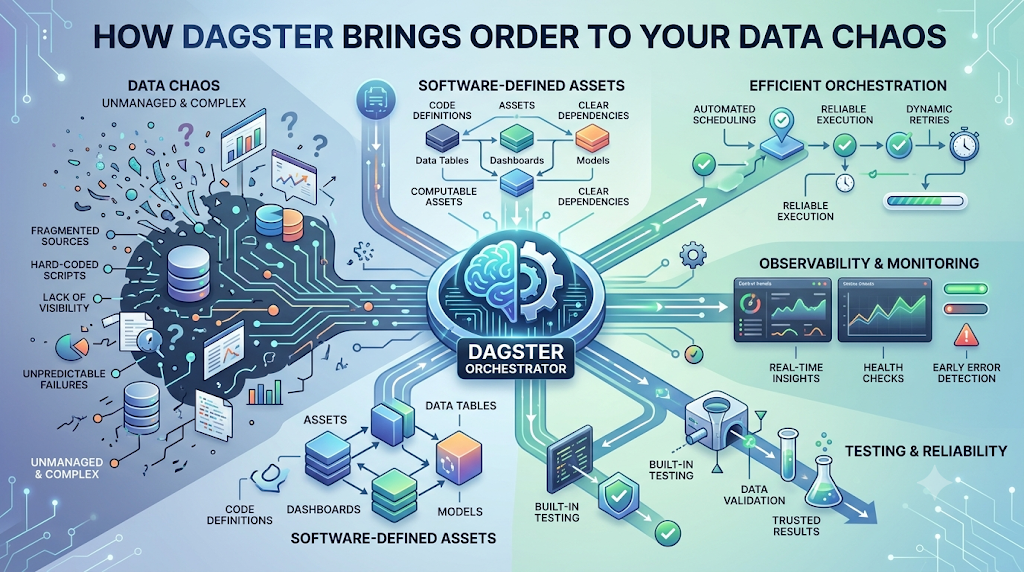
Dagster is a modern software tool built specifically to fix these stressful problems. It acts as the ultimate supervisor for your data, ensuring everything runs in the perfect order, at the exact right time, without any nasty surprises.
The Role of the Orchestrator
To understand what Dagster does, think of a massive symphony orchestra. You have violins, cellos, trumpets, and drums. If they all just start playing whatever they want, whenever they want, you get a terrible, noisy mess. An orchestrator is like the conductor standing at the front of the stage. The conductor does not actually play the instruments. Instead, they tell the violins exactly when to start, how loud the trumpets should be, and when the drums need to wait. Dagster is the conductor for your data. It ensures every computer task runs in the exact right order, so the final result is a beautiful, accurate report instead of chaotic noise.
Focusing on Assets Instead of Just Tasks
Older tools (like a popular one called Airflow) only focused on the tasks—they just wanted to know if a script ran successfully or if it failed. Dagster takes a completely different approach using something called “Software-Defined Assets.” Instead of just looking at the action (like “run the download script”), Dagster focuses on the actual data being created (like “the cleaned list of today’s customers”). By focusing on the final product—the asset—engineers can easily see exactly what data they have, where it came from, and if it is ready to be used by the rest of the company.
Catching Errors Before They Happen
One of the best things about Dagster is how it prevents bad data from reaching important business reports. It gives engineers a beautiful, clear visual map of their entire data system. You can look at the computer screen and see exactly how a piece of information flows from the website all the way to the CEO’s dashboard. If a step in the middle breaks, Dagster stops the line. It prevents the broken data from moving forward, meaning the CEO might see yesterday’s correct data instead of today’s completely ruined data. This gives engineers time to fix the issue calmly, rather than panicking in the middle of a business meeting.
Comparing Dagster vs. Traditional Orchestrators
When deciding how to manage data, teams usually compare modern tools like Dagster against older, traditional tools like Airflow. Here is a simple breakdown of how they differ.
| Feature | Dagster (Modern Orchestrator) | Traditional Tools (like Airflow) |
|---|---|---|
| Primary Focus | The actual Data (Assets) being created | The Actions (Tasks) being run |
| Ease of Testing | Very easy to test directly on a personal laptop | Hard to test without a full server setup |
| Developer Experience | Clean, visual map; catches errors early | Tangled, hard to read; errors happen late |
| Handling Failures | Stops bad data from moving forward automatically | Often lets bad data slip through unnoticed |
The biggest difference between these two approaches is how they view the world of data. Traditional tools are essentially just very fancy alarm clocks. They are great at saying “wake up at 6 AM and run this script.” But they do not really care what the script actually does or if the data it produces makes any sense. They just check off a box that says the task finished. This is why silent failures happen so often with older tools.
Dagster, on the other hand, cares deeply about the data itself. Because of its focus on assets, it knows exactly what the end result should look like. It is not just an alarm clock; it is a quality inspector. If the data looks wrong, Dagster raises a red flag immediately. This shift in focus from “doing tasks” to “creating reliable data assets” changes everything for an engineering team, making their daily jobs much easier.
Furthermore, Dagster makes testing a breeze. With older tools, engineers often had to push their code to the main company servers just to see if it worked, which is risky and slow. Dagster is designed so that a developer can test the entire flow right on their own personal laptop. They can make sure everything is perfect in a safe environment before sending it out to the rest of the business, saving countless hours of frustration and preventing broken reports.
Real-World Scenario: Building a Trustworthy Dashboard
To really understand the power of this system, let us look at a realistic example. Imagine a large retail company that sells shoes online. Every single day, they need to pull a list of the previous day’s sales from their website, clean up any messy information (like removing test orders or fixing misspelled addresses), and then send the final numbers to a shiny daily sales dashboard for the company executives to read with their morning coffee.
In this scenario, the data team uses Dagster to manage the entire journey. First, Dagster reaches out to the shoe website and carefully extracts the raw sales numbers. Then, it passes that information to a cleaning step. This is where it removes any weird glitches or duplicate orders. Because Dagster uses a visual map, the engineers can look at a screen and literally watch a little green light move from the “Download Box” to the “Cleaning Box.” They know exactly where the data is at all times.
Once the cleaning is done, Dagster safely delivers the final, perfectly accurate numbers to the executive dashboard. But what happens if the shoe website changes its format overnight, and the download step pulls in broken information? With an old tool, that broken information would flow right into the dashboard, ruining the executives’ morning. But with Dagster, the system immediately recognizes that the data looks wrong during the cleaning step.
Instead of pushing the bad data forward, Dagster stops the line. It turns the box on the visual map red and sends a polite alert to the data team saying, “Hey, the website data looks different today, I paused the dashboard update so nothing gets ruined.” The engineers can then easily look at their computer, see exactly where the red box is, fix the small website change, and press a button to resume the flow. The dashboard is updated accurately, and the executives never even know there was a problem.
How to Prepare Your Team for Dagster
Moving a whole company to a new software tool can sound scary, but it does not have to be a painful process. The first step to preparing your team for Dagster is to assess your current situation. Take a look at all the messy scripts and old tools your team is currently using. Identify the most frustrating parts of your daily work. Are your engineers constantly waking up to fix broken alerts? Are your business leaders complaining about wrong numbers? Pinpointing these pain points will help your team understand exactly why the change is necessary.
The best advice for bringing in a new orchestrator is to start small. Do not try to rip out all your old tools and replace everything in a single weekend. That is a recipe for disaster. Instead, find one single, low-risk project to test out. For example, use Dagster to build a brand new, internal report that only the data team uses. This allows your engineers to get comfortable with the new tool in a safe space where mistakes do not matter as much. Once they see how easy it is to use, they will naturally want to move bigger projects over.
Training your team on the “asset” mindset is also incredibly important. Most data engineers have spent years thinking only about tasks and schedules. You have to help them shift their perspective to focus on the final product—the data asset itself. Encourage them to draw out their data flows on a whiteboard before they write any code. Seeing the visual connection between different pieces of data will help them write better, cleaner code when they finally sit down at their keyboards.
Ultimately, the goal of moving to a modern tool is to make everyone’s life easier. Once your team gets past the initial learning curve, they will start to enjoy the benefits of less stress, fewer middle-of-the-night emergency calls, and a much better relationship with the business leaders who rely on their data. A calm, well-organized data team is a productive data team, and modern orchestration is the key to unlocking that peace of mind.
Conclusion
Managing the endless flow of information in a modern business is no small task. The old ways of writing messy, disconnected scripts and hoping for the best simply cannot keep up with the demands of today’s fast-paced world. Without a strong central brain to organize the chaos, companies will always struggle with broken reports, lost trust, and exhausted engineers.
Modern orchestration tools bring much-needed order to this confusion. By acting as a skilled conductor, tools like Dagster ensure that every piece of information is handled with care, processed in the right order, and delivered perfectly. Moving away from a focus on basic tasks and embracing a focus on high-quality data assets fundamentally changes how teams work. It brings visibility, safety, and reliability to a process that used to be a constant source of anxiety. When your data flows smoothly, your entire business can finally operate with confidence and clarity.
FAQs
1. What exactly is data orchestration?
It is the process of coordinating and managing multiple computer tasks so that information is collected, cleaned, and delivered in the correct order, much like a conductor leading a musical band.
2. What does a “silent failure” mean?
A silent failure happens when a computer system breaks or pulls in the wrong data, but fails to send an alert. This results in business leaders looking at wrong numbers without realizing there is a problem.
3. How is Dagster different from Airflow?
Airflow mostly focuses on running tasks on a schedule, like an alarm clock. Dagster focuses on the actual data being created, acting more like a quality inspector to ensure the final product is accurate.
4. What are “Software-Defined Assets”?
It is Dagster’s way of focusing on the end result (the clean data) rather than just the action of moving it. It allows engineers to see exactly what information is ready for the company to use.
5. Do I need to be a coding expert to understand Dagster?
While engineers write the code to set it up, Dagster provides a visual map that is very easy to read. Even non-technical managers can look at the screen and see how the data is flowing.
6. Can Dagster really prevent broken dashboards?
Yes. Because it tracks the flow of data visually, it can pause the process if a step fails. This stops bad or broken data from moving forward and ruining the final dashboard.
7. Is it hard to switch from my old tools to Dagster?
It does not have to be. The best approach is to start with one small, low-risk project so your team can learn the tool without the pressure of changing the whole business overnight.
8. Why is testing easier with Dagster?
Dagster is built so developers can run and test their entire data process right on their personal laptops, whereas older tools often required pushing the code to a main company server just to see if it worked.
9. Does Dagster help with engineer burnout?
Absolutely. By catching errors early and preventing silent failures, engineers spend less time waking up at 3 AM to fix broken scripts and more time doing meaningful work during normal hours.
10. What happens if a step in my data flow breaks while using Dagster?
The system will turn that specific step red on the visual map, pause the flow to protect the rest of your data, and alert your team so they can easily find and fix the exact location of the problem.
