Introduction
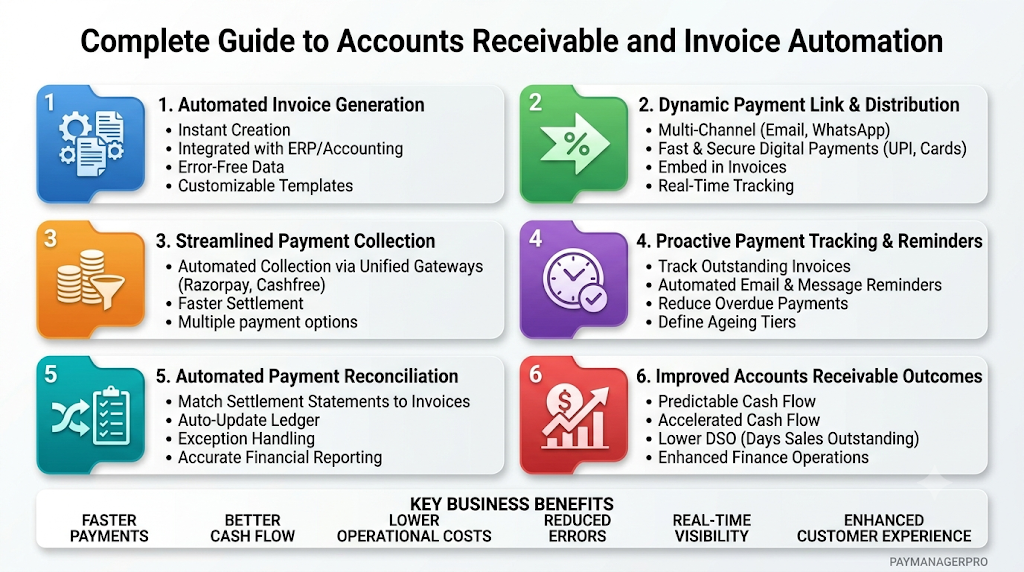
Managing financial operations manually is an operational burden for growing B2B enterprises. Modern business leaders face persistent delays in accounts receivable, fragmented collection workflows, and tedious ledger reconciliation. Relying on disconnected spreadsheets and disjointed payment gateways consumes hundreds of operational hours each quarter, leaving cash flow vulnerable to human error and oversight. Adopting an integrated enterprise payment management platform addresses these core vulnerabilities. Automation replaces fragmented workflows with a single source of truth, enabling finance teams to streamline operations, reduce overhead, and secure predictable cash flow. This comprehensive guide covers the essentials of modern accounts receivable automation, key compliance frameworks, and best practices for building an end-to-end invoice-to-cash workflow.
What is Invoice and Payment Management Software?
Invoice and payment management software is a unified digital platform designed to automate the generation, delivery, tracking, collection, and reconciliation of business transactions. Rather than relying on separate tools for billing, messaging, payment links, and ledger entries, this software consolidates every step of the payment lifecycle into a single operational interface.
The Core Workflow
- Invoice Generation: Draft tax-compliant bills automatically using saved client profiles and item catalogs.
- Link Delivery: Send dynamic payment links via email, WhatsApp, or SMS with embedded payment options.
- Automated Collection: Process incoming funds through multiple payment gateways.
- Settlement & Reconciliation: Match bank credits against open ledger items automatically in real time.
- Reporting: Generate immediate financial dashboards detailing cash flow, pending balances, and collection metrics.
Key Components
- Dynamic Invoicing Engine: Supports GST parameters, line-item tax details, and automated numbering formats.
- Multi-Gateway Payment Dashboard: Consolidates routes across providers like Razorpay, Cashfree, and Paytm.
- Reconciliation Module: Automatically links bank settlement statements with internal invoice IDs.
- Automated Reminder Scheduler: Triggers periodic payment prompts based on customized ageing intervals.
By bringing these tools together, organizations eliminate data siloes, enforce consistent credit terms, and give finance teams complete visibility into liquid assets.
Why Modern Businesses Need Automated Payment Management
Manual financial management restricts scalability. As transaction volumes grow, manual entry leads to administrative errors, delayed follow-ups, and mismatched balances.
Manual Invoicing (Spreadsheets, Manual Reminders)
   │
   ▼
Fragmented Gateways & Unlinked Payment Links
   │
   ▼
Delayed Settlements & Manual Bank Matching
   │
   ▼
Bloated DSO, Cash Flow Friction & Audit Errors
Replacing these steps with an automated end-to-end framework secures systemic advantages across your financial stack:
Automated Invoicing Engine (GST Compliant)
   │
   ▼
Unified Multi-Gateway Dashboard & Auto-Reminders
   │
   ▼
Instant Collection & Automated Reconciliation
   │
   ▼
Optimized Cash Flow, Lower DSO & Real-Time Audits
Cash Flow Acceleration
Automated payment workflows accelerate the invoice-to-cash lifecycle. Delivering dynamic payment links instantly via email or messaging apps reduces friction, allowing clients to settle invoices using their preferred payment methods.
Complete Payment Visibility
Centralized dashboards offer real-time tracking of unpaid invoices, impending due dates, and processed collections. Finance teams gain clear insights without sifting through conflicting bank statements or spreadsheet versions.
Reduced Administrative Burden
Automating routine billing and reminder tasks frees finance personnel to focus on strategic capital allocation, credit risk assessment, and financial planning, rather than manual data entry.
Improved Client Experience
Clients appreciate clear, professional invoices containing embedded payment links and flexible payment options. Transparent billing reduces disputes, strengthens customer relationships, and encourages prompt settlements.
Key Features of PayManagerPro
PayManagerPro is built to serve as an end-to-end enterprise payment management platform, eliminating friction across B2B billing and collection operations.
                  ┌──────────────────────────────┐
                  │   Invoice Creation Engine    │
                  └──────────────┬───────────────┘
                                 │
                   ┌─────────────┴─────────────┐
                   ▼                           ▼
        ┌─────────────────────┐     ┌─────────────────────┐
        │   GST Compliance    │     │ Dynamic Payment Link│
        └──────────┬──────────┘     └──────────┬──────────┘
                   │                           │
                   └─────────────┬─────────────┘
                                 │
                                 ▼
                  ┌──────────────────────────────┐
                  │ Multi-Gateway Collection Hub │
                  │ (Razorpay, Cashfree, Paytm)  │
                  └──────────────┬───────────────┘
                                 │
                                 ▼
                  ┌──────────────────────────────┐
                  │ Automated Reconciliation Hub │
                  └──────────────┬───────────────┘
                                 │
                   ┌─────────────┴─────────────┐
                   ▼                           ▼
        ┌─────────────────────┐     ┌─────────────────────┐
        │ Custom API Triggers │     │  Maker-Checker Logs │
        └─────────────────────┘     └─────────────────────┘
- GST Invoicing: Automatically calculate itemized tax splits according to domestic regulations, ensuring complete compliance on every issued invoice.
- Custom Invoice Numbering: Maintain strict sequence integrity across multiple financial years and business units.
- Payment Links: Generate multi-use or single-use dynamic payment links for instant delivery across digital communication channels.
- Collection Dashboard: Track total receivables, settled funds, and overdue buckets through a centralized control panel.
- Gateway Integrations: Unify collection processing across major enterprise gateways within a single management console.
- Reporting: Export comprehensive financial ledgers, tax breakdowns, and collection ageing reports effortlessly.
- Automated Reconciliation: Match incoming settlement deposits to open invoice records without manual line-by-line verification.
- API Framework: Connect billing engines directly to custom enterprise software, ERPs, and CRMs.
- Approval Workflows: Enforce maker-checker approval controls to maintain oversight before issuing invoices or credit notes.
- Audit Logs: Track all account changes, user actions, and payment events with secure, immutable audit trails.
Explore platform capabilities on the PayManagerPro Feature Overview.
GST Invoice Software in India
B2B transactions in India require strict adherence to standard tax compliance guidelines set by the GST Council. Issuing incomplete or non-compliant tax invoices can disrupt Input Tax Credit (ITC) flow for clients and lead to administrative penalties under Ministry of Corporate Affairs regulations.
Core GST Components
To comply with domestic tax standards, invoicing engines must accurately apply the correct tax categories:
- CGST (Central Goods and Services Tax): Applied alongside SGST on intrastate sales.
- SGST (State Goods and Services Tax): Collected for intra-state transactions by the local state government.
- IGST (Integrated Goods and Services Tax): Applied to interstate commercial transactions.
Compliance Features
Automated GST invoice software simplifies compliance through built-in validation checks:
- HSN/SAC Code Directory: Automatically map line items to mandatory HSN/SAC codes.
- Tax Identification Number (GSTIN) Validation: Verify client tax identifiers before issuing invoices to prevent filing rejections.
- Structured E-Invoicing Data: Format transaction details to generate B2B invoices that meet e-invoicing standards.
- Simplified GSTR-1 Reporting: Export cleanly formatted transaction ledgers to streamline monthly tax filings.
By automating these processes, companies prevent billing errors, support smooth client ITC claims, and maintain reliable records for tax audits.
Payment Link Management
Relying on traditional bank wire transfers often leads to delays. Payment link management simplifies collections by letting businesses share dynamic payment links directly through communication channels like WhatsApp, SMS, and email.
          ┌──────────────────────────────────────────────┐
          │      Finance System Generates Link           │
          └──────────────────────┬───────────────────────┘
                                 │
             ┌───────────────────┴───────────────────┐
             ▼                                       ▼
  ┌─────────────────────┐                 ┌─────────────────────┐
  │   Email Delivery    │                 │  WhatsApp / SMS     │
  └──────────┬──────────┘                 └──────────┬──────────┘
             │                                       │
             └───────────────────┬───────────────────┘
                                 │
                                 ▼
          ┌──────────────────────────────────────────────┐
          │ Client Opens Secure Portal & Selects Payment │
          └──────────────────────┬───────────────────────┘
                                 │
             ┌───────────────────┼───────────────────┐
             ▼                   ▼                   ▼
      ┌────────────┐      ┌────────────┐      ┌────────────┐
      │   UPI      │      │ NetBanking │      │ Card / Wallet│
      └─────┬──────┘      └─────┬──────┘      └─────┬──────┘
            │                   │                   │
            └───────────────────┼───────────────────┘
                                │
                                ▼
          ┌──────────────────────────────────────────────┐
          │ Real-Time Ledger Update & Auto-Reconciliation│
          └──────────────────────────────────────────────┘
Key Payment Link Capabilities
- Instant Creation: Generate dynamic links containing pre-filled amounts, invoice IDs, and customer information.
- Multi-Channel Distribution: Share links through integrated WhatsApp Business engines, SMS gateways, or direct email notifications.
- Partial Payments: Allow clients to pay in milestones while automatically tracking remaining balances.
- Expiration Controls: Set custom expiration dates to enforce strict credit terms and encourage timely settlements.
- Real-Time Status Tracking: Monitor link activity instantly to see when a client opens, attempts, or completes a payment.
Automated Payment Collection
Offering diverse payment methods makes it easier for clients to settle invoices on time. Integrated payment platforms support multiple digital channels through unified gateways compliant with guidelines from the Reserve Bank of India (RBI) and the National Payments Corporation of India (NPCI).
Supported Payment Channels
- UPI (Unified Payments Interface): Fast, direct bank-to-bank transfers via mobile apps.
- Credit and Debit Cards: Support for major card networks with standard authentication protocols.
- Net Banking: Direct integrations with leading commercial banks for high-value B2B settlements.
- Digital Wallets: Flexible digital balance payments for quick transactions.
Centralizing incoming settlements into a multi-gateway dashboard reduces operational delays. Automatically routing transactions through active payment channels ensures high authorization rates and uninterrupted collection operations.
Invoice Payment Tracking
Tracking unpaid balances is critical for maintaining healthy corporate liquidity. Without dedicated invoice payment tracking software, finance departments struggle to monitor overdue accounts and prioritize collection efforts effectively.
+-----------------------------------------------------------------------------------+
|                           ACCOUNTS RECEIVABLE AGEING DASHBOARD                   |
+-------------------+-----------------+------------------+--------------------------+
|  Ageing Bracket   | Outstanding Amt | Risk Designation | Recommended Action       |
+-------------------+-----------------+------------------+--------------------------+
| Current (0-30 days)| $450,000        | Low Risk         | Standard Digital Invoice |
| 31-60 Days        | $120,000        | Moderate Risk    | Auto Email/WhatsApp      |
| 61-90 Days        | $45,000         | High Attention   | Dedicated Account Manager|
| 90+ Days          | $15,000         | Critical Risk    | Escalated Legal / Notice |
+-------------------+-----------------+------------------+--------------------------+
Core Tracking Mechanisms
- Collection Ageing Analysis: Categorize receivables into standard time buckets (e.g., 0–30 days, 31–60 days, 90+ days) to identify at-risk accounts.
- Customer Balance Dashboards: Maintain clear records of historical transactions, outstanding amounts, and credit limits for every client account.
- Automated Reminders: Schedule personalized payment reminders before and after due dates across email and messaging channels.
- Real-Time Notifications: Alert collections teams instantly when clients complete payments, avoiding unnecessary follow-ups.
Structured tracking reduces administrative friction and prevents overdue invoices from turning into bad debt.
Automated Payment Reconciliation
Manual ledger matching is time-consuming and prone to human error. Finance teams often waste hours manually matching bank line items with internal sales spreadsheets.
Automated payment reconciliation software simplifies this process by matching incoming settlement batches with open invoice IDs automatically.
       BANK SETTLEMENT STATEMENT              INTERNAL INVOICE LEDGER
       ┌────────────────────────┐            ┌────────────────────────┐
       │ Date: 24/10/2026       │            │ Inv ID: #INV-88492     │
       │ Ref: TXN-9938201       │◄──────────►│ Customer: Acme Corp    │
       │ Amt: $12,500.00        │  Matched   │ Amt Due: $12,500.00    │
       └────────────────────────┘            └────────────────────────┘
                                   │
                                   ▼
                   ┌─────────────────────────────────┐
                   │ Auto-Close Invoice in Dashboard │
                   └─────────────────────────────────┘
Strategic Benefits
- Settlement Matching: Automatically match settlement payout files against open receivables, accounting for gateway fees and processing charges.
- Exception Handling: Highlight unmatched line items, partial payments, or discrepancies for quick review.
- Audit Trail Generation: Maintain detailed reconciliation logs that align with standard accounting practices and financial audits.
- Faster Month-End Closing: Reduce month-end closing times from weeks to hours with real-time balance updates.
Accounts Receivable Automation
Accounts receivable automation software streamlines the entire collection pipeline, eliminating manual handoffs from invoice generation to final reconciliation.
[ Invoice Generation ] ──► [ Automated Link Distribution ] ──► [ Payment Processing ]
                                                                      │
[ Dashboard Reporting ] ◄── [ Automated Reconciliation ] ◄────────────┘
Core Lifecycle Steps
- System-Triggered Invoicing: Generate invoices instantly upon contract milestones or ERP triggers.
- Scheduled Communication: Deliver payment requests across channels according to set collection schedules.
- Smart Collections: Redirect payments through optimal, cost-effective gateways automatically.
- Automated Reconciliation: Reconcile incoming settlements and update account balances instantly.
- Real-Time Financial Reporting: Feed collection metrics directly into executive reporting tools for clear visibility.
Automating accounts receivable lowers collection costs, reduces human error, and ensures predictable cash flow.
Invoice-to-Cash Automation
The invoice-to-cash lifecycle covers every step between issuing a bill and settling the cash in your enterprise account.
1. Invoice Creation (Tax & Line items validated)
   │
   ▼
2. Dynamic Payment Link Distribution (Email, WhatsApp)
   │
   ▼
3. Digital Collection Processing (Multi-Gateway Routes)
   │
   ▼
4. Bank Settlement & Net Fee Calculation
   │
   ▼
5. Automated Ledger Reconciliation & Audit Logging
   │
   ▼
6. Executive Reporting Update (Real-time Liquidity Dashboards)
By connecting each stage of this process, enterprises build a reliable collection system that eliminates manual bottlenecks and accelerates capital velocity.
Enterprise Payment Management
Large organizations and enterprise operations require specialized tools to manage complex organizational structures, strict compliance requirements, and high transaction volumes.
Advanced Enterprise Features
- Multi-Branch Operations: Manage multiple branches, subsidiaries, and geographic locations within a single administrative console.
- Granular Role-Based Access: Limit user access to sensitive financial records based on job roles and operational responsibilities.
- Maker-Checker Workflows: Require dual approvals before issuing high-value invoices, refunds, or credit adjustments.
- Custom Enterprise APIs: Integrate collection workflows directly with complex backend systems, custom ERPs, and financial engines.
To learn more about custom setup options, visit the PayManagerPro Platform Portal.
Security & Compliance
Enterprise financial systems must adhere to strict security standards to protect sensitive transactional data and ensure regulatory compliance.
Core Safeguards
- Data Protection & Encryption: Secure sensitive information using end-to-end encryption protocols during transit and at rest.
- Access Control & Permissions: Implement multi-factor authentication (MFA) and strict role-based controls to protect operational configurations.
- Immutable Audit Logs: Maintain detailed logs of every transaction, system change, and manual override for audit compliance.
- Regulatory Alignment: Ensure all invoicing and tax workflows align fully with updated domestic regulations, including Income Tax Department guidelines.
Integration Capabilities
Modern financial tools must connect seamlessly with existing business software. PayManagerPro provides flexible API connections and pre-built integrations across major business applications:
                    ┌──────────────────────────────┐
                    │    PayManagerPro API Hub     │
                    └──────────────┬───────────────┘
                                   │
      ┌────────────────────────────┼────────────────────────────┐
      ▼                            ▼                            ▼
┌───────────────┐          ┌───────────────┐            ┌───────────────┐
│ Payment Hubs  │          │   ERP Systems │            │ Accounting/CRM│
│ - Razorpay    │          │ - SAP         │            │ - Tally       │
│ - Cashfree    │          │ - Oracle      │            │ - Zoho Books  │
│ - Paytm       │          │ - Microsoft   │            │ - Salesforce  │
└───────────────┘          └───────────────┘            └───────────────┘
Integrating your collection stack with core ERPs and CRMs ensures accurate data synchronization, eliminates double entry, and maintains operational consistency across departments.
Industry Applications
Flexible invoicing engines support the unique billing and collection workflows of diverse business sectors:
Manufacturing
- Handle complex, multi-stage billing schedules linked to production milestones.
- Track large wholesale distributions with detailed tax entries.
Healthcare
- Streamline billing across corporate clients, insurance providers, and patients.
- Manage high volume diagnostic and treatment charges on a single platform.
Education
- Automate periodic fee collections and send reminders directly to parents.
- Provide dynamic payment links for instant fee settlements.
Logistics
- Send instant payment links upon verified delivery confirmation.
- Reduce holding times by streamlining freight settlement processing.
Retail & E-Commerce
- Process high-volume B2B settlements smoothly through integrated payment gateways.
- Reconcile bulk daily sales payments automatically.
Software as a Service (SaaS)
- Manage recurring enterprise billing and multi-tier subscription plans effortlessly.
- Send automated reminders to reduce churn caused by failed transactions.
Agencies & Professional Services
- Issue professional milestone bills with embedded payment links.
- Track hourly project retainer balances accurately.
Manual Processes vs. PayManagerPro
| Operational Metric | Manual Invoicing & Spreadsheets | PayManagerPro Automated Platform |
| Invoice Creation | Manual data entry, prone to human error | Automated generation from saved customer templates |
| Collection Tracking | Manual follow-up notes in spreadsheets | Automated reminders via Email, WhatsApp, and SMS |
| Payment Reconciliation | Hours spent matching bank lines manually | Instant matching against open invoice balances |
| GST Compliance | Manual tax code mapping and manual checks | Automated HSN/SAC lookups and tax calculations |
| Financial Reporting | Static reports updated late in the period | Real-time liquidity and collection dashboards |
| Error Rate | High risk of manual entry errors | Minimal risk through automated system checks |
| Operational Costs | High due to labor-intensive manual work | Low due to streamlined workflow automation |
Business Benefits
Upgrading to an automated payment management platform provides clear operational and financial advantages:
Faster Settlements ──► Reduced Operational Costs ──► Stronger Cash Flow
- Faster Cash Collections: Dynamic payment links and automated reminders accelerate settlement times.
- Stronger Cash Flow: Shorter collection cycles reduce DSO and ensure predictable operational capital.
- Lower Operational Costs: Automating routine tasks cuts administrative overhead and manual labor costs.
- Fewer Operational Errors: System-wide validation checks prevent billing mistakes and reconciliation gaps.
- Better Financial Visibility: Real-time dashboards give leaders complete oversight of company liquidity.
Best Practices for B2B Payment Management
To maximize collection efficiency and maintain healthy receivables, finance teams should adopt these operational best practices:
- Standardize Payment Terms: Establish clear payment terms, credit limits, and due dates upfront during client onboarding.
- Deliver Invoices Promptly: Issue invoices immediately upon delivering goods or completing service milestones.
- Offer Multiple Payment Methods: Provide flexible payment options—including UPI, cards, and net banking—to reduce friction.
- Automate Reminder Schedules: Set up polite, automated payment reminders before and after due dates.
- Reconcile Accounts Daily: Perform daily automated reconciliations to maintain accurate balance records and catch disputes early.
Common Payment Management Mistakes
Avoid these frequent operational pitfalls to keep your accounts receivable pipeline running smoothly:
- Relying on Manual Spreadsheets: Using manual tracking tools increases the risk of error as transaction volumes grow.
- Inconsistent Collection Follow-Ups: Inconsistent reminder schedules lead to longer collection delays and higher overdue balances.
- Issuing Duplicate Invoices: Poor record-keeping causes duplicate billings, frustrating clients and complicating account entries.
- Incorrect Tax Calculations: Manual tax entries can lead to filing rejections and disrupt input tax credit claims for clients.
- Delayed Bank Reconciliations: Delaying reconciliation creates discrepancies between internal ledgers and actual cash balances.
Future Trends in Digital Payment Management
Business payment management continues to evolve alongside advances in financial technology:
- AI-Driven Predictive Collections: Machine learning models analyze payment histories to forecast collection dates and identify high-risk accounts early.
- Smart Automated Reconciliation: Advanced algorithms match complex multi-part payments, partial settlements, and fee structures automatically.
- Embedded Financial Workflows: B2B platforms integrate payment links directly into software ecosystems, CRMs, and communication tools.
- API-First Financial Architecture: Open API frameworks enable systems to sync financial data instantly across global software platforms.
Frequently Asked Questions
What is automated payment management software?
Automated payment management software is a digital platform that automates the invoice-to-cash workflow. It handles invoice generation, link distribution, multi-gateway processing, follow-up reminders, and ledger reconciliation within a single system, replacing slow, error-prone manual tasks.
How does PayManagerPro streamline GST invoice generation?
PayManagerPro automates GST compliance by applying appropriate CGST, SGST, and IGST rates based on customer locations. It validates GSTIN entries, links line items to standard HSN/SAC codes, and exports clean transaction ledgers to simplify monthly tax filings.
What payment channels are supported via payment links?
Payment links support multiple modern payment methods, including UPI, credit cards, debit cards, net banking, and digital wallets. Customers can pay instantly using their preferred payment method through a secure, encrypted portal.
How does automated reconciliation work?
Automated payment reconciliation software matches incoming bank settlement statements with open invoice balances automatically. It accounts for processing fees and highlights unmatched line items, eliminating the need for manual line-by-line verification.
Can PayManagerPro integrate with existing ERP systems?
Yes. PayManagerPro features flexible API frameworks that connect easily with enterprise ERP systems, accounting software, and CRMs, ensuring accurate real-time data flow across your entire financial software ecosystem.
How do automated payment reminders help reduce DSO?
Automated reminders deliver timely notifications via email, WhatsApp, or SMS before and after due dates. By prompting clients consistently without manual staff intervention, businesses reduce overdue balances and shorten their overall collection cycle.
Is PayManagerPro suitable for multi-branch organizations?
Yes. The platform supports enterprise configurations with multi-branch management, role-based access permissions, maker-checker approval workflows, and centralized reporting across multiple business units.
How does payment management software improve business cash flow?
By combining instant invoice delivery, dynamic payment links, multiple payment options, automated reminders, and fast reconciliation, payment software accelerates collection cycles, ensuring steady and predictable liquidity.
What security standards protect financial transactions on the platform?
Enterprise platforms protect data using strong encryption standards during transit and at rest, role-based access controls, multi-factor authentication, and immutable audit logs that comply with standard regulatory guidelines.
How do payment links improve the customer payment experience?
Payment links give customers a simple, fast way to pay. Instead of logging into bank portals to make manual wire transfers, customers can click a link, select their preferred payment method, and complete payments in seconds.
Conclusion
Manual accounts receivable processes create operational bottlenecks, increase administrative costs, and delay liquidity. Transitioning to an end-to-end automated framework allows growing enterprises to simplify invoicing, eliminate manual data entry errors, and accelerate cash collections across all business channels. Adopting an enterprise platform like PayManagerPro helps finance teams streamline their entire invoice-to-cash lifecycle. With built-in GST compliance, multi-gateway collections, dynamic payment links, and real-time automated reconciliation, modern enterprises gain the operational tools needed to optimize liquidity and scale efficiently.
