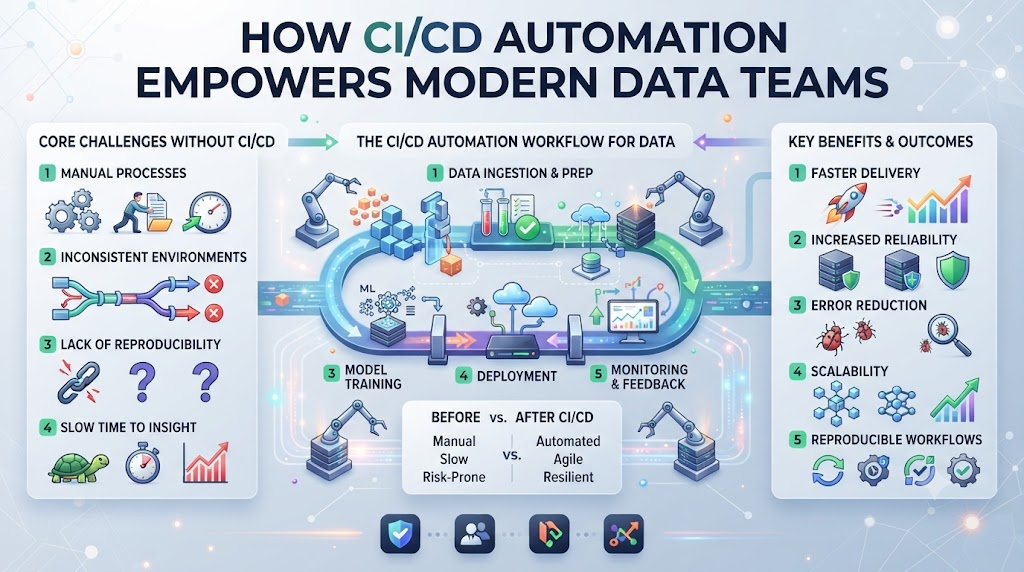
Data engineers spend hours fixing broken dashboards. You push a small code update, and suddenly all morning reports show zero values. This stress ruins your day and frustrates business leaders. You can stop this cycle by using smart automation. Bringing continuous integration into your analytics workflow protects your tables from bad code.
Programs at DataOpsSchool give you the exact steps to build reliable automated pipelines. Let us look at how these tools change your daily work for the better. When you remove manual tasks, your team gains speed and confidence. You ship cleaner data models without fearing unexpected production crashes.
Understanding the Core Value of DataOps Workflows
DataOps workflows bring software engineering discipline to data teams. You treat your SQL queries and Python scripts just like application code. This means you track changes, review peer pull requests, and run tests automatically.
Without this structure, everyone works in silos. One person changes a table schema, and another team’s query breaks completely. Automated workflows spot these conflicts instantly before they reach live tables. You save hours of debugging time every single week.
Why Manual Data Checks Fail Every Time
Manual checks rely on human memory and constant attention. People get tired, skip steps, and miss subtle data anomalies. When data volumes grow, manual testing becomes completely impossible.
You cannot check millions of rows by looking at a spreadsheet. You need machine speed and automated scripts to verify data health. Automated checks run the same way every time without getting bored or careless.
How Continuous Integration Protects Your Analytics
Continuous integration for data means testing every tiny code change. Whenever you edit a transformation model, automated tests run in the background. These tests check for null values, duplicates, and broken joins.
If any test fails, the system blocks the update immediately. Your production warehouse stays clean and safe from bad data injections. Business users look at dashboards knowing the underlying numbers are fully verified.
Deploying Code Safely with Automated Checks
Moving code from development to production should be boring and routine. When you rely on manual deployment steps, panic sets in every time. Automated deployment scripts remove human error from the release process.
The pipeline pulls your tested code and applies changes in the correct order. If an error occurs during release, the system rolls back instantly. You get peace of mind and stable data services around the clock.
Choosing the Right Automation Setup for Your Team
Every data team has unique needs and technical stacks. Some teams prefer lightweight cloud runners for quick setup. Others need heavy local servers to handle massive batch jobs.
Look at your current infrastructure before picking an automation tool. Choose a platform your engineers already understand and enjoy using. A simple tool used well beats a complex tool that nobody maintains.
Comparing Manual Deployments vs. Automated CI/CD
| Feature | Manual Deployments | Automated CI/CD Pipelines |
| Error Rate | High due to human mistakes | Very low through scripted testing |
| Speed | Slow and prone to delays | Fast and repeatable |
| Confidence | Low and stressful | High and predictable |
| Audit Trail | None or poorly documented | Complete commit and test history |
Switching from manual releases to automated workflows transforms your team culture. Engineers focus on building cool features instead of fixing routine bugs.
Real-World Stories of Data Pipeline Success and Failure
- A retail analyst pushed an unreviewed SQL script straight into production. The query accidentally wiped out three months of customer purchase history. They learned the hard way to use automated staging checks before every release.
- A fintech startup set up automated testing for their core dbt models. Every code pull triggered nightly checks for missing primary keys. Data errors dropped by ninety percent within the very first month.
- A healthcare provider relied on manual morning file uploads to check patient metrics. Staff members forgot to filter out blank rows, sending messy reports to doctors. Automating the ingestion checks solved this dangerous problem overnight.
- A marketing firm integrated automated runners into their campaign tracking pipeline. Sudden traffic spikes crashed their old server setup during a major sale. Moving to elastic CI runners kept their data flowing without any lag.
- An e-commerce giant had frequent schema updates break their recommendation engine. They added automated schema validation tests to their continuous integration workflow. Broken code now gets stopped before touching live user data.
- A logistics company used automated deployment scripts to coordinate truck tracking feeds. Their data pipelines scaled smoothly during the busy holiday shipping season. They never missed a single delivery metric update.
- A media streaming service failed to test a new subscription pricing transformation script. Billing reports showed zero revenue for thousands of active users. Implementing strict CI/CD gates prevented any future billing disasters.
- An insurance firm automated their monthly compliance data validation checks. The new pipeline caught rounding errors before external auditors saw the reports. This automation saved them from costly regulatory fines.
- A travel agency struggled with slow data syncs across three different cloud regions. They parallelized their test suites using cloud runners. Data processing times dropped from four hours to twenty minutes.
- A SaaS platform suffered from duplicate user records in their sales CRM database. They added a uniqueness test inside their deployment pipeline. Clean data finally restored trust in their daily revenue metrics.
Common Mistakes and Pitfalls in Data CI/CD Setup
- Skipping test environments because production looks easier to update. Always test changes in a safe sandbox before touching real data tables.
- Writing complex scripts that nobody else on the team understands. Keep your pipeline definitions simple, readable, and well-commented for everyone.
- Ignoring test execution time as your data volume grows. Optimize your queries so your CI pipeline finishes in minutes, not hours.
- Storing database passwords in plain text inside your workflow files. Use secure secret managers to keep your production credentials safe from leaks.
- Testing only happy paths while ignoring edge cases like null inputs. Write unit tests for missing data, negative numbers, and duplicate entries.
- Failing to notify the right engineer when a pipeline build fails. Set up instant alerts in Slack or email so someone fixes the bug fast.
- Running heavy data transformations on your main development branch. Use feature branches and pull requests to isolate experimental code changes.
- Treating data CI/CD as a one-time project instead of a daily habit. Review your pipeline logs weekly to catch new performance bottlenecks early.
- Forgetting to clean up temporary test tables after runs finish. Purge old data assets regularly to keep your cloud storage costs low.
- Relying entirely on automated tools without manual spot checks. Inspect your core dashboards periodically to ensure the business logic still makes sense.
Step-by-Step Implementation Roadmap for Your Data CI/CD
- Audit your current data workflow to find manual bottlenecks and frequent errors.
- Choose a CI/CD platform that matches your team size and tech stack.
- Set up a version control repository for all your data transformation scripts.
- Build a staging environment that mirrors your live production database setup.
- Write your first automated test for basic data types and null checks.
- Connect your repository to your chosen CI/CD tool using secure credentials.
- Configure pull requests to trigger your test suite automatically on every commit.
- Add deployment steps that push passing code to your staging environment.
- Train your data team on how to read test failures and fix bugs.
- Monitor pipeline performance metrics and refine your tests over time.
Frequently Asked Questions
What is a data CI/CD pipeline?
A data CI/CD pipeline automates how you test, build, and deploy data code changes into production.
Which tool is best for small data teams?
GitHub Actions is often best for small teams because it integrates directly with code repositories and requires little setup.
How do I stop bad data from reaching production?
You can stop bad data by adding automated data quality tests to your continuous integration workflow.
Do I need a staging environment for data?
Yes, a staging environment lets you test code changes safely without harming your live production tables.
How long does it take to set up data CI/CD?
Basic pipeline automation can take a few days, while full enterprise integration may take several weeks.
Are there free CI/CD tools available?
Most major git providers offer free tiers with enough build minutes for small data projects and startups.
What languages do data CI/CD tools support?
Data tools commonly support Python, SQL, and bash scripting through standard command-line runner tasks.
How often should my data tests run?
Your automated tests should run every time a developer opens a pull request or pushes code updates.
What is the hardest part of data automation?
Changing team habits and convincing engineers to write tests before pushing code is often the hardest part.
How does DataOpsSchool help with automation?
DataOpsSchool offers structured learning programs that teach you practical frameworks for building reliable data pipelines.
Final Recommendation and Next Steps
Automating your data workflows takes patience and clear planning. Start small by automating tests for just one critical data model. Once that runs smoothly, expand your pipeline coverage to the rest of your tables. Keep your code simple, your tests fast, and your team aligned. Take action today and build your first automated data pipeline to secure your future data operations.
