A data pipeline runs every morning without any issues. One day, a developer renames a column in the source table. The pipeline still runs. No error shows up. But the reports that follow now show wrong numbers, and nobody notices for three days.
This kind of silent failure happens often in DataOps. A pipeline can run successfully and still produce bad data.
This is exactly why testing automation matters. It helps teams catch problems like this before they ever reach a report or a business decision.
What Is a DataOps Pipeline?
A DataOps pipeline moves data from one place to another, through several stages.
A typical pipeline follows this path:
Source → Ingestion → Transformation → Validation → Storage → Reporting
- Source – Where the data comes from, like an app or a database.
- Ingestion – The step where data enters the pipeline.
- Transformation – Where raw data gets cleaned, changed, or combined.
- Validation – Where data gets checked for problems.
- Storage – Where the finished data gets saved.
- Reporting – Where people finally use the data, often in dashboards.
Each stage depends on the one before it. A small problem early on can affect everything downstream.
What Is Testing Automation?
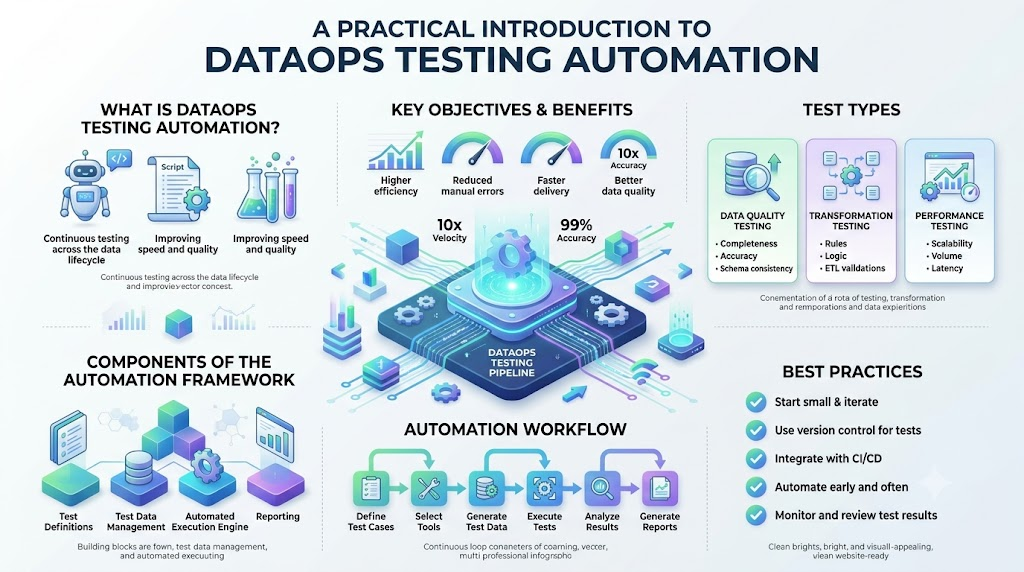
Testing automation means using a system to check your pipeline automatically, instead of relying on a person to check everything by hand.
Instead of an engineer manually opening a table to check for errors, an automated test runs on its own and reports the result.
Simple example: A test can check every morning if a table has any duplicate customer IDs. If it finds duplicates, it alerts the team right away, without anyone needing to look first.
Why Testing Matters in DataOps
A pipeline that runs successfully doesn’t always mean the data is correct.
Testing helps catch issues such as:
- Wrong data – Values that don’t match reality.
- Missing data – Records that never arrived.
- Duplicate records – The same row appearing more than once.
- Broken pipelines – Steps that fail silently or partly.
- Schema changes – Column names or types that changed unexpectedly.
- Failed transformations – Logic that doesn’t produce the right result.
- Delayed data – Data that arrives later than expected.
- Incorrect business rules – Data that breaks rules the business depends on.
Without testing, these problems often go unnoticed until someone spots wrong numbers in a report.
Why Manual Testing Is Not Enough
Checking data by hand has real limits.
- Takes more time – Manual checks slow teams down.
- Easy to miss problems – Humans get tired and miss small issues.
- Hard to repeat – The same manual check must be redone every time.
- Difficult to scale – More pipelines mean more manual work.
- Depends on human effort – Checks only happen if someone remembers to do them.
- Slows down frequent changes – Teams that update pipelines often can’t keep up manually.
As pipelines grow, manual testing becomes harder to keep up with. Automation solves this by running the same checks, every time, without extra effort.
How Automated Testing Works in a DataOps Pipeline
Automated testing usually follows a clear flow:
Code Change → Test → Data Validation → Quality Check → Deploy → Monitor
- Code Change – A developer updates pipeline code or logic.
- Test – Automated tests run to check the code.
- Data Validation – The system checks if the data follows expected rules.
- Quality Check – Data quality tests run to catch issues like duplicates or missing values.
- Deploy – If tests pass, the change goes live.
- Monitor – The pipeline keeps running, with ongoing checks in place.
Exact steps can differ between teams, but this general flow is common across most DataOps setups.
Types of Tests Used in DataOps Pipelines
Different tests check different parts of a pipeline.
Schema Tests
These check whether columns, data types, and table structures are correct. For example, making sure a “price” column stays a number, not text.
Data Quality Tests
These check for problems like missing, duplicate, or invalid data across a table.
Transformation Tests
These check whether your transformation logic gives the expected result. For example, checking if a total sales calculation matches what it should be.
Freshness Tests
These check whether data arrives on time. For example, confirming a table updates every hour as expected.
Volume Tests
These check whether the amount of data falls within a normal range. A sudden drop in row count often signals a problem.
Uniqueness Tests
These check whether fields that should be unique, like customer IDs, don’t contain duplicates.
Null Checks
These check whether required fields are missing values when they shouldn’t be.
Business Rule Tests
These check whether data follows rules specific to your business, like order totals never being negative.
Simple Example of Automated Data Testing
A company receives customer data every hour. The pipeline expects a few things to always be true:
- Every customer must have an ID.
- Customer IDs must be unique.
- Email fields must follow a valid format.
- New data must arrive every hour.
Automated tests check each of these rules after every pipeline run.
If the uniqueness test finds duplicate customer IDs, it can stop the pipeline and alert the team right away. This gives engineers a chance to fix the issue before bad data reaches any report.
Data Quality Tests vs Pipeline Tests
| Area | Data Quality Test | Pipeline Test |
|---|---|---|
| Main focus | The actual data values | The pipeline process itself |
| Example | Checking for duplicate customer IDs | Checking if a job finished without errors |
| Checks | Missing values, duplicates, formats | Run time, failures, successful completion |
| Goal | Make sure data is correct | Make sure the pipeline works as expected |
Testing in CI/CD for DataOps
CI/CD stands for Continuous Integration and Continuous Deployment. It means changes get tested and released in small, regular steps, instead of big, risky updates.
A simple flow looks like this:
Developer Change → Pull Request → Automated Tests → Review → Deployment
When a developer changes pipeline code, automated tests run right away. If tests pass, a teammate reviews the change. Only then does it get deployed.
DataOps practices commonly connect automated testing with CI/CD, so problems get caught before they ever reach production. Not every team sets up CI/CD the same way, but the core idea stays similar: test early, and test often.
Testing Before and After Deployment
Both stages of testing matter, and they check different things.
Before Deployment
Tests can check:
- Pipeline code
- SQL logic
- Schema
- Transformation logic
- Data rules
After Deployment
Tests can check:
- Data freshness
- Pipeline runs
- Data volume
- Data quality
- Output data
- Errors
Testing before deployment catches problems in the code. Testing after deployment catches problems in the real, live data.
What Happens When an Automated Test Fails?
A typical failure flow looks like this:
Test Failure → Pipeline Stops → Alert Sent → Engineer Checks Problem → Fix Applied → Test Runs Again
When a test fails, the pipeline can stop before bad data spreads further downstream. An alert goes out, so an engineer can quickly check what went wrong.
Not every pipeline should stop on every single failure. Some teams choose to let minor issues pass through with just a warning, while serious issues stop the pipeline completely. The right choice depends on how critical the data is.
Automated Testing and Data Quality
Automated tests help teams catch data problems early, often before anyone downstream even notices.
This includes catching:
- Missing values
- Wrong formats
- Duplicate rows
- Invalid values
- Unexpected changes
- Broken relationships between tables
- Missing records
Testing is one important part of data quality, but it’s not the whole picture. Good data quality also depends on good source systems and clear rules.
Automated Testing and Data Observability
Testing and observability work together, but they answer different questions.
Testing checks whether known rules pass or fail. For example, “Does every row have a customer ID?”
Observability helps teams understand what’s happening in the data system over time, even for problems nobody wrote a specific test for.
Together, testing catches known issues fast, while observability helps teams spot and understand new, unexpected problems.
Benefits of Testing Automation in DataOps
- Faster feedback – Problems get flagged right away, not days later.
- Fewer manual checks – Less time spent manually reviewing data.
- Earlier problem detection – Issues get caught before they reach users.
- Better data quality – Fewer bad records slip through.
- Safer pipeline changes – Developers can change code with more confidence.
- More reliable deployments – Fewer surprises after a release.
- Easier repeat testing – The same checks run consistently, every time.
- Better team confidence – Teams trust their pipelines more.
Automated testing greatly reduces risk, but it doesn’t promise perfect data or zero failures.
Challenges of Automated Testing
- Writing useful tests – Good tests take real thought and effort.
- Maintaining old tests – Tests need updates as pipelines change.
- False failures – Sometimes tests fail even when nothing is truly wrong.
- Poor test data – Bad sample data can lead to unreliable tests.
- Slow test runs – Too many tests can slow down deployments.
- Changing business rules – Rules change, and tests must keep up.
- Complex pipelines – More complexity makes testing harder to manage.
- Missing test coverage – Some important checks may get overlooked.
Automated testing still needs regular human review and maintenance to stay useful.
Best Practices for DataOps Testing Automation
- Start with critical pipelines. Focus first on the pipelines that matter most.
- Test important business rules. Don’t skip the rules your business depends on.
- Keep tests simple. Simple tests are easier to maintain.
- Run tests early. Catch issues before they reach production.
- Add tests to CI/CD. Make testing part of your regular workflow.
- Use realistic test data. Tests work best with data that reflects real conditions.
- Review failed tests quickly. Don’t let failures sit unresolved.
- Remove outdated tests. Old, unused tests just add noise.
- Track test results. Keep a record of what passes and fails over time.
- Improve test coverage over time. Add more tests as your pipeline grows.
Simple DataOps Testing Workflow
Write → Test → Review → Deploy → Validate → Monitor → Improve
- Write – Build or update pipeline code.
- Test – Run automated tests against the change.
- Review – A teammate checks the change and test results.
- Deploy – The change goes live.
- Validate – Tests check the live data after deployment.
- Monitor – The team watches for ongoing issues.
- Improve – Tests and pipelines get updated based on what’s learned.
Common Mistakes to Avoid
- Testing only after deployment – Missing chances to catch issues early.
- Checking only if the pipeline runs – Ignoring whether the data itself is correct.
- Ignoring data quality – Focusing only on the process, not the results.
- Writing too many complex tests – Making tests hard to maintain.
- Not testing business rules – Missing checks that actually matter to the business.
- Ignoring failed tests – Letting known problems go unresolved.
- Using poor test data – Testing with data that doesn’t reflect reality.
- Never updating old tests – Letting tests fall out of date as pipelines change.
How to Start Testing Automation in a DataOps Pipeline
Step 1
Choose one important pipeline to start with.
Step 2
List the most important data rules for that pipeline.
Step 3
Create simple automated tests based on those rules.
Step 4
Run the tests every time the pipeline runs.
Step 5
Add these tests to your CI/CD process.
Step 6
Track failures and review them regularly.
Step 7
Add more tests over time, as you learn what matters most.
Starting small and building up works better than trying to test everything at once.
Future of Testing Automation in DataOps
Testing automation in DataOps will likely keep growing in a few key directions.
- More automated validation across pipelines
- Better data observability tools
- Smarter, easier test creation
- AI-assisted testing suggestions
- Continuous data quality checks
- Deeper CI/CD integration
These changes should make testing easier over time, but teams will still need to review results and keep tests updated as pipelines evolve.
FAQs
1. What is testing automation in DataOps?
It means using automated systems to check pipeline code and data, instead of relying only on manual checks.
2. Why is automated testing important for data pipelines?
Because a pipeline can run successfully while still producing wrong, missing, or duplicate data.
3. What types of tests are commonly used in DataOps?
Common types include schema tests, data quality tests, transformation tests, freshness tests, and uniqueness tests.
4. How does automated testing improve data quality?
It catches issues like missing values, duplicates, and format errors early, before they reach reports or users.
5. How does testing work with CI/CD in DataOps?
Tests run automatically when developers change pipeline code, helping catch problems before deployment.
6. What happens when a pipeline test fails?
The pipeline may stop, an alert gets sent, and an engineer reviews and fixes the issue before rerunning tests.
7. Can automated tests check data freshness?
Yes, freshness tests check whether data arrives on time, based on the expected schedule.
8. What is the difference between data testing and data observability?
Testing checks known rules for pass or fail. Observability helps teams understand unexpected changes over time.
9. How can beginners start testing a DataOps pipeline?
Start with one important pipeline, list key data rules, and build simple automated tests around them.
10. What are common challenges with automated data testing?
Challenges include writing useful tests, maintaining them over time, and handling false failures or poor test data.
Conclusion
Testing automation gives DataOps teams a way to catch problems before they reach real users. A pipeline that runs without errors can still carry bad data, and manual checks alone can’t keep up with fast-moving teams.
By adding automated tests at the right stages, connecting them to CI/CD, and reviewing results regularly, teams build pipelines they can actually trust. It’s not about achieving perfect data. It’s about catching problems early, before they turn into bigger issues downstream.
