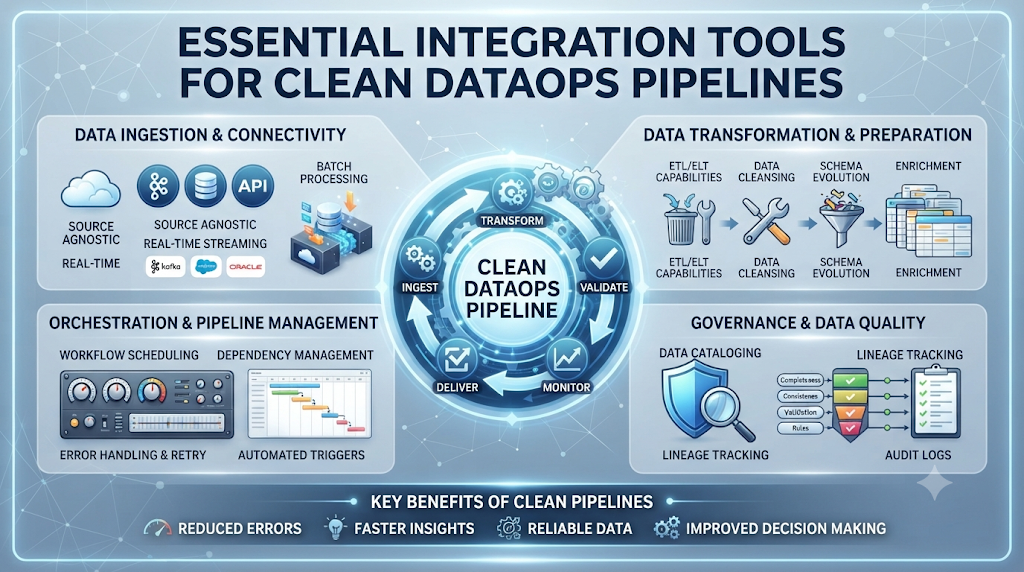
Your data pipelines break down every single week. You spend hours fixing messy code, missing logs, and delayed reports.
You need a better way to connect your data sources without losing your mind. That is where modern integration tools come to help.
Check out DataOpsSchool to learn more about building strong data pipelines. These tools take the pain out of moving data from one place to another.
What is a DataOps Pipeline?
A DataOps pipeline is a step-by-step path for your data. It moves information from apps and databases into your main storage.
Think of it like a water pipe system for your business data. Clean data flows in, goes through checks, and feeds your dashboards.
When your pipes leak, your business decisions suffer. Fixing these leaks fast is the core goal of DataOps.
Why Integration Tools Matter Today
Old ways of moving data take too long and break often. You need tools that connect apps fast and fix errors automatically.
Good integration tools save your team from endless manual tasks. They watch your data flow and alert you before a crash happens.
This means less stress for you and more reliable data for your boss.
Key Features to Look For
You need tools that are easy to set up and use every day. Look for clear dashboards that show your data flow in real time.
Automated testing is a must-have feature for any good pipeline tool. It catches bad data before it ruins your reports.
Good support and active user communities also save you when things go wrong.
Comparing Popular Integration Tool Types
| Tool Type | Best Used For | Main Benefit |
| ETL Tools | Moving heavy data batches | Handles huge file sizes easily |
| Reverse ETL | Sending data back to apps | Keeps customer tools updated |
| Streaming Tools | Real-time data movement | Zero delay in data updates |
| Workflow Orchestration | Scheduling pipeline steps | Clear view of task order |
How Integration Tools Improve Team Speed
Your data team wastes hours fixing broken data scripts every month. Good integration tools let you build pipelines using simple visual steps.
This means data engineers and business analysts can work together smoothly. No more waiting weeks for a simple data fix.
Everyone gets the correct numbers when they need them.
Real-World Story About Server Crashes
- Story 1: A retail store lost all weekend sales data because an old batch script failed silently overnight.
- Story 2: A health app crashed during peak hours when too many users tried to sync their fitness data at once.
- Story 3: A finance team sent a bad report to the board because a data column shifted without warning.
- Story 4: A streaming service lost user watch history due to a slow database connection timeout error.
- Story 5: A travel booking site double-booked flights when two data pipelines tried to update seats at the exact same time.
- Story 6: A marketing team ran ads for out-of-stock items because their inventory sync tool stopped working.
- Story 7: A logistics firm lost track of delivery trucks when their GPS data pipeline ran out of memory.
- Story 8: A support desk lost all customer chat logs after a messy database migration failed halfway through.
- Story 9: A gaming company banned innocent players because a corrupted data pipeline marked normal scores as cheats.
- Story 10: A food delivery app crashed its payment gateway when an old integration script failed to handle new security rules.
Common Mistakes and Pitfalls
- Mistake: Skipping data tests to launch your pipeline faster.
- Fix: Always set up automated checks to catch bad data early.
- Mistake: Hardcoding database passwords inside your connection scripts.
- Fix: Use secure environment variables to store your secret keys.
- Mistake: Ignoring error logs until a major crash happens.
- Fix: Set up instant alerts for any pipeline failure.
- Mistake: Building giant custom scripts instead of using proven tools.
- Fix: Use standard integration platforms to save time and reduce bugs.
- Mistake: Forgetting to scale your pipeline resources as data grows.
- Fix: Monitor your system load and upgrade server limits ahead of time.
- Mistake: Not keeping a backup copy of your pipeline configuration files.
- Fix: Store all your pipeline settings in a version control system like Git.
- Mistake: Running heavy data sync jobs during peak business hours.
- Fix: Schedule big data updates for late at night when traffic is low.
- Mistake: Failing to clean up old log files until disk space runs out.
- Fix: Set up automatic log deletion rules after thirty days.
- Mistake: Giving every team member full admin rights to production pipelines.
- Fix: Limit access permissions based on actual job needs.
- Mistake: Ignoring data privacy laws when moving customer records.
- Fix: Mask sensitive personal data before it enters the pipeline.
Step-by-Step Implementation Roadmap
- Map your data sources: List every app and database you need to connect.
- Choose your integration tool: Pick a tool that matches your team skill level and budget.
- Set up a test environment: Build a safe sandbox to test your new data pipelines.
- Connect your first source: Link one simple data source to test the basic connection.
- Add data quality checks: Write simple rules to check for missing or broken data.
- Schedule your data runs: Set your pipelines to run at specific safe times.
- Set up team alerts: Connect your tool to Slack or email for instant error warnings.
- Run a full test: Run your entire pipeline with sample data to check for speed.
- Deploy to production: Move your tested pipeline to your live business server.
- Monitor and improve: Watch your daily data reports and fix small issues fast.
Frequently Asked Questions
1. What is a data integration tool?
A data integration tool is software that helps you move and combine data from different apps into one central place.
2. Why do I need DataOps for my pipelines?
DataOps brings speed and quality control to your data work so your reports stay accurate and reliable.
3. How do I choose the right pipeline tool?
Look at your budget, your team size, and the types of databases you need to connect.
4. Are open-source tools better than paid tools?
Open-source tools give you more control, but paid tools often offer better support and easier setup.
5. How often should my data pipelines run?
It depends on your business needs. Some need real-time streaming, while others only need a nightly update.
6. What causes most data pipeline crashes?
Bad data formats, network timeouts, and sudden schema changes are the most common causes of pipeline failures.
7. How do I test my data pipelines safely?
Always use a separate test database and sample data before running new scripts on live customer data.
8. Can non-technical users build data pipelines?
Yes, modern visual integration tools let business analysts build simple pipelines without writing complex code.
9. How do I secure my data during transfer?
Always use encrypted connections and hide sensitive personal details before moving data across servers.
10. What should I do if my pipeline fails?
Check your error logs immediately, fix the broken data point, and restart the specific step in your pipeline.
Final Recommendation
Start small by picking one messy data pipeline in your current setup. Use a reliable integration tool to clean up that single process first.
Once you see how much time it saves, expand the tool to your other business systems. Keep your setups simple and always monitor your error logs.
