Introduction
Artificial intelligence has shifted from a novel experiment to a fundamental pillar of modern operations. Whether drafting marketing copy, generating application code, summarizing dense academic literature, or automating customer interactions, professionals across industries rely heavily on Large Language Models (LLMs). However, as teams integrate generative AI deeper into their daily routines, a glaring inefficiency emerges: managing the inputs that drive these systems. Building a scalable AI strategy depends on mastering prompt engineering, organizing reusable prompt libraries, and establishing systematic quality control. This guide explores how individual creators and enterprise teams can analyze, test, version control, and optimize their prompts to turn daily AI interactions into reliable, repeatable business assets. To discover how structured prompt infrastructure transforms your daily output, explore the feature set available on Promptosia.
What is an AI Prompt Management Tool?
Definition
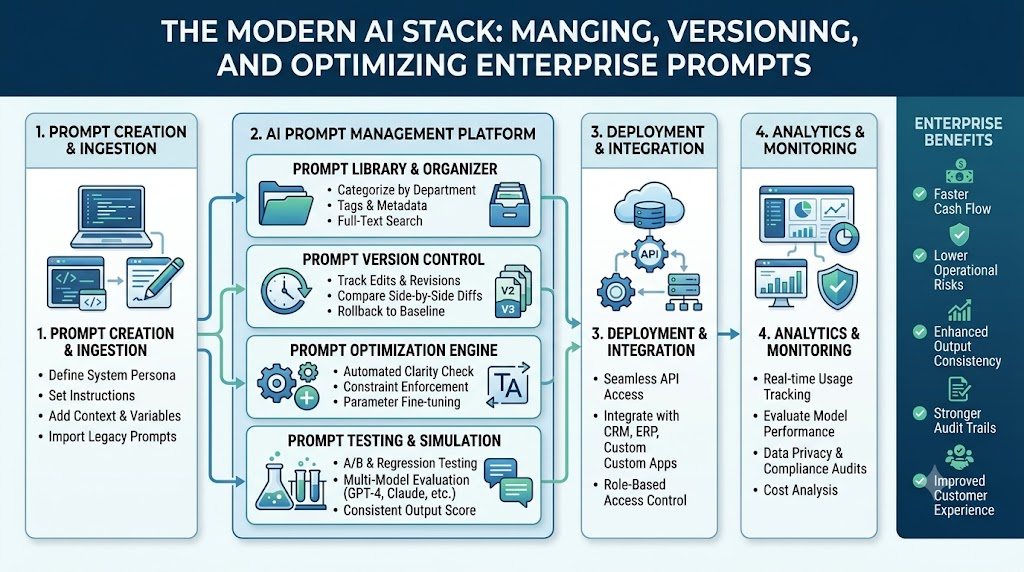
An AI prompt management tool is a centralized platform engineered to store, organize, optimize, test, version, and deploy instructions for large language models. Rather than relying on scattered notes, hidden text documents, or buried chat histories, a prompt management solution acts as a dedicated repository and development environment for your AI interactions.
       FRAGMENTED PROMPTS                            CENTRALIZED PROMPT SYSTEM
┌──────────────────────────────┐              ┌─────────────────────────────────────┐
│  Notes Apps, Chat History,   │              │     AI Prompt Management Tool       │
│  Slack Threads, Spreadsheets │              │             (Promptosia)            │
└──────────────┬───────────────┘              └──────────────────┬──────────────────┘
               │                                                 │
               ▼                                                 ▼
┌──────────────────────────────┐              ┌─────────────────────────────────────┐
│ High Inconsistency, Repeated │              │ Searchable Library, Versioning,     │
│ Rewriting, Unmapped Changes  │              │ Automated Testing, Team Standards   │
└──────────────────────────────┘              └─────────────────────────────────────┘
Why Prompt Management Matters
When AI adoption scales beyond an individual user, unmanaged prompts cause significant operational friction. Team members end up creating redundant variations of the same underlying instructions, leading to inconsistent brand voices, varying code quality, and wasted tokens. Centralized prompt systems solve this by establishing a single source of truth for high-performing prompts.
Common Prompt Challenges
- Prompt Loss: Losing effective instructions within long chat logs.
- Inconsistent Results: Unintended variations in tone, formatting, or logic caused by small phrasing changes.
- Lack of Visibility: Inability to see which prompt versions generated specific outputs in the past.
- Knowledge Silos: Individual team members storing valuable prompts locally rather than sharing them across the company.
Benefits of Organized Prompt Libraries
By housing your assets in a structured AI prompt library, you streamline searchability through tags and categories, enforce output formatting guidelines, and preserve context across complex projects. Furthermore, treating prompts as structured templates makes it easy to introduce variables, allowing teams to dynamically adjust inputs without altering core instruction logic.
Understanding Prompt Engineering
Prompt engineering is the process of structuring, refining, and designing text inputs to guide generative AI models toward accurate, contextually relevant, and high-quality outputs. Far from simple trial and error, it relies on structured language rules and system constraints. To master this discipline, developers and creators consult authoritative documentation like the OpenAI Prompt Engineering Guide to build predictable model interactions.
┌────────────────────────────────────────────────────────────────────────┐
│                          STRUCTURED PROMPT MODEL                       │
├────────────────────────────────────────────────────────────────────────┤
│ 1. Role Definition   : "You are a Senior Frontend Engineer..."        │
│ 2. Context Background : "We are updating a legacy React app..."        │
│ 3. Instructions      : "Refactor this component into modern TS..."    │
│ 4. Dynamic Variables : "[Insert Code Block Here]"                      │
│ 5. Output Constraints: "Return ONLY TypeScript. No explanations."   │
└────────────────────────────────────────────────────────────────────────┘
Core Components of a Production-Ready Prompt
1. Role Definition
Assigning a explicit persona sets the knowledge parameters, tone, and reasoning style of the underlying LLM.
Example: “You are a Senior Technical Writer specializing in cloud-native infrastructure.”
2. Context
Providing historical background, audience details, or environment parameters prevents the model from making incorrect assumptions.
Example: “The target audience consists of Junior DevOps engineers migrating from monolithic setups to Kubernetes.”
3. Instructions
Clear, action-oriented directives detailing exactly what task the AI must execute.
Example: “Outline a 5-step migration guide focusing strictly on security best practices.”
4. Variables
Dynamic placeholders that allow a single core template to process varying dataset inputs seamlessly.
Example:
{{target_framework}},{{user_persona}}, or{{code_snippet}}.
5. Output Formatting
Defining structural requirements ensures the model generates clean data formats like JSON, Markdown tables, or bulleted lists.
Example: “Format the output as a two-column Markdown table containing ‘Step Name’ and ‘Security Impact’.”
6. Constraints
Explicit rules that define what the model must not do, minimizing hallucinations and off-topic responses.
Example: “Do not mention third-party paid tools. Limit the response to 300 words.”
Using a full-featured prompt engineering platform helps users map out these core elements systematically rather than writing unstructured walls of text.
Building an Organized AI Prompt Library
A collection of prompts is only useful if team members can find and execute the right asset when needed. Structuring your collection using an AI prompt organizer transforms loose text snippets into a searchable, intuitive digital database.
                            ┌────────────────────────┐
                            │    PROMPT LIBRARY      │
                            └───────────┬────────────┘
                                        │
           ┌────────────────────────────┼────────────────────────────┐
           ▼                            ▼                            ▼
┌─────────────────────┐      ┌─────────────────────┐      ┌─────────────────────┐
│     CATEGORIES      │      │        TAGS         │      │     COLLECTIONS     │
│ (Engineering, Copy) │      │ (#python, #meta-seo)│      │(Product Launch Kit) │
└─────────────────────┘      └─────────────────────┘      └─────────────────────┘
Essential Structural Pillars
- Categorization: Group assets by business function, such as Engineering, Growth Marketing, Executive Reporting, or Customer Experience.
- Tagging Systems: Apply granular tags based on target models (e.g.,
#gpt-4o,#claude-3-5-sonnet), task formats (#json,#draft), or industry domains. - Variable Placeholders: Embed standardized brackets for dynamic values so team members know exactly where to input fresh data without corrupting system instructions.
- Metadata & Descriptions: Document the intended purpose, expected token budget, and ideal temperature settings directly alongside the asset entry.
- Custom Collections: Group complementary prompts together into continuous workflows, such as a “Content Launch Kit” containing research, drafting, and social distribution prompts.
AI Prompt Optimization
Prompt optimization is the continuous process of refining prompt logic to maximize clarity, precision, and consistency while reducing token overhead. Utilizing a dedicated AI prompt optimizer turns vague, ambiguous user queries into highly detailed, system-ready prompts.
VAGUE INPUT:
"Write a blog post about cybersecurity for small businesses."
                               │
                               ▼
                   [ AI PROMPT OPTIMIZER ENGINE ]
                               │
                               ▼
OPTIMIZED ASSET:
"You are a Cybersecurity Consultant. Write an educational 800-word article
targeted at small business owners with non-technical backgrounds.

Focus Areas:
1. Ransomware defense via multi-factor authentication (MFA)
2. Employee phishing training best practices
3. Cost-effective data backup strategies

Constraints: Avoid heavy technical jargon. Use active voice and include
bullet points for actionable steps."
Key Principles of Optimization
- Removing Ambiguity: Replace general statements (“make it good”) with objective criteria (“use clear headings, active voice, and short sentences”).
- Optimizing Context Window: Remove redundant words to lower API token usage without sacrificing important instruction context.
- Enforcing Step-by-Step Reasoning: Add directives like “think step-by-step” or explicit reasoning steps to help models solve complex logic problems accurately.
- Few-Shot Prompting: Provide concrete input-output examples directly inside the prompt payload to guide the AI toward preferred responses.
AI Prompt Analysis
Before running an instruction set across production environments, it must undergo thorough functional analysis. Using a built-in AI prompt analyzer allows creators to evaluate prompt health prior to deployment.
┌────────────────────────────────────────────────────────────────────────┐
│                        PROMPT HEALTH ANALYSIS                          │
├────────────────────────────────────────────────────────────────────────┤
│ [✓] System Role Defined        : Senior Software Architect             │
│ [✓] Variable Detection         : Found 2 variables {{lang}}, {{code}}  │
│ [!] Constraint Strength        : Moderate (Add explicit negation rule) │
│ [✓] Safety Alignment           : Compliant with standard AI guidelines │
│ [✓] Output Format Specified    : Structured JSON Array                 │
└────────────────────────────────────────────────────────────────────────┘
Critical Analysis Checkpoints
- Goal Alignment: Does the prompt state its primary target clearly, or does it combine too many competing tasks into one call?
- Variable Mapping: Are all dynamic fields correctly bracketed and documented so variables map accurately in app integrations?
- Format Integrity: Does the prompt enforce explicit structural rules (like valid JSON schemas) to prevent parsing errors in downstream software?
- Safety & Policy Guardrails: Does the prompt design prevent jailbreak vulnerabilities or unsafe responses as outlined in the Anthropic System Prompts & Safety Guidelines?
- Efficiency Rating: Does the prompt achieve its goal using minimal token overhead?
Prompt Quality Checking
Establishing a standardized quality scoring model allows teams to review and refine their prompt assets systematically before publishing them.
+------------------------------------------------------------------------+
│                       PROMPT QUALITY SCORECARD                         │
+-------------------+--------------------+-------------------------------+
│ Evaluation Metric | Target Standard    | Score / Assessment            |
+-------------------+--------------------+-------------------------------+
│ Clarity           │ Explicit directives│ 9/10 - Highly clear           |
│ Context           │ Background provided│ 8/10 - Sufficient detail      |
│ Structural Layout │ Tagged sections    │ 10/10 - Cleanly formatted     |
│ Reusability       │ Dynamic variables  │ 9/10 - Variable-ready         |
│ Safety            │ Anti-jailbreak     │ 10/10 - Secure layout         |
+-------------------+--------------------+-------------------------------+
│ OVERALL SCORE     │ Enterprise Ready   | 92 / 100                      |
+-------------------+--------------------+-------------------------------+
An automated prompt quality checker scores inputs against structural benchmarks, helping users spot missing context, vague language, or unconstrained variables before deployment.
Version Control for AI Prompts
LLM responses change as model providers release updates, tune parameters, or alter base weights. Consequently, a prompt that works well today might yield different results after an upstream model update. Implementing a prompt version control tool brings modern software engineering discipline to prompt management.
  v1.0 (Base Draft) ──►  v1.1 (Added Context) ──►  v2.0 (Refactored Logic)
       │                      │                         │
       ▼                      ▼                         ▼
  Initial Prompt        Added Role Persona        Converted to JSON Output
  (Inconsistent)        (Improved Tone)           (Production Ready)
Why Version History Matters
- Tracking Iterations: Record exactly what changes were made, who updated the prompt, and why a specific instruction was modified.
- Instant Rollbacks: Restore a previously verified prompt version instantly if an experimental edit degrades response quality.
- Model Migration: Track how prompt performance varies when shifting workloads between models like GPT-4o, Claude 3.5 Sonnet, or Gemini 1.5 Pro.
- Audit Trails: Maintain clear compliance logs showing the exact system instructions used in production at any given point in time.
Testing AI Prompts
Building reliable AI workflows requires empirical testing across different models, temperatures, and variable inputs.
                             ┌───────────────────┐
                             │ TEST INPUT DATASET│
                             └─────────┬─────────┘
                                       │
                 ┌─────────────────────┴─────────────────────┐
                 ▼                                           ▼
      ┌─────────────────────┐                     ┌─────────────────────┐
      │   PROMPT VARIANT A  │                     │   PROMPT VARIANT B  │
      │   (Zero-Shot Style) │                     │   (Few-Shot Style)  │
      └──────────┬──────────┘                     └──────────┬──────────┘
                 │                                           │
                 ▼                                           ▼
      ┌─────────────────────┐                     ┌─────────────────────┐
      │  Claude 3.5 Sonnet  │                     │       GPT-4o        │
      └──────────┬──────────┘                     └──────────┬──────────┘
                 │                                           │
                 └─────────────────────┬─────────────────────┘
                                       │
                                       ▼
                             ┌───────────────────┐
                             │ OUTPUT COMPARISON │
                             │   & EVALUATION    │
                             └───────────────────┘
Using an AI prompt testing tool allows creators to run side-by-side experiments, measuring output consistency and latency across multiple test scenarios.
Testing Methodologies
- A/B Prompt Experiments: Execute two prompt variations against identical datasets to see which structure produces cleaner, more accurate outputs.
- Cross-Model Validation: Run the same instruction set across various model architectures (e.g., OpenAI, Anthropic, Google) to evaluate portability.
- Edge-Case Evaluation: Test prompts against unusual, missing, or adversarial inputs to ensure constraints hold firm under stress.
- Community Evaluation: Gather feedback from team members or public reviewer panels to grade output accuracy objectively.
Reusable AI Prompt Templates
Creating modular reusable AI prompt templates across major business functions speeds up adoption and ensures consistent work across departments.
               ┌──────────────────────────────────────────────┐
               │         REUSABLE TEMPLATE FRAMEWORK          │
               ├──────────────────────────────────────────────┤
               │ [Role Persona]                               │
               │ [Task Specifics]                             │
               │ Context Input: {{context_data}}              │
               │ Target Goal:   {{desired_outcome}}           │
               │ Format Rule:   {{format_type}}               │
               └──────────────────────────────────────────────┘
High-Impact Enterprise Use Cases
- Software Development: Boilerplate code generation, automated refactoring, pull request summaries, and unit test generation.
- Content & Marketing: SEO article outlines, ad copy variations, metadata generation, and email campaign drafts.
- Research & Analysis: Summarizing complex PDF reports, extracting structured tables, and performing competitive analysis.
- Customer Support: Automated response generation, ticket categorization, and escalation summaries.
- Product Management: User story generation, feature specification drafting, and feedback sentiment analysis.
Promptosia for Different User Types
Writers
Bloggers, technical writers, and authors use Promptosia to preserve their unique brand voice across projects, outline complex content, and avoid writer’s block using saved workflow templates.
Developers
Engineers convert loose prompts into structured, variable-driven system messages. They track version histories and test outputs across models to keep API pipelines reliable.
Marketers
Growth teams build shared prompt collections for campaign copy, SEO metadata, ad variations, and social content, ensuring brand consistency across all channels.
Students
Learners organize prompts that act as personal tutors, breaking down difficult topics, checking code logic, and generating custom practice quizzes.
Researchers
Academics create prompts designed to analyze dense literature, extract key methodology details, and format citation data accurately.
Educators
Teachers use prompt templates to build custom lesson plans, generate rubric matrices, and create differentiated learning assignments quickly.
Businesses
Enterprises lock down core prompt assets, manage team permissions, maintain quality standards, and prevent knowledge loss as team members onboard or offboard.
Content Creators
Video producers and social managers store script structures, title generation ideas, and thumbnail concepts in organized, searchable folders.
Agencies
Client service teams manage distinct prompt collections for different client accounts, securing custom brand guidelines and tones within dedicated project spaces.
AI Professionals
Consultants and prompt engineers analyze prompt safety, run side-by-side model duels, and issue verified Prompt Passports to certify prompt quality for clients.
Best Practices for Prompt Management
┌────────────────────────────────────────────────────────────────────────┐
│                   PROMPT LIFECYCLE BEST PRACTICES                      │
├────────────────────────────────────────────────────────────────────────┤
│ 1. Capture    : Save promising prompts immediately                     │
│ 2. Structure  : Apply dynamic variables {{var}} and explicit roles     │
│ 3. Organize   : Tag, categorize, and document utility metadata         │
│ 4. Refine     : Run quality checks and remove token clutter            │
│ 5. Version    : Log major revisions and maintain working rollbacks     │
│ 6. Evaluate   : Test across updated LLM models regularly               │
└────────────────────────────────────────────────────────────────────────┘
To build a reliable library of prompt assets, adopt these core operational habits:
- Document System Roles Explicitly: Always define the background, expertise, and expected perspective of the AI model.
- Standardize Variable Naming: Use clear variable formats like
{{target_audience}}across all team templates. - Set Explicit Constraints: Define boundaries clearly (e.g., “Do not use passive voice,” “Limit output to 200 words”) to prevent off-topic responses.
- Enforce Output Schemas: Always instruct the model on how to format its response (e.g., Markdown headers, bulleted lists, JSON objects).
- Prune Outdated Assets: Review your library quarterly to archive obsolete versions or prompts built for retired LLMs.
Common Prompt Engineering Mistakes
           BAD PROMPT DESIGN                         OPTIMIZED DESIGN
┌──────────────────────────────────────┐  ┌──────────────────────────────────────┐
│ "Write a good product description    │  │ "Act as an E-commerce Copywriter.    │
│ for this shoe. Make it snappy."      │  │ Write a 150-word product overview... │
└──────────────────┬───────────────────┘  └──────────────────┬───────────────────┘
                   │                                         │
                   ▼                                         ▼
┌──────────────────────────────────────┐  ┌──────────────────────────────────────┐
│ Vague instruction, unmapped audience,│  │ Defined persona, clear target goal,  │
│ inconsistent output lengths.         │  │ structured formatting and constraints│
└──────────────────────────────────────┘  └──────────────────────────────────────┘
- Vague Directives: Using subjective requests like “write a smart summary” without defining what “smart” means leads to inconsistent results.
- Missing Context: Expecting the model to infer industry terminology or specific project goals without background details causing hallucinations.
- Ignoring Token Limits: Overloading prompts with unnecessary conversational filler wastes tokens and dilutes core system instructions.
- Skipping Version Control: Overwriting working prompts during testing without backing up earlier versions makes it difficult to recover lost functionality.
- Over-reliance on a Single Model: Assuming a prompt optimized for one model will perform identically on another model architecture without testing.
Comparison Table
| Feature Dimension | Manual Storage (Notes, Chat History) | Promptosia AI Management Platform |
| Organization | Scattered, unindexed text files and chat logs | Searchable categories, tags, and collections |
| Version Control | Manual copying/pasting; no update history | Complete version control with instant rollback |
| Variable Support | Hardcoded text requiring manual editing | Dynamic variable placeholders {{variable}} |
| Quality Analysis | Subjective, manual guesswork | Automated structural analysis & scoring |
| Model Testing | Copying text manually across chat interfaces | Side-by-side prompt duels & multi-model testing |
| Team Collaboration | Fragmented sharing via chat or email | Shared team libraries with permission controls |
| Asset Security | Vulnerable to accidental deletion or loss | Secure cloud backups & asset certification |
The Future of Prompt Engineering
Prompt engineering continues to evolve alongside generative AI capabilities. System guidelines published in the Google AI Documentation highlight a clear shift toward structured, context-rich prompting models.
       EARLY STAGE                    CURRENT STAGE                  FUTURE STATE
┌───────────────────────┐      ┌───────────────────────┐      ┌───────────────────────┐
│ Basic Text Inputs &   │ ───► │ Structured Libraries, │ ───► │ AI-Optimized Pipelines│
│ Trial-and-Error Chat  │      │ Variables & Testing   │      │ & Autonomous Assets   │
└───────────────────────┘      └───────────────────────┘      └───────────────────────┘
- AI-Assisted Self-Optimization: Optimization tools will automatically adjust system instructions based on output feedback logs.
- Standardization Across Frameworks: Industry-standard prompt protocols will allow prompt assets to run smoothly across different LLM APIs.
- Enterprise Asset Certification: Prompts will be treated as formal digital assets, complete with security audits, quality scores, and access controls.
- Autonomous Agent Pipelines: Prompts will evolve from single instruction sets into multi-step agent workflows that execute complex tasks automatically.
How Promptosia Helps Users Build Better Prompts
Promptosia brings structure to your AI workflows by providing an all-in-one platform to organize, optimize, analyze, and test your prompts.
   ┌───────────────┐     ┌───────────────┐     ┌───────────────┐
   │   ORGANIZE    │ ──► │   OPTIMIZE    │ ──► │  TEST & DUAL  │
   │ (Central Hub) │     │(Quality Check)│     │(Multi-Model)  │
   └───────────────┘     └───────────────┘     └───────────────┘
                                                       │
                                                       ▼
   ┌───────────────┐     ┌───────────────┐     ┌───────────────┐
   │  COLLABORATE  │ ◄── │   CERTIFY     │ ◄── │    VERSION    │
   │ (Shared Hub)  │     │  (Passports)  │     │(History Log)  │
   └───────────────┘     └───────────────┘     └───────────────┘
- Centralized Library: Save all your prompts in one organized, searchable space using custom categories, tags, and dynamic variables.
- AI-Powered Optimization: Refine vague prompts instantly using built-in optimization tools that clarify instructions and add structure.
- Deep Quality Analysis: Evaluate your prompts against structural guidelines, safety rules, and token efficiency benchmarks before deployment.
- Complete Version History: Track changes over time, compare iterations, and revert to previous versions whenever needed.
- Side-by-Side Testing: Run prompt duels across multiple LLM models to find the best-performing instruction structure for your use case.
- Shared Team Workflows: Share verified prompt collections across your organization to keep tone, formatting, and quality consistent.
Get answers to common platform and usage questions by visiting the Promptosia Help Center.
Frequently Asked Questions
What is an AI prompt management tool?
An AI prompt management tool is a dedicated platform designed to store, organize, refine, test, and version control instructions for large language models. It replaces scattered notes and chat logs with a centralized library, making it easy to search, update, and reuse prompts across teams and applications.
Why should I save and organize my AI prompts?
Saving and organizing AI prompts prevents you from wasting time rewriting successful instructions. An organized prompt library ensures consistent output quality, simplifies sharing across teams, enables variable usage, and protects valuable prompt assets from getting lost in daily chat histories.
What is prompt engineering and why is it important?
Prompt engineering is the practice of designing, structuring, and refining inputs to guide AI models toward accurate, contextually rich outputs. It is essential because well-structured prompts reduce hallucinations, minimize token costs, enforce desired formats, and deliver consistent, high-quality results.
How does an AI prompt optimizer work?
An AI prompt optimizer analyzes a basic user request and expands it into a clear, structured prompt. It automatically adds helpful details like role definitions, background context, step-by-step instructions, variables, formatting rules, and constraints to improve response quality.
Why is prompt version control necessary?
Prompt version control logs every change made to an instruction set over time. Since model updates can alter response behavior, keeping a complete version history lets you track performance changes, collaborate safely, and revert to a working version instantly if an edit degrades output quality.
How does an AI prompt analyzer evaluate prompt quality?
An AI prompt analyzer evaluates prompts against structural benchmarks such as role clarity, context completeness, variable usage, constraint strength, and output formatting. It flags potential weaknesses, security risks, or vague phrasing, helping you fix issues before running the prompt in production.
What are dynamic variables in prompt templates?
Dynamic variables are customizable placeholders (like {{product_name}} or {{target_language}}) embedded within a prompt template. They allow a single master prompt to process different inputs without altering the core instructions, making your prompts versatile and easy to reuse.
How does side-by-side prompt testing work?
Side-by-side prompt testing runs different prompt variations or models against the same test dataset simultaneously. This allows creators to compare outputs directly, measuring differences in tone, accuracy, formatting compliance, and latency to choose the best option.
Can enterprise teams collaborate on shared prompt libraries?
Yes. Enterprise prompt management platforms allow teams to build shared prompt repositories with custom folder structures, role-based permissions, approval workflows, and usage analytics. This keeps brand messaging, coding standards, and operational workflows aligned across the entire company.
Who should use a prompt management platform like Promptosia?
Promptosia is built for developers, writers, marketers, researchers, educators, agencies, and businesses that use generative AI daily. Anyone looking to eliminate repetitive prompt rewriting, maintain output quality, test model responses, and organize prompt assets will benefit from a dedicated prompt management system.
Conclusion
As generative AI becomes central to modern workflows, managing text inputs effectively is a core operational requirement. Leaving prompt creation to unorganized trial-and-error creates inconsistent outputs, lost knowledge, and wasted development hours. Treating your prompts as dynamic, reusable digital assets is the key to getting consistent, high-value results from AI. By using systematic prompt engineering, setting up clear categorizations, running regular quality checks, and using version control, individual creators and enterprise teams can turn simple queries into reliable, repeatable workflows. Implementing a dedicated prompt infrastructure turns everyday AI interactions into scalable competitive advantages.
