Your data pipeline breaks at two in the morning. You check the code. Someone changed a table name without telling you. Now your boss is mad. The dashboard is blank. You spend hours hunting for the mistake. We have all been there.
Data projects move fast. Teams change code every single day. Without the right tracking tools, chaos takes over. You lose track of who changed what. Models break. Bad data flows into your reports.
You need a better way to work. Version control tools save your team from this daily headache. They act like a time machine for your code. You can undo mistakes in seconds. If you want to learn how to keep your data pipelines safe and clean, check out DataOpsSchool for expert tips and training.
Version control is not just for software developers. Data engineers need it too. When you treat data like code, your projects run smoothly. Let us look at how these tools work.
What Is Version Control in DataOps?
Version control tracks every change you make. It records who made the change and when. Think of it like a smart save button. If a new update breaks your data flow, you simply step back to the last working version.
DataOps brings speed and quality together. It blends data engineering with smart operations. Version control is the backbone of this process. Without it, your team works in the dark.
Many teams skip this step. They rush to push models live. Then errors creep in. A simple tracking tool stops this problem before it starts. You get peace of mind and clean data.
Why Traditional Git Is Not Enough for Data
Regular Git tracks code files very well. But data projects are different. They include massive files, database schemas, and trained machine learning models. Git struggles with large files.
That is why you need specialized tools. These tools handle large datasets with ease. They link your code changes directly to your data outputs. You see the whole picture in one place.
When you use the right tool, teamwork gets easier. Two people can work on the same pipeline without breaking each other’s work. The system merges the changes safely.
Key Features to Look For in DataOps Tools
You need tools that fit your daily routine. Look for simple interfaces. Your team should not need a degree in rocket science to save a file.
Speed matters a lot. If a tool slows down your pipeline, people will stop using it. Choose software that runs fast in the background.
Integration is another big deal. Your version control tool must work well with your current database, cloud storage, and testing frameworks. Everything must connect smoothly.
Real-World Stories About Server Crashes and Pipeline Failures
- The Midnight Schema Swap: A junior developer renamed a core customer table in production. The main dashboard crashed instantly. Because the team used proper version control, they rolled back the change in two minutes and saved the morning report.
- The Missing Model Weights: A data scientist trained a great machine learning model but forgot to save the exact code version. When the server crashed, nobody could rebuild the model. They had to spend three days retraining from scratch.
- The Ghost Duplicate Record: Two engineers edited the same transformation script at the same time. Their code merged incorrectly, duplicating every sales record. Version control diff tools helped them spot the exact line of bad code within minutes.
- The Cloud Bill Shock: An unoptimized data query ran on a loop overnight due to a bad merge. The cloud bill spiked by five thousand dollars. Strict code review rules inside the version control tool now block these loops automatically.
- The Stale Cache Disaster: A marketing report showed zero sales because an old configuration file overwrote the new one. The team traced the bad file using history logs and fixed the bug before any clients noticed.
- The Broken API Connection: A third-party software update broke the data ingestion script. The team reverted the script to the previous stable release while they fixed the API parser offline, keeping data flowing smoothly.
- The Hardcoded Password Leak: An intern accidentally pushed database passwords to a public repository. Security tools flagged the commit instantly. The team revoked the key and used version history to scrub the secret from the logs.
- The Conflicting Library Version: Two services required different versions of a data processing library. The pipeline threw errors non-stop. Version lock files solved the conflict and kept both services running happily.
- The Corrupted Parquet File: A faulty write operation saved half-empty data files into the data lake. The rollback feature allowed the data engineering team to restore the clean state of the data lake instantly.
- The Lost Documentation Mystery: An engineer left the company without explaining a complex data cleaning script. Thanks to detailed commit messages in the repository, the new hire understood the logic on day one.
Comparing Popular Version Control Approaches
| Tool Feature | Basic Git | Specialized DataOps Tools |
| File Size Limit | Struggles with large files | Handles huge datasets easily |
| Data Lineage | Code only | Links code to data outputs |
| Collaboration | Great for text | Built for data teams |
| Setup Speed | Fast | Requires some configuration |
Common Mistakes and Pitfalls
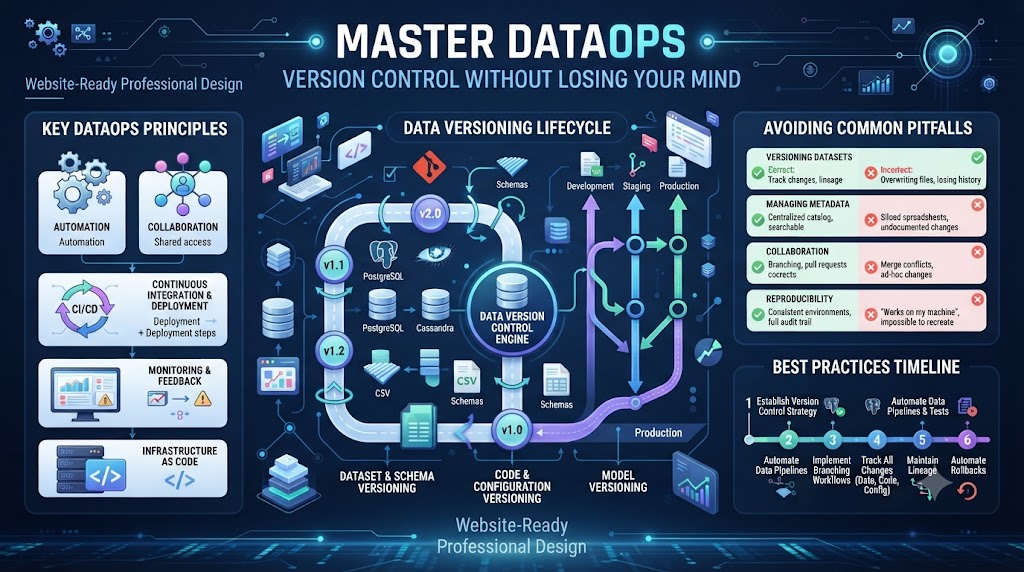
- Mistake: Committing huge raw data files directly into the repository.Fix: Store data in secure cloud buckets and track only the file pointers in your version control tool.
- Mistake: Writing vague commit messages like “fixed stuff” or “updated code”.Fix: Write short, clear messages that explain what changed and why you made the fix.
- Mistake: Working directly on the main production branch without testing.Fix: Always create a separate branch for your work and test it before merging.
- Mistake: Skipping code reviews to save time.Fix: Make it a rule that at least one teammate must check your code before it goes live.
- Mistake: Ignoring conflict warnings until the very last minute.Fix: Pull updates from the main branch often to catch and fix conflicts early.
- Mistake: Storing plain text passwords and API keys in your scripts.Fix: Use secure environment variables and secret managers to keep keys safe.
- Mistake: Forgetting to tag stable releases with version numbers.Fix: Use clear tags like v1.0 so you can always find your best working versions.
- Mistake: Not backing up the local repository outside your main computer.Fix: Push your work to a secure remote cloud server at the end of every work day.
- Mistake: Deleting old branches that might contain useful experimental code.Fix: Archive old branches instead of deleting them so you can check them later if needed.
- Mistake: Failing to train new team members on the version control process.Fix: Run a short weekly onboarding session to teach everyone the correct workflow rules.
Step-by-Step Implementation Roadmap
- Audit Your Current Workflow: List all your current scripts, databases, and manual steps to see where code gets lost.
- Choose the Right Tool: Pick a version control system that handles both your code and your data files well.
- Set Up the Central Repository: Create your main online project space and invite your team members with proper access roles.
- Define Branching Rules: Write down simple rules for who can create branches and who can merge them into production.
- Move Scripts Over: Upload your existing SQL queries, Python scripts, and configuration files into the new repository.
- Add Automated Tests: Set up basic checks that run every time someone pushes new code to catch bugs early.
- Train the Team: Hold a friendly workshop to show everyone how to commit, push, and pull code safely.
- Run a Test Migration: Simulate a broken pipeline on a test branch to make sure your rollback plan works.
- Monitor Daily Usage: Keep an eye on your team’s commits to ensure everyone follows the new rules consistently.
- Review and Improve: Hold a quick monthly meeting with your team to fix any workflow bottlenecks and improve your speed.
Faqs
1. What is the main benefit of using version control for data projects?
It lets you track every change, find bugs quickly, and roll back broken updates in seconds without losing your mind.
2. Can I use regular Git for my data pipelines?
Git works well for code files, but you need specialized tools to handle massive data files and machine learning model weights.
3. How often should my team commit changes?
You should commit your code whenever you finish a small, working piece of your task, usually several times a day.
4. What should I do if a merge conflict happens?
Pull the latest updates from the main branch, talk to your teammate who edited the same lines, and combine the code carefully.
5. How do I stop team members from pushing hardcoded passwords?
Use secure environment variables and automated security scan tools that block commits containing sensitive keys.
6. Do non-technical team members need to learn version control?
Basic understanding helps everyone see project progress, but visual tools make it easy for non-developers to follow along.
7. Why should I avoid putting raw data inside my repository?
Raw data files are usually too large and will slow down your repository while eating up valuable cloud storage space.
8. What is the best way to train my team on these tools?
Start with short, hands-on practice sessions and create a simple one-page cheat sheet of everyday commands.
9. How do I know if my version control setup is working?
Your team will spend less time fixing broken production pipelines and more time building useful new data features.
10. Where can I learn more advanced DataOps strategies?
You can visit DataOpsSchool for expert guides, tutorials, and training resources to level up your skills.
Final Recommendation and Next Steps
Start small. Do not try to fix your whole data setup in one day. Pick one single pipeline that causes you the most trouble. Set up version control for just that one project.
Once your team gets comfortable with the basics, expand to your other data workflows. Keep your rules simple. Focus on clear communication and regular backups. Your pipelines will run faster, your data will stay clean, and you will sleep much better at night.
