Picture a Monday at 6 a.m. The sales dashboard shows zero orders. Nothing crashed. A source file changed one column name, and no one noticed. This is a hypothetical story, but many data teams know it well.
DataOps fixes this kind of problem. It applies DevOps habits to data work. These habits include version control, automated tests, CI/CD (automatic checks and releases), and monitoring.
Open-source tools for DataOps pipelines give you the building blocks. You pay no license fee, and you can read the code. This post shows which tool fits which job, how to connect them, and where things go wrong.
Assumptions: You have a small to mid-size team. Most of your pipelines run in batches. You use a cloud or self-hosted data warehouse.
Why Open-Source Fits DataOps
Open-source tools have clear benefits. They cost nothing to start. Big communities answer questions and fix bugs. You can switch parts later, so you avoid lock-in.
There is a trade-off, though. You run the tools yourself. You also handle upgrades and fixes.
My recommendation is simple. Choose open source if your team has some engineering skill. If nobody can maintain servers, think twice.
The Five Layers of a DataOps Pipeline
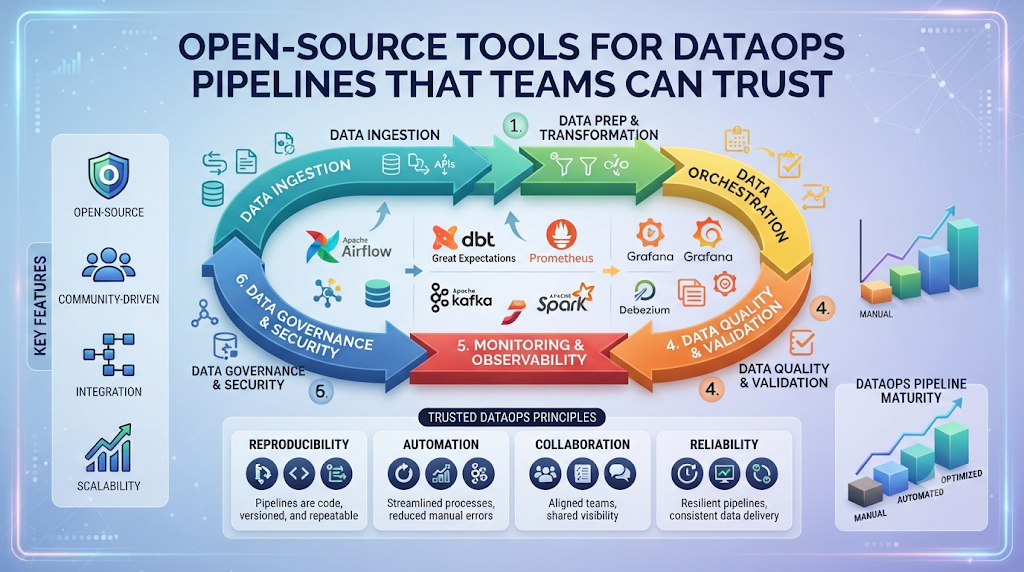
Every pipeline has the same basic layers. Knowing them helps you pick tools without confusion.
- Ingestion: moves data from sources into your storage.
- Orchestration: runs steps in the right order and retries on failure.
- Transformation: cleans and shapes raw data into useful tables.
- Quality checks: test the data before people use it.
- Observability: shows you what is running, late, or broken.
Add Git and CI/CD around all five. That’s the DataOps part.
Ingestion: Getting Data In
Two popular choices are Airbyte and Meltano. Airbyte offers many ready-made connectors. A connector is a small piece that reads from one source, like a database or app.
Meltano works from the command line. Its settings live in files, so Git tracks them well. It builds on the Singer connector standard.
For live event streams, Apache Kafka is a common pick. It is powerful, but it needs real care to run.
When not to use these: If you copy one database to another, a simple script or built-in replication may be enough.
What can go wrong: Connector quality varies. Test each one on real data. Also read each tool’s license terms before you build on it.
Orchestration: The Pipeline’s Traffic Controller
An orchestrator is a scheduler. It runs your steps in order. It also retries failed steps and sends alerts.
Here is how the three main open-source options compare.
| Tool | Core idea | Best fit | Watch out for |
|---|---|---|---|
| Apache Airflow | Tasks arranged in DAGs (step maps) | Teams that want a mature tool with a huge ecosystem | Setup takes effort |
| Dagster | Data assets, such as tables, come first | Teams that think in tables and want easy testing | A new mental model to learn |
| Prefect | Plain Python functions as flows | Teams that want a fast, Python-first start | Fewer ready-made integrations than Airflow |
My recommendation is this. Pick Airflow if hiring and community help matter most. Pick Dagster if you care about data assets. Pick Prefect for a quick start.
Don’t run two orchestrators. One is enough for most teams.
Transformation: dbt Core
dbt Core turns SQL select statements into tables in your warehouse. Each statement is called a model. dbt works out the order of models by itself. It also runs tests and builds docs.
This is the simplest way to keep SQL logic clean and reviewed.
When not to use it: If your logic needs heavy non-SQL code, use Apache Spark or plain Python instead. You can still use dbt for the SQL parts.
Data Quality Testing
Bad data does more harm than a failed job. A failed job is loud. Bad data is quiet.
Start with dbt tests. They are the easiest to add. Add Great Expectations or Soda Core later. These tools check rules on raw files and other sources.
Good first checks include:
- No empty values in key columns
- No duplicate IDs
- Only allowed values in status fields
- Fresh data (not older than expected)
- Row counts within a normal range
Here is a small dbt example.
yaml
models:
  - name: orders
    columns:
      - name: order_id
        tests:
          - unique
          - not_null
      - name: status
        tests:
          - accepted_values:
              values: ['placed', 'shipped', 'cancelled']
Newer dbt versions also accept the key name data_tests. Check the docs for your version.
Version Control and CI/CD
Put everything in Git. This includes SQL, pipeline code, and settings. Never put passwords in Git. Use a secrets manager instead.
Then add CI/CD with GitHub Actions or GitLab CI. Both run checks when someone opens a pull request. Docker keeps your setup the same on every machine.
A good flow looks like this:
- A person changes a model on a branch.
- CI runs tests on a small data sample.
- A teammate reviews the change.
- The change merges, and the release runs on its own.
This flow catches most mistakes before users see them.
Observability: Monitoring and Lineage
Observability means you can see what your pipeline is doing. Prometheus collects numbers, and Grafana draws charts and sends alerts.
Lineage shows where data came from and where it goes. OpenLineage is an open standard for this. Marquez is a tool that stores and shows lineage data.
Alert on the things that matter:
- Failed runs
- Late data
- Sudden drops in row counts
Keep alerts few. Too many alerts teach people to ignore them.
A Starter Stack (Hypothetical Example)
Say a team of three loads data from an app database and a marketing tool. They want clean tables for reporting. This is a made-up example, not a real case study.
A sensible stack for them:
- Ingestion: Meltano or Airbyte
- Transformation: dbt Core
- Orchestration: Dagster or Airflow
- Quality: dbt tests first, Soda Core later
- CI/CD: Git with GitHub Actions
- Alerts: Grafana
Why this works: each tool does one job. The team can learn them one at a time.
Build It Step by Step
Start small. A tiny working pipeline beats a big plan.
- Name the data product and its owner. Someone must answer when it breaks.
- Create a Git repo. Add folders for ingestion, models, and tests.
- Load one source. Pick the most useful one.
- Build one model. Add two or three tests right away.
- Schedule it. Set retries and a failure alert in your orchestrator.
- Add CI. Run tests on every pull request.
- Grow slowly. Add one source or one check at a time.
How to Check That It Works
Don’t trust a green dashboard alone. Test the safety net.
In a test copy, rename a column on purpose. Your pipeline should fail fast, and an alert should reach the owner. If it doesn’t, fix that first.
Then track a few simple signs over time:
- How often runs fail
- How long it takes to spot a problem
- How long it takes to fix one
- How fresh your key tables are
Compare these against your own past numbers. Don’t borrow benchmarks from other teams.
What Can Go Wrong
Most problems are about people and habits, not code.
- Tool sprawl. Five tools doing one job waste time.
- Skipped upgrades. Old versions bring bugs and security holes.
- Secrets in Git. This is a serious risk. Rotate any key that leaks.
- No owner. Unowned pipelines rot.
- Hidden running costs. Servers and staff time add up, even if the software is free.
- License changes. Some projects change terms over time. Review them now and then.
When Not to Go Open Source
Open source is not always the answer. Skip it if your data is tiny and a spreadsheet works. Skip it if nobody can maintain the tools. Strict rules in your industry may also need a vendor with a support contract. A managed service can be safer in that case.
Common Mistakes to Avoid
- Building everything before testing anything
- Writing tests only after something breaks
- Letting one person hold all the knowledge
- Skipping docs because “the code explains itself”
- Adding tools because they’re popular
Quick checklist:
- Is every file in Git?
- Does each pipeline have an owner?
- Do key tables have tests?
- Do failures send an alert?
- Can you rebuild the setup from code?
Frequently Asked Questions
Q1. Which open-source tool should I learn first for DataOps?
Start with dbt Core and Git. They teach you testing, version control, and clean SQL. These skills carry over to every other tool.
Q2. Is Apache Airflow still a good choice?
Yes, for many teams. It has a large community and many integrations. Newer tools like Dagster and Prefect may feel simpler for some use cases.
Q3. Can open-source tools handle production workloads?
Many teams run them in production. Success depends on how well you run them. You need monitoring, backups, upgrades, and clear owners.
Q4. How is DataOps different from DevOps?
DevOps focuses on code and apps. DataOps adds the data itself. It cares about data quality, freshness, and trust, not only about code that runs.
Q5. Do I need Kafka for a DataOps pipeline?
Not always. Kafka suits live event streams. If a daily or hourly batch is enough, simpler tools will do and cost less to run.
Q6. How much does an open-source stack really cost?
The software is free, but running it isn’t. Count servers, storage, and staff time. Add the cost of fixing outages as well.
Q7. What is the easiest way to add data quality checks?
Use dbt tests. Add checks for empty values, duplicates, and allowed values first. Move to Great Expectations or Soda Core when you need more.
Q8. Should I self-host or use a managed service?
Self-host if you have the skills and want control. Choose managed if your team is small or you need vendor support. Many teams mix both.
Q9. How long does it take to build a first pipeline?
A small pipeline with one source and a few tests can be done quickly. Making it reliable takes longer. Plan time for alerts, reviews, and docs.
Q10. What should I do after my first pipeline works?
Add alerts, then CI checks, then lineage. Write short docs for each pipeline. Then grow one source at a time.
Conclusion
Open-source tools for DataOps pipelines work best when each tool has one clear job. Start small with Git, dbt tests, and one orchestrator. Test your alerts on purpose, and give every pipeline an owner. Pick one source today, build the smallest working pipeline, and improve it from there. You can learn more step by step with DataOpsSchool.
