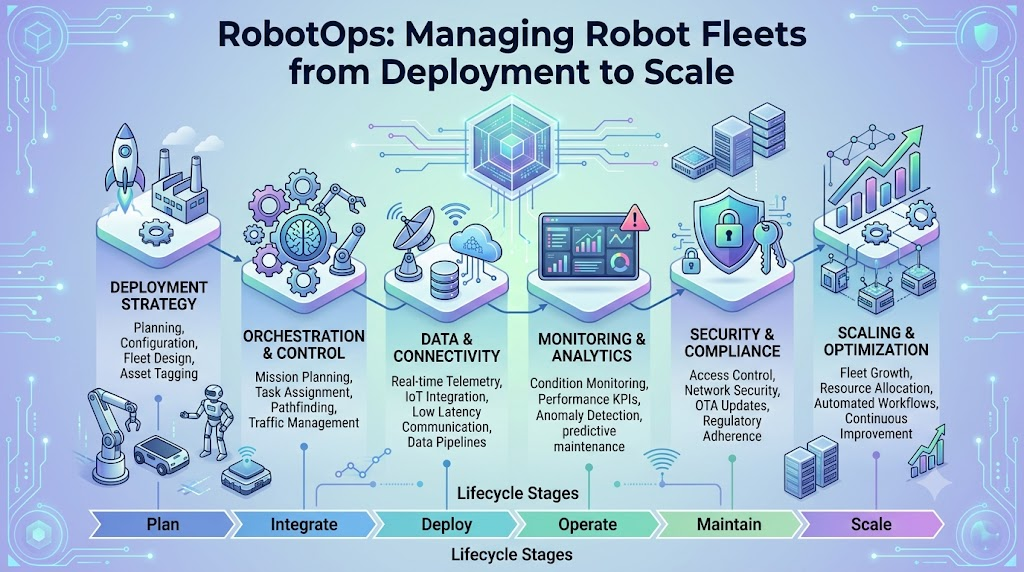
A robot may work perfectly during a demonstration, but what happens when an organization operates 20, 100, or 1,000 robots across different locations? Batteries drain, sensors behave differently, software needs updates, and unexpected failures interrupt daily operations. Managing these challenges requires more than robotics knowledge. It requires a structured approach that connects software development, automation, monitoring, maintenance, and operational support. RobotOps is the practice of applying DevOps, observability, automation, and lifecycle management principles to robotic systems. It helps teams deploy, monitor, update, troubleshoot, and maintain robots throughout their operational life. Robot Fleet Management extends this approach by coordinating multiple robots from a central operational process. This guide explains how RobotOps works, why fleet management matters, what skills teams need, and how organizations can build a reliable robotics operation.
What Is RobotOps?
RobotOps combines robotics engineering with operational practices used in software and IT environments. Its goal is to keep robots reliable, observable, secure, and manageable after they leave the development laboratory.
A traditional robotics project often focuses on building a robot and making it complete a specific task. RobotOps focuses on what happens afterward. Teams must ensure that the robot continues working, receives safe updates, reports problems, and operates correctly alongside other machines.
For example, a delivery robot may navigate successfully during testing. However, its performance can change when it encounters crowded pathways, weak network connectivity, changing lighting, or a low battery. RobotOps provides the processes and tools needed to identify and handle these conditions.
RobotOps vs. Traditional Robotics Development
Traditional robotics development generally concentrates on:
- Designing robotic hardware
- Developing control software
- Testing sensors and motors
- Building navigation and perception systems
- Validating individual robot behavior
RobotOps adds operational responsibilities, such as:
- Monitoring robot health
- Managing software releases
- Tracking battery and sensor status
- Diagnosing failures remotely
- Coordinating multiple robots
- Recording incidents and corrective actions
- Planning maintenance and system upgrades
The two approaches are connected. A robot cannot be operated reliably if its software is poorly designed, and strong robotics software still needs effective operational management.
Why Robot Operations Become Difficult at Scale
Managing one robot manually may be manageable during an early pilot. The same method becomes difficult when dozens of robots operate continuously across a factory, warehouse, hospital, or outdoor environment.
Consider a warehouse with 50 autonomous mobile robots. If one robot stops, an operator may be able to investigate it manually. If ten robots experience different issues at the same time, the team needs centralized visibility, clear priorities, and automated responses.
Common Operational Challenges
Unexpected downtime: A robot may stop because of a motor problem, sensor failure, network interruption, or software crash. Downtime can delay work and increase manual intervention.
Failed software deployments: An update that works in a test environment may behave differently on a specific robot model or hardware version. Poorly managed deployments can create widespread failures.
Manual monitoring: Checking each robot separately consumes time and makes it harder to detect patterns across the fleet.
Safety concerns: Robots interact with people, equipment, and physical spaces. Incorrect navigation, communication failures, or faulty sensors can create operational risks.
Limited troubleshooting access: Robots may be deployed in large facilities or remote locations. Sending an engineer to inspect every issue increases response time.
RobotOps addresses these challenges by treating robots as continuously operated systems rather than devices that only need attention during installation.
Who Benefits from RobotOps?
RobotOps is useful for teams involved in designing, deploying, and operating robotic systems.
Robotics Engineers
Robotics engineers can use operational feedback to understand how navigation, perception, control, and sensor systems perform outside controlled testing environments.
DevOps and Platform Engineers
DevOps engineers can support automated deployments, configuration management, infrastructure reliability, logging, and release processes for robotics software.
Site Reliability Engineers
SRE teams can apply monitoring, service-level objectives, incident management, and reliability practices to robotic platforms.
Automation Engineers
Automation engineers can connect robot workflows with warehouse systems, manufacturing platforms, industrial controllers, and enterprise applications.
Operations Managers
Operations managers need a clear view of fleet availability, active failures, maintenance requirements, and productivity interruptions.
Students and Learners
Students interested in robotics can build stronger practical knowledge by learning how software behaves throughout a robot’s complete lifecycle.
A useful analogy is an airline. Pilots operate individual aircraft, but airlines also need systems for scheduling, maintenance, safety monitoring, and incident response. RobotOps provides a similar operational structure for robotic fleets.
Core Components of RobotOps
RobotOps includes several connected practices. Each one supports a different part of the robot’s lifecycle.
1. Telemetry and Monitoring
Telemetry is the collection of operational data from a system, such as battery levels, temperature, location, sensor readings, and error messages.
Telemetry helps teams understand what a robot is doing without physically inspecting it. A monitoring dashboard may show:
- Battery percentage
- Current task
- Robot location
- Motor temperature
- Sensor health
- Network connection
- Software version
- Error codes
- Charging status
For example, if several robots report rising motor temperatures, the operations team can investigate whether the problem is related to a particular route, workload, or hardware component.
2. Observability
Monitoring usually tells teams whether a known condition has occurred. Observability helps teams understand why a system is behaving in a particular way by using logs, metrics, traces, and related operational information.
In robotics, observability may connect:
- Navigation errors
- Camera or lidar data
- CPU and memory usage
- Communication delays
- Application logs
- Task completion times
- Sensor failures
Imagine a robot repeatedly stopping at the same location. A simple dashboard may show that the robot stopped. An observable system may reveal that the navigation module lost localization whenever lighting conditions changed.
3. Robot Lifecycle Management
Robot lifecycle management covers the stages a robot passes through, including:
- Design and development
- Simulation
- Hardware integration
- Field testing
- Deployment
- Monitoring
- Maintenance
- Software upgrades
- Retirement or replacement
Each stage needs different controls. A development robot may receive frequent experimental updates, while a production robot requires more careful testing and approval.
4. Predictive Maintenance
Predictive maintenance uses operational data to identify signs of possible equipment failure before the failure becomes severe.
A fleet platform may analyze battery performance, motor temperature, vibration, or repeated sensor warnings. The information can help teams schedule inspections based on actual conditions instead of relying only on fixed time intervals.
Predictive maintenance does not guarantee that every failure will be detected in advance. Its effectiveness depends on data quality, suitable models, sensor coverage, and proper maintenance processes.
5. Incident Management
An incident is an event that interrupts normal operation or reduces system performance.
A RobotOps incident process should define:
- How failures are detected
- Who receives the alert
- How incidents are prioritized
- What immediate actions are permitted
- When a robot should be stopped
- How the root cause is investigated
- How the issue is documented
For instance, a minor reporting delay may require investigation, while a safety sensor failure may require immediate isolation of the affected robot.
Understanding Robot Fleet Management
Robot Fleet Management refers to the processes and systems used to coordinate, monitor, configure, and maintain multiple robots.
Instead of managing each robot independently, fleet management provides a shared operational view. This is particularly useful when robots perform similar tasks across a facility or across multiple sites.
Important Fleet Management Functions
Robot Registration
Each robot should have a unique identity and associated information, such as:
- Model
- Hardware configuration
- Software version
- Deployment location
- Maintenance history
- Current operational status
Task Allocation
Fleet systems can assign tasks based on availability, location, battery level, capability, or priority.
For example, a robot with low battery should not receive a long-distance task if another suitable robot is available.
Traffic and Route Coordination
Multiple autonomous robots may need to share narrow paths, charging stations, elevators, or loading areas. Fleet coordination helps reduce conflicts and inefficient movement.
Remote Diagnostics
Operators should be able to review logs, check system status, restart approved services, or apply controlled troubleshooting steps without visiting every robot.
Software and Configuration Updates
Fleet management systems can help distribute updates in stages. A team might first update a small test group, evaluate the results, and then expand the rollout.
Fleet management is similar to managing a large group of computers in an enterprise environment. However, robots add physical movement, hardware variation, safety requirements, and environmental uncertainty.
Skills Needed for RobotOps
RobotOps requires knowledge from multiple technical areas. Teams do not need to master every subject immediately, but a strong foundation is helpful.
ROS 2
ROS 2 is a robotics software framework that supports communication between components such as sensors, navigation modules, controllers, and applications.
Learners should understand:
- Nodes
- Topics
- Services
- Actions
- Parameters
- Launch files
- Package management
- Communication patterns
ROS 2 knowledge helps engineers understand how robotic applications are structured and connected.
Robotics Middleware
Middleware is the software layer that allows different components or applications to communicate and work together.
In a robot, middleware may connect sensor data, navigation logic, control software, and monitoring services. Understanding communication delays, message reliability, and system dependencies is valuable for troubleshooting.
Simulation
Simulation allows teams to test robotic behavior in a virtual environment before using physical hardware. It can reduce early testing costs and help reproduce difficult situations.
Navigation and Perception
Navigation helps robots determine where to move and how to reach a destination. Perception helps robots interpret information from cameras, lidar, depth sensors, and other devices.
RobotOps professionals do not always need to develop these systems from scratch, but they should understand their basic failure modes.
DevOps and Automation
Useful DevOps skills include:
- Version control
- Continuous integration and delivery
- Containerization
- Automated testing
- Configuration management
- Release management
- Linux administration
- Monitoring and alerting
These practices help robotics teams manage software changes more consistently.
A Practical RobotOps Workflow
A structured workflow helps teams move from development to reliable production operations.
Step 1: Define the Operational Requirements
Before deployment, identify the robot’s intended tasks, operating environment, safety constraints, connectivity requirements, and maintenance expectations.
Ask practical questions:
- Where will the robot operate?
- What happens if connectivity is lost?
- How will the robot be stopped safely?
- What data must be collected?
- Who responds to failures?
- How will software updates be approved?
Step 2: Test in Simulation
Use simulation to evaluate navigation, task execution, sensor behavior, and unusual situations.
A digital twin is a virtual representation of a physical system that can be used to understand, test, or monitor aspects of its real-world counterpart. A digital twin may support scenario testing and operational analysis, but its accuracy depends on how closely the model represents the physical environment.
Step 3: Run Controlled Hardware Tests
After simulation, test the robot in a controlled physical environment. Verify sensor readings, movement, emergency procedures, communication, and recovery behavior.
Do not assume that successful simulation automatically proves safe real-world operation.
Step 4: Establish Monitoring
Connect the robot to a monitoring platform that captures essential metrics, logs, and events. Set thresholds for conditions that require attention.
For example:
- Low battery warning
- High motor temperature
- Loss of localization
- Communication failure
- Repeated navigation retries
Step 5: Deploy in Small Groups
Avoid releasing a major software update to the entire fleet at once. Use a staged rollout that begins with a limited number of robots.
Compare performance before expanding the deployment.
Step 6: Review Incidents and Improve
After a failure, record what happened, why it happened, how the team responded, and what changes can prevent repetition.
This feedback loop helps improve software, operating procedures, and maintenance plans.
Tools Used in Robotics Operations
The best toolset depends on the robot type, operating environment, budget, safety requirements, and technical skills of the team.
Simulation Tools
Simulation platforms help teams test robot behavior without immediately using physical machines.
Common categories include:
- Robot and environment simulators
- Physics simulation systems
- Digital twin platforms
- Scenario testing tools
Fleet Monitoring Tools
These systems provide visibility into robot health, location, tasks, and failures.
Typical capabilities include:
- Fleet dashboards
- Robot status tracking
- Alerts
- Remote diagnostics
- Task monitoring
- Maintenance records
Middleware and Robotics Frameworks
Middleware tools connect software components and support communication between robot processes. ROS 2 is widely used in robotics development and can form part of a broader operational architecture.
Navigation Tools
Navigation frameworks support mapping, localization, path planning, obstacle avoidance, and movement control.
Telemetry and Logging Platforms
Telemetry platforms collect information from robots and make it available for analysis. Logging systems help teams investigate failures and identify recurring patterns.
Tool selection should be based on operational needs rather than popularity alone. A small research project may need a lightweight setup, while a large industrial fleet may require stronger access controls, integration, scalability, and audit capabilities.
RobotOps Best Practices
Use Centralized Monitoring
A central dashboard gives operators a consistent view of the fleet. It should show both individual robot information and overall operational trends.
Support Remote Diagnostics
Remote access can reduce response time, particularly when robots operate across large or difficult-to-reach locations. Access should be controlled, logged, and designed around safety requirements.
Apply Staged Software Releases
Test updates on a limited group before wider deployment. Maintain rollback procedures when technically possible and appropriate.
Create Safety Checks
Safety checks should cover hardware, software, environmental conditions, emergency procedures, and human interaction.
A software deployment process should never bypass required safety validation.
Maintain Incident Response Plans
Define responsibilities and escalation procedures before a major incident occurs. Teams should know how to isolate affected robots and restore operations safely.
Track Configuration Changes
Keep records of software versions, firmware, parameters, hardware changes, and deployment dates. Configuration history makes troubleshooting more reliable.
Review Operational Data Regularly
Data should not only be used when something fails. Regular reviews can reveal recurring delays, inefficient routes, excessive battery consumption, or maintenance patterns.
Common Mistakes to Avoid
Treating Robots as Ordinary Servers
Robots include physical components and interact with real environments. A restart or update that is acceptable for a server may not be suitable for a moving machine.
Better approach: Include hardware conditions, safety controls, and physical surroundings in operational planning.
Deploying Updates to Every Robot at Once
A small software issue can become a fleet-wide problem when updates are released without testing.
Better approach: Use staged releases, approval checks, and recovery plans.
Collecting Too Much or Too Little Data
Collecting excessive data can increase storage and analysis costs. Collecting too little data makes troubleshooting difficult.
Better approach: Identify the metrics and logs that directly support safety, reliability, and operational decisions.
Ignoring Network Conditions
Robots may operate in areas with unstable or limited connectivity.
Better approach: Test offline behavior, reconnection handling, and safe responses to communication loss.
Failing to Document Incidents
Teams may fix a problem temporarily but fail to record the underlying cause.
Better approach: Maintain incident records and use post-incident reviews to identify long-term improvements.
Practical Example: Managing Warehouse Robots
Imagine a warehouse using autonomous mobile robots to move goods between storage shelves and packing stations.
At the beginning, operators may monitor each robot manually. As the fleet grows, several challenges appear:
- Robots compete for charging stations
- Some routes become congested
- Batteries lose capacity over time
- Software versions become inconsistent
- A small number of robots experience repeated navigation failures
A RobotOps approach can address these problems through several steps.
First, the team creates a centralized dashboard showing robot location, battery condition, software version, and active tasks. Next, it adds alerts for repeated navigation failures and low battery levels.
The team then introduces staged software deployments. A new navigation update is tested on a small group of robots before it is released to the wider fleet.
Operational records reveal that many navigation failures occur near one storage area. Engineers investigate the environment and discover that changing shelf arrangements affect localization. They update the map, test the change, and monitor the results.
This example shows how RobotOps connects monitoring, fleet coordination, software management, and operational learning. The objective is not simply to repair individual robots. It is to improve the performance of the entire system.
Simulation and Real-World Testing
Simulation and physical testing serve different purposes.
| Area | Simulation | Physical Testing |
|---|---|---|
| Environment | Virtual or modeled | Real operating location |
| Cost of early experiments | Usually lower | Can require hardware and staff |
| Safety risk during testing | Can reduce some physical risks | Requires physical safety controls |
| Sensor realism | Depends on model quality | Exposes real sensor limitations |
| Environmental uncertainty | Limited by simulation accuracy | Includes real-world variation |
| Best use | Early validation and scenario testing | Hardware, safety, and field verification |
Simulation can help teams test unusual conditions, but it cannot replace all physical testing. A robot must be evaluated in the actual environment where it will operate.
Frequently Asked Questions
1. What does RobotOps mean?
RobotOps applies DevOps, monitoring, automation, and lifecycle management practices to robotic systems. It helps teams operate, maintain, update, and troubleshoot robots after deployment.
2. How is RobotOps different from robotics engineering?
Robotics engineering focuses on designing and developing robotic systems. RobotOps focuses on keeping those systems reliable, observable, maintainable, and manageable during real-world operations.
3. What is Robot Fleet Management?
Robot Fleet Management involves coordinating and monitoring multiple robots through shared tools and processes. It may include task allocation, software updates, diagnostics, location tracking, and maintenance management.
4. Why is telemetry useful in robotics?
Telemetry provides operational data such as battery levels, temperatures, sensor conditions, and error messages. This information helps teams monitor robot health and investigate problems remotely.
5. Is ROS 2 required for learning RobotOps?
ROS 2 is useful for many robotics applications, especially when robots use ROS 2-based software components. However, the required technologies depend on the robot platform and the organization’s architecture.
6. Can RobotOps reduce robot downtime?
RobotOps can help reduce avoidable downtime through monitoring, faster troubleshooting, staged deployments, and maintenance planning. Results depend on implementation quality and the operating environment.
7. What skills should a beginner learn first?
Beginners can start with Linux, networking basics, Python, version control, ROS 2 fundamentals, simulation, monitoring, and basic automation. They should gradually learn robotics safety and lifecycle practices.
8. Why is simulation important in RobotOps?
Simulation helps teams test software, navigation, and operating scenarios before using physical robots. It can reveal design problems early, although physical testing remains necessary.
9. What should a robot incident response plan include?
It should define how incidents are detected, prioritized, escalated, investigated, and resolved. It should also explain when a robot must be stopped or isolated for safety reasons.
10. Where can I learn more about RobotOps?
You can explore educational material on RobotsOps.com to learn more about robotics operations, fleet management, automation, and related technologies.
Conclusion
RobotOps helps organizations manage robotics as an ongoing operational responsibility rather than a one-time engineering project. By combining monitoring, Robot Fleet Management, automation, safety checks, software delivery, and maintenance planning, teams can build more structured and dependable robotic operations. Start with a small use case, establish clear visibility, test changes carefully, and expand your processes as the fleet grows. Explore RobotOps learning resources to continue building your knowledge.
