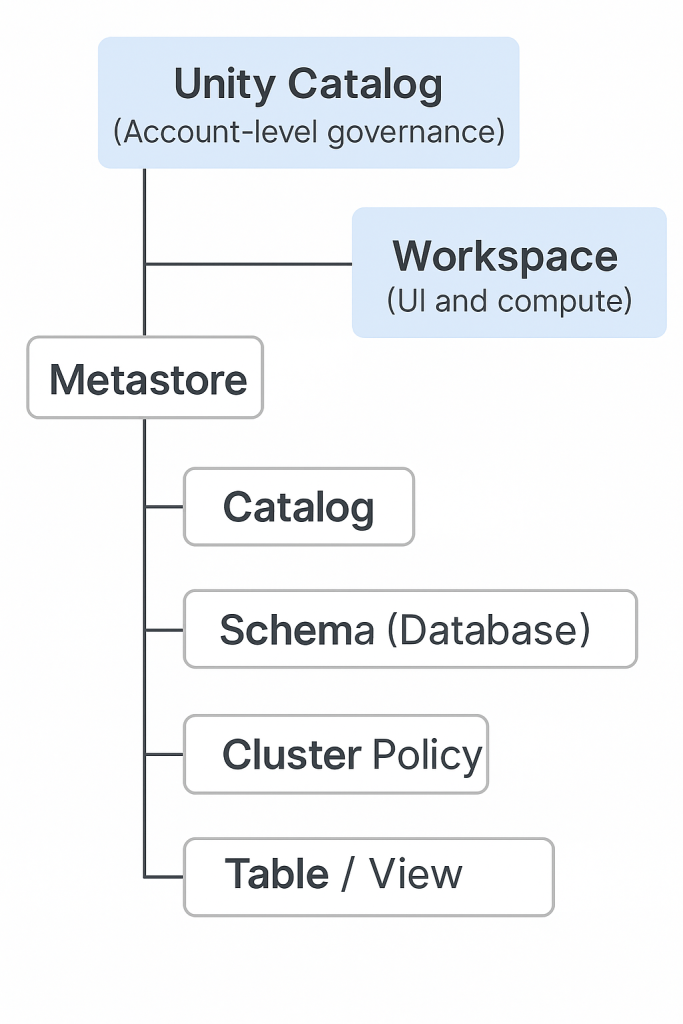
🔑 Unity Catalog vs Catalogs vs Workspace vs Metastore
1. Unity Catalog (UC) ✅
- Think of it as the master governance system.
- It’s account-level (above all workspaces).
- Manages:
- Who can see what (permissions, ACLs).
- Metadata (table names, schemas, lineage).
- Secure data sharing across workspaces (Delta Sharing).
👉 Analogy: National Library System – it governs all libraries in a country.
2. Catalogs 📚
- A container for organizing data assets inside Unity Catalog.
- A catalog contains Schemas (databases).
- Within schemas, you have Tables, Views, Volumes, Functions, Models.
👉 Analogy: A library inside the national library system.
3. Schemas (Databases)
- Sub-containers within Catalogs.
- Organize Tables and Views.
👉 Analogy: Sections in the library (History, Science, Fiction).
4. Tables & Views
- Actual data objects stored in schemas.
- Tables → structured datasets (Delta by default).
- Views → saved queries on tables.
👉 Analogy: Books on the library shelves.
5. Workspace 🖥️
- A UI and compute environment where users collaborate (notebooks, jobs, clusters).
- Workspaces don’t “own” the data; they just connect to Unity Catalog for governed data access.
👉 Analogy: The reading room where you sit, study, and work with books.
6. Metastore 📒
- The backend metadata database that stores info about catalogs, schemas, tables, permissions.
- In Unity Catalog:
- Account-level Metastore is shared across workspaces.
- In legacy mode:
- Each workspace had its own Hive Metastore (separate, siloed).
👉 Analogy: The card catalog / index system telling you where each book is and who can borrow it.
✅ Hierarchy
Unity Catalog (Account-level Governance)
   └── Metastore (Metadata storage)
         └── Catalogs (Top-level containers)
               └── Schemas (Databases)
                     └── Tables / Views / Volumes / Models
And Workspaces are where you interact with all of this (via notebooks, jobs, queries).
Key Distinction
- Unity Catalog = The system of rules + governance layer.
- Catalog = Logical container for data inside UC.
- Metastore = Metadata database that keeps track of it all.
- Workspace = Your working environment (UI + compute) that connects to the above.
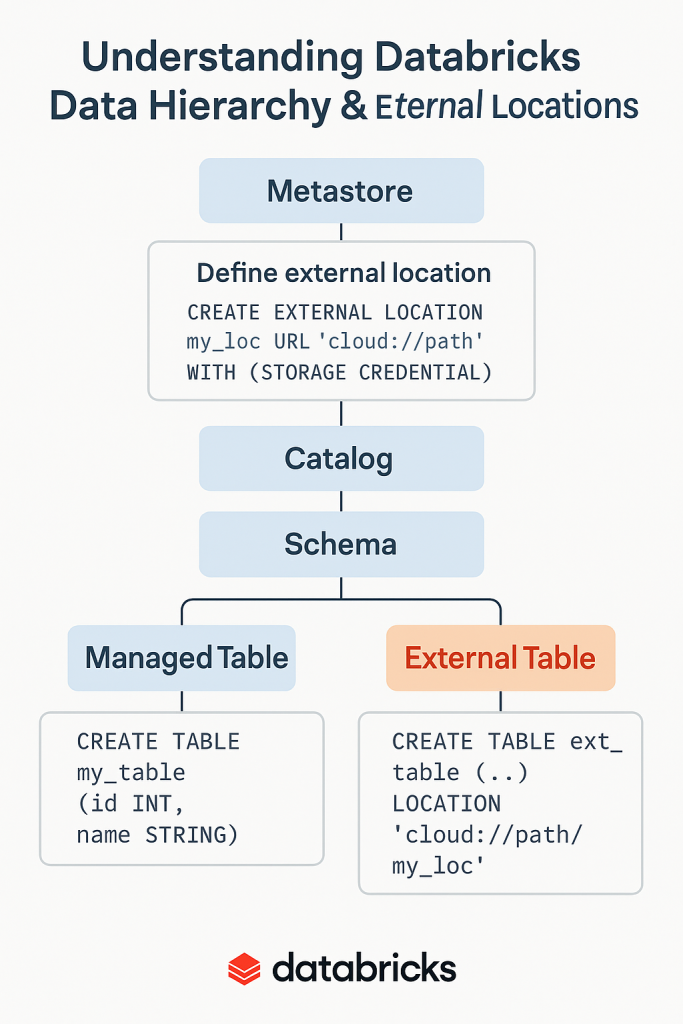
Let’s wrap up everything we’ve discussed about Metastore → Catalog → Schema → Table and external locations into a single, step-by-step tutorial that you can follow on Databricks.
📘 Tutorial: Understanding Databricks Data Hierarchy & External Locations
1. The Hierarchy
In Unity Catalog, Databricks enforces this hierarchy:
Metastore
   └── Catalog
         └── Schema
               └── Table / View / Volume / Model
- Metastore → The root metadata container. Every account gets one Unity Catalog metastore.
- Catalog → Top-level logical container for schemas and data assets.
- Schema (Database) → Organizes objects within a catalog.
- Table → Stores data (managed or external).
2. Managed vs External Tables
- Managed Table: Databricks manages both metadata + storage. Dropping the table deletes files.
- External Table: Databricks manages only metadata. The data stays in your cloud storage when dropped.
3. External Location (Key Concept)
- An External Location is a Unity Catalog object that maps a cloud storage path (S3, ADLS, GCS) + a storage credential.
- Defined at the Metastore level → not at Catalog or Schema.
- Used when creating external tables.
Example:
-- Step 1: Create storage credential (cloud-specific)
CREATE STORAGE CREDENTIAL my_cred
WITH AZURE_MANAGED_IDENTITY 'my-managed-identity'
COMMENT 'Credential for ADLS';

-- Step 2: Register external location
CREATE EXTERNAL LOCATION my_ext_loc
URL 'abfss://external-container@mydatalake.dfs.core.windows.net/data/'
WITH (STORAGE CREDENTIAL my_cred)
COMMENT 'External data location';
4. Creating Catalog, Schema, and Tables
-- Create a catalog
CREATE CATALOG sales_catalog;

-- Create a schema (inside catalog)
CREATE SCHEMA sales_catalog.sales_schema;

-- Managed table (Databricks manages storage)
CREATE TABLE sales_catalog.sales_schema.customers_managed (
  id INT, name STRING
);

-- External table (you provide LOCATION)
CREATE TABLE sales_catalog.sales_schema.customers_external
USING DELTA
LOCATION 'abfss://external-container@mydatalake.dfs.core.windows.net/data/customers/';
5. Insert, Query, and Drop Data
-- Insert data (only works on managed tables)
INSERT INTO sales_catalog.sales_schema.customers_managed VALUES (1, 'Alice'), (2, 'Bob');

-- Query data
SELECT * FROM sales_catalog.sales_schema.customers_managed;

-- Drop table
DROP TABLE sales_catalog.sales_schema.customers_managed;

-- For external table → only metadata removed, data files remain
DROP TABLE sales_catalog.sales_schema.customers_external;
6. Quick Rules Recap ✅
- Metastore → Mandatory, stores metadata & external location definitions.
- Catalog → Mandatory, logical top-level container.
- Schema → Mandatory, organizes tables within catalogs.
- Table → Optional, where the actual data lives.
- External Location → Defined at Metastore, used at Table level.
🎯 Conclusion
- You cannot define external locations at catalog or schema level.
- You must define them at the metastore and use them when creating external tables.
- Always think:
- Metastore = registry
- Catalog = library section
- Schema = shelf
- Table = book (data itself)
Catalogs themselves don’t directly “use” external locations, but you can associate them with external storage in Unity Catalog. Let me explain:
Catalog Storage in Databricks using External Location
1. Default Behavior
- When you create a catalog in Unity Catalog:
CREATE CATALOG sales_catalog;→ Databricks automatically assigns it a default storage location (in the metastore’s root storage).- All managed tables created inside
sales_cataloggo there by default.
- All managed tables created inside
2. Catalog With External Location
- You can override this by explicitly binding a catalog to an external location:
CREATE CATALOG sales_catalog MANAGED LOCATION 'abfss://container@storageacct.dfs.core.windows.net/sales_data/';- Here, the catalog’s default managed tables will live in that external location.
- This is sometimes called a “catalog-level managed location.”
3. Schema Level
- Similarly, you can also define a managed location for a schema:
CREATE SCHEMA sales_catalog.retail MANAGED LOCATION 'abfss://container@storageacct.dfs.core.windows.net/retail_data/';- Now tables created in this schema (without explicit
LOCATION) go here.
- Now tables created in this schema (without explicit
4. Table Level
- For external tables, you still provide the
LOCATIONexplicitly:CREATE TABLE sales_catalog.retail.customers USING DELTA LOCATION 'abfss://container@storageacct.dfs.core.windows.net/customers/';
✅ So to answer your question
- Yes, you can create a catalog in Databricks that uses an external location as its default managed storage.
- But ⚠️ this doesn’t mean all tables are external tables — it just changes the default storage path for managed tables created in that catalog (or schema).
- External tables still need their own explicit
LOCATIONor use a registered external location.
