A Relational Database is a type of database that stores data in tables (also called relations), where each table consists of rows and columns. These databases use Structured Query Language (SQL) for defining and manipulating data. Relationships between tables are maintained via foreign keys, ensuring data integrity and logical consistency.
History or Background
1970: Edgar F. Codd introduced the relational model in his seminal paper “A Relational Model of Data for Large Shared Data Banks.”
1980s–1990s: Commercial RDBMSs like Oracle, IBM DB2, and Microsoft SQL Server emerged.
2000s–Present: Open-source databases like MySQL and PostgreSQL gained traction, with cloud-based relational databases (e.g., Amazon RDS, Google Cloud SQL) becoming integral to modern DevSecOps workflows.
Why Is It Relevant in DevSecOps?
Relational databases are crucial in DevSecOps pipelines for:
Secure application development: Enforcing data integrity and access controls.
Compliance: Supporting auditable logging, encryption, and role-based access.
Automation: Seamless integration into CI/CD processes for schema migrations and tests.
Monitoring: Facilitating observability and alerting through telemetry integrations.
2. Core Concepts & Terminology
Key Terms and Definitions
Term
Definition
Table
A collection of rows and columns representing an entity (e.g., Users).
Primary Key
A column or group of columns that uniquely identifies each row.
Foreign Key
A column that creates a relationship between two tables.
Normalization
A process to organize data to reduce redundancy.
SQL
Standard language to query and manipulate relational databases.
ACID
Atomicity, Consistency, Isolation, Durability – properties of reliable transactions.
RDBMS
Relational Database Management System – software that manages relational databases.
How It Fits into the DevSecOps Lifecycle
DevSecOps Phase
Role of Relational Database
Plan
Data modeling and schema design.
Develop
Developer sandbox databases, unit testing with test data.
Build
Database schema migrations managed in code.
Test
Secure test datasets and validation of DB logic (e.g., triggers).
Release
Schema promotion across environments.
Deploy
Infrastructure-as-Code provisioning of DBs.
Operate
Monitoring, performance tuning, backups.
Secure
Encryption, role-based access, auditing.
3. Architecture & How It Works
Components
Tables: Core storage structures for data.
Schemas: Logical groupings of database objects.
Indexes: Speed up data retrieval.
Views: Virtual tables derived from SQL queries.
Stored Procedures/Functions: Encapsulate logic on the database side.
Triggers: Automated operations based on events like insert or update.
Internal Workflow
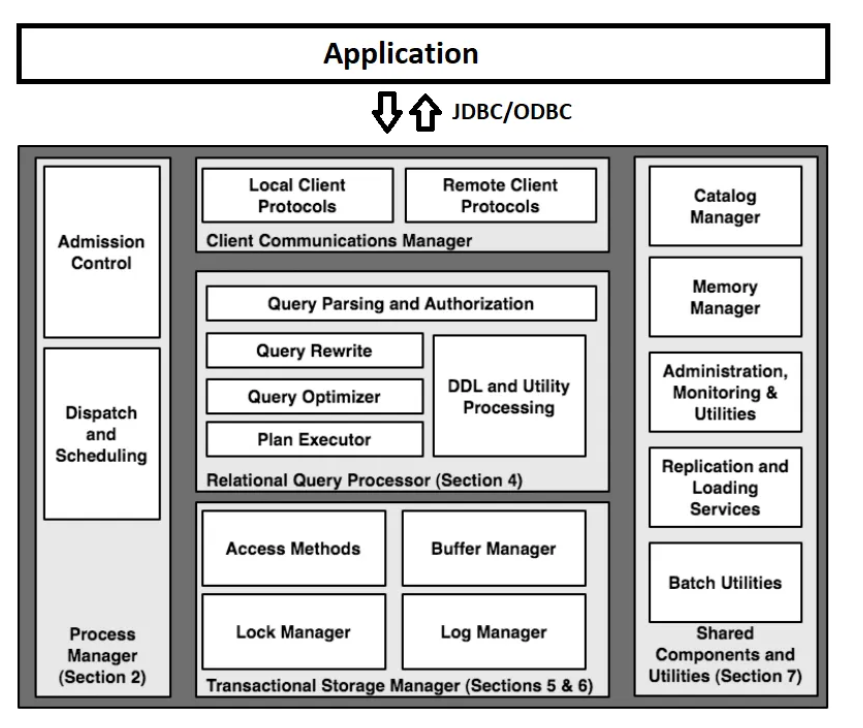
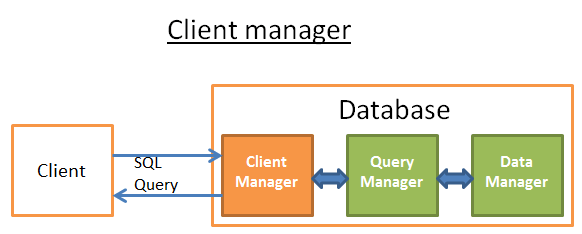
Application issues SQL query via client.
RDBMS parses, optimizes, and compiles query.
Data is retrieved or modified following ACID guarantees.
Results returned to client; logs and metrics are optionally captured.
Schema changes can be complex to manage in agile workflows.
Performance
Joins and complex queries can slow down large-scale systems.
Operational Overhead
Backup, replication, and tuning require expert involvement.
7. Best Practices & Recommendations
Security Tips
Enforce TLS for all connections.
Rotate DB credentials via secrets manager.
Use IAM roles for temporary access in cloud-native environments.
Performance & Maintenance
Regularly vacuum (PostgreSQL) or optimize tables (MySQL).
Monitor slow queries and tune indexes.
Archive old data using partitioning.
Compliance Alignment
Enable logging for GDPR, HIPAA compliance.
Apply encryption-at-rest and in-transit.
Use data classification tools to label sensitive columns.
Automation Ideas
Use Liquibase + GitHub Actions for push-to-deploy schema updates.
Automate data masking for staging environments.
Integrate with HashiCorp Vault for dynamic DB secrets.
8. Comparison with Alternatives
Feature
Relational DB (e.g., PostgreSQL)
NoSQL (e.g., MongoDB)
NewSQL (e.g., CockroachDB)
Data Integrity
Strong (ACID)
Weak or tunable
Strong (ACID)
Schema Flexibility
Fixed
Flexible
Fixed
Query Language
SQL
Custom or JSON-like
SQL
Scale-Out
Limited (manual)
Native
Native
Security Features
Mature
Varies
Evolving
When to Choose a Relational Database
You need strong consistency and data integrity.
Regulatory compliance is critical.
Application logic relies on complex joins or transactions.
9. Conclusion
Final Thoughts
Relational databases are the bedrock of modern application and infrastructure design, especially in DevSecOps where security, reliability, and automation converge. While newer paradigms exist, RDBMSs continue to evolve with cloud-native features, self-healing capabilities, and integrated observability.
Future Trends
Serverless RDBMS (e.g., Aurora Serverless)
ML-assisted query optimization
DBaaS with built-in CI/CD hooks
Next Steps
Explore Flyway or Liquibase for database versioning.
Deploy a PostgreSQL instance in the cloud (AWS RDS or GCP Cloud SQL).
Integrate security scanning for DB misconfigurations.
Software teams in Japan are under real pressure. Business leaders want new features every week. Customers expect apps to work all the time. But many internal teams…
Introduction Picture an analyst opening a dashboard first thing in the morning. The sales chart is empty. A pipeline broke overnight, and nobody knows why. The analyst…
Here’s something most software ads never admit: half the tools bought each year sit unused within three months. Sounds surprising? It shouldn’t. Bright banners promise magic fixes….
Hyderabad is a busy city. Something new happens every week. New cafes open. Bands play live shows. Comedians make people laugh. But there is one big problem….
Introduction Your sales team asks for a minor dashboard tweak on Monday morning. You update the query, hit refresh, and wait. By Tuesday afternoon, the live revenue…