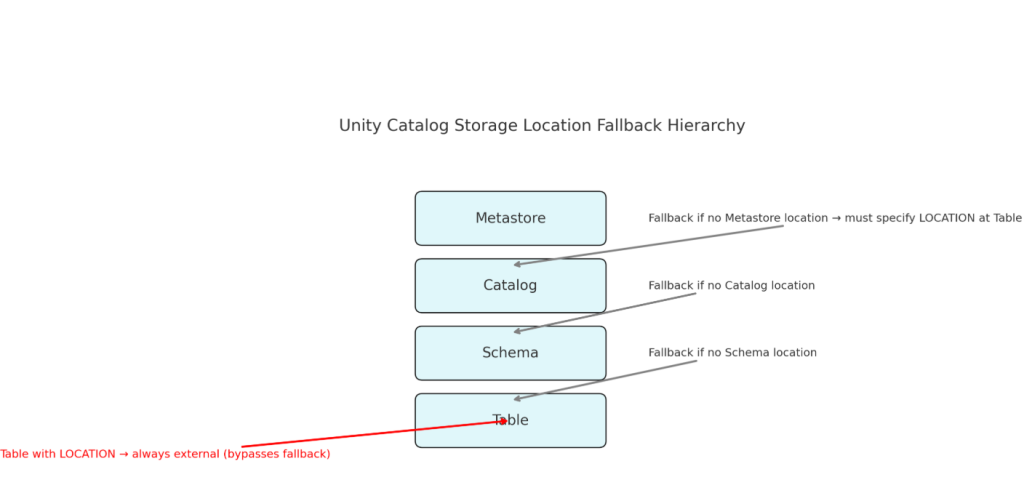
this is exactly the core of Unity Catalog’s object model. The way Databricks resolves storage paths for managed tables depends on where you attach the external/managed location. Let’s break it down carefully by Catalog → Schema → Table levels.
🔑 Unity Catalog Storage Hierarchy
Unity Catalog object model:
Metastore → Catalog → Schema → Table
- You can set managed storage locations (via external locations) at Metastore, Catalog, or Schema level.
- Tables may also define a LOCATION clause (explicit path).
- Databricks applies a fallback precedence:
Schema location (if exists) → Catalog location (if exists) → Metastore location (if exists).
1️⃣ Catalog with External Location
When you create a catalog with an external location:
CREATE CATALOG dev_ext
MANAGED LOCATION 'abfss://data@<storage_account>.dfs.core.windows.net/ADB/catalog/';
- Effect:
- Any managed tables created inside this catalog (and its schemas) will, by default, write to this catalog’s external location.
- The actual storage path will be:
/ADB/catalog/<catalog-id>/tables/<table-id>/ - If no schema-level location is set, the catalog’s location is used.
- Example:
CREATE SCHEMA dev_ext.bronze; CREATE TABLE dev_ext.bronze.sales (...) ;→ Data files stored under the catalog-level path.
2️⃣ Schema with External Location
When you create a schema with an external location:
CREATE SCHEMA dev_ext.bronze_ext
MANAGED LOCATION 'abfss://data@<storage_account>.dfs.core.windows.net/ADB/schema/bronze_ext/';
- Effect:
- Any managed tables inside this schema are stored under the schema’s external location.
- Schema location overrides the catalog location.
- Actual storage path:
/ADB/schema/bronze_ext/<schema-id>/tables/<table-id>/
- Example:
CREATE TABLE dev_ext.bronze_ext.sales (...) ;→ Data files stored at the schema-level location.
3️⃣ Table with External Location
When you create a table with a LOCATION clause:
CREATE TABLE dev_ext.bronze.sales_external (
  id INT, product STRING, amount DOUBLE
)
LOCATION 'abfss://data@<storage_account>.dfs.core.windows.net/ADB/external-tables/sales_external';
- Effect:
- This is an external table, not a managed one.
- The data files live exactly at the path you specify.
- Databricks only manages metadata in Unity Catalog; it will never delete the underlying files if you drop the table.
- Example:
- Drop the table → metadata gone, files remain at
/ADB/external-tables/sales_external/. - Undrop → metadata is restored (within 7 days).
- Drop the table → metadata gone, files remain at
🔄 Comparison Across Scenarios
| Scenario | Default Data Storage | Cleanup Behavior on DROP TABLE |
|---|---|---|
| Catalog with external location | Tables stored under catalog’s managed path (/catalog/<catalog-id>/tables/<table-id>/) | Dropping table: metadata removed, data files deleted after 7–30 days (grace period for undrop). |
| Schema with external location | Tables stored under schema’s managed path (/schema/<schema-id>/tables/<table-id>/) | Same as above: metadata gone immediately, data eventually deleted after retention period. |
| Table with LOCATION (external table) | Data stored exactly at the specified path (/external-tables/<name>/) | Metadata dropped immediately, data files always remain. UC never deletes them. |
⚡ Key Takeaways
- Metastore-level location = global default (used if neither catalog nor schema has a location).
- Catalog-level location = default for all schemas under it (unless schema overrides).
- Schema-level location = strongest override for managed tables.
- Table with LOCATION = always external → UC does not manage lifecycle of data files.
👉 So, in short:
- Catalog external location = whole catalog defaults there.
- Schema external location = just that schema overrides catalog.
- Table external location = explicit → always external, metadata-only management.
