🚀 Databricks Auto Loader Tutorial
(with Schema Evolution Modes & File Detection Modes)
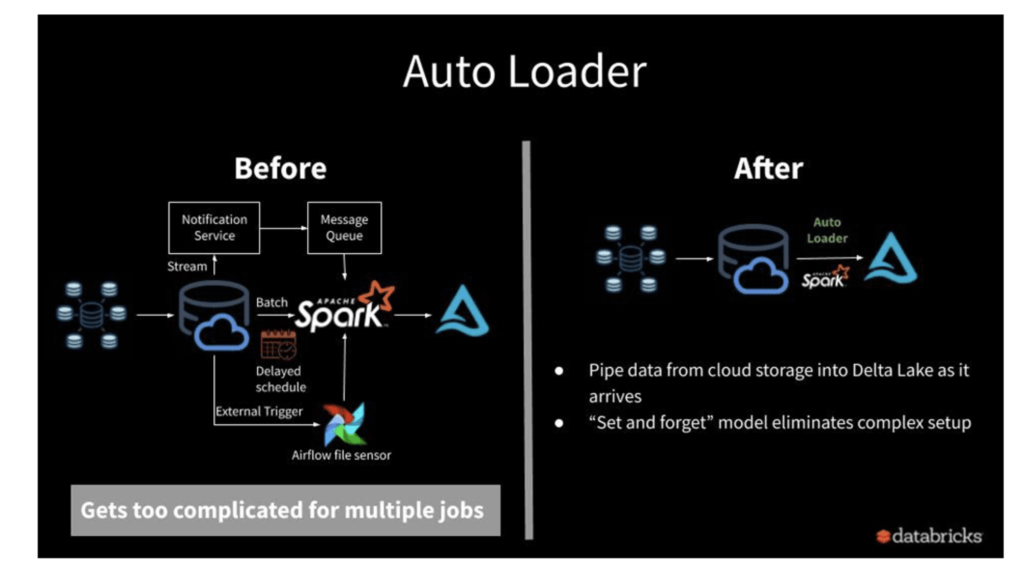
Auto Loader in Databricks is the recommended way to ingest files incrementally and reliably into the Lakehouse. This tutorial covers:
- What Auto Loader is and when to use it
- File detection modes (Directory Listing vs File Notification)
- Schema handling (Schema Location, Schema Hints)
- Schema evolution modes (addNewColumns, rescue, none, failOnNewColumns)
- Exactly-once processing & checkpoints
- Full working examples
1️⃣ Introduction to Auto Loader
Auto Loader is a Databricks feature that:
- Incrementally ingests new files from cloud storage (ADLS, S3, GCS, or DBFS).
- Works with structured streaming via the
cloudFilessource. - Supports both batch and streaming ingestion.
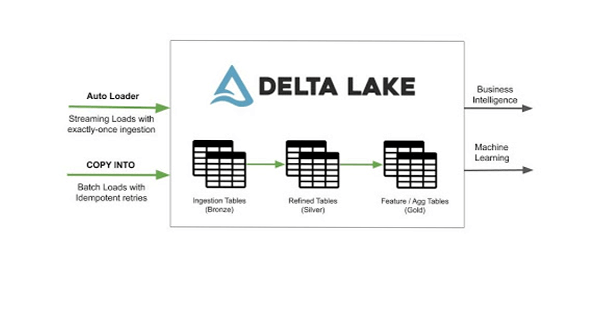
- Guarantees exactly-once delivery (no duplicate loads).
- Can scale to millions of files per hour.
👉 Compared to COPY INTO, which is retriable and idempotent, Auto Loader is designed for large-scale continuous ingestion.
2️⃣ File Detection Modes in Auto Loader
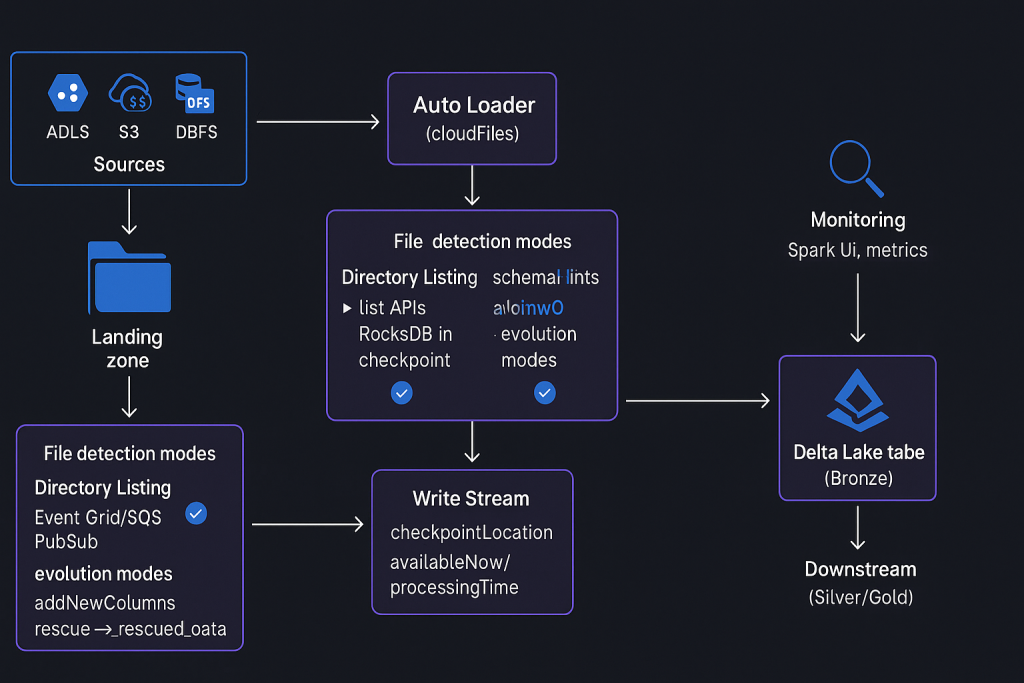
Auto Loader uses two file detection modes to track new files:
🔹 a) Directory Listing (Default)
- Uses cloud storage list API calls.
- Tracks processed files in the checkpoint (
RocksDB). - Works out-of-the-box.
- Best for low-to-medium ingestion volumes.
df = (spark.readStream
      .format("cloudFiles")
      .option("cloudFiles.format", "csv")
      .load("dbfs:/mnt/landing/year=*/month=*/day=*"))
🔹 b) File Notification
- Uses event services (Azure Event Grid + Queue, AWS S3 + SQS, GCP Pub/Sub).
- Requires elevated cloud permissions to create these services.
- Efficient for very large ingestion pipelines.
df = (spark.readStream
      .format("cloudFiles")
      .option("cloudFiles.format", "csv")
      .option("cloudFiles.useNotifications", "true")
      .load("s3://mybucket/landing"))
📌 Tip: Start with Directory Listing → move to File Notification at scale.
3️⃣ Using Auto Loader in Databricks
Example: Reading from Nested Folder Structure
Suppose files are stored as:
/landing/year=2024/month=08/day=30/file.csv
We can read them with wildcards:
df = (spark.readStream
      .format("cloudFiles")
      .option("cloudFiles.format", "csv")
      .option("pathGlobFilter", "*.csv")
      .option("header", "true")
      .option("cloudFiles.schemaLocation", "dbfs:/mnt/checkpoints/schema1")
      .load("dbfs:/mnt/landing/year=*/month=*/day=*"))
Key Options:
cloudFiles.format→ input format (csv,json,parquet).cloudFiles.schemaLocation→ path to store schema metadata.pathGlobFilter→ filter file extensions.header→ handle CSV headers.
4️⃣ Schema Location in Auto Loader
Auto Loader requires a schema location:
- Stores schema evolution metadata.
- Ensures consistency across multiple runs.
- Lives in the checkpoint directory.
.option("cloudFiles.schemaLocation", "dbfs:/mnt/checkpoints/autoloader/schema")
Inside this folder:
_schemas/→ schema historyrocksdb/→ file tracking for exactly-once
5️⃣ Schema Hints in Auto Loader
Instead of defining the entire schema, you can hint only specific columns.
df = (spark.readStream
      .format("cloudFiles")
      .option("cloudFiles.format", "csv")
      .option("cloudFiles.schemaHints", "Quantity INT, UnitPrice DOUBLE")
      .load("dbfs:/mnt/landing"))
This:
- Infers other columns automatically.
- Forces
Quantityas integer,UnitPriceas double.
✅ Useful when schema is evolving but certain columns should remain strongly typed.
6️⃣ Writing with Auto Loader
Write DataFrame into a Delta Table with checkpoints for exactly-once.
(df.withColumn("file_name", F.input_file_name())  # track source file
   .writeStream
   .option("checkpointLocation", "dbfs:/mnt/checkpoints/autoloader/run1")
   .outputMode("append")
   .trigger(availableNow=True)   # batch-like run
   .toTable("dev.bronze.sales_data"))
checkpointLocation→ prevents reprocessing of old files.trigger(availableNow=True)→ processes once in batch style.toTable()→ saves to a Delta table.
7️⃣ Schema Evolution in Auto Loader
When new columns appear in source files, Auto Loader handles it via schema evolution modes:
🔹 a) addNewColumns (Default)
- If new columns are detected:
- Stream fails once, updates schema in schemaLocation.
- Rerun → succeeds, new columns appear in the table.
.option("cloudFiles.schemaEvolutionMode", "addNewColumns")
🔹 b) rescue
- New columns → pushed into a special column
_rescued_data. - Stream does not fail.
- Useful when schema changes are frequent.
.option("cloudFiles.schemaEvolutionMode", "rescue")
Example Output:
| InvoiceNo | Quantity | _rescued_data |
|---|---|---|
| 12345 | 10 | {“State”: “CA”} |
🔹 c) none
- Ignores new columns completely.
- No schema updates, no
_rescued_data.
.option("cloudFiles.schemaEvolutionMode", "none")
🔹 d) failOnNewColumns
- If new columns appear → stream fails.
- Requires manual schema update.
.option("cloudFiles.schemaEvolutionMode", "failOnNewColumns")
8️⃣ Incremental Ingestion & Exactly Once
- Processed files are tracked in RocksDB inside checkpoint.
- Already-processed files are not re-ingested.
- New files only → incremental load.
✅ This ensures idempotent and exactly-once ingestion.
9️⃣ File Notification Mode (Advanced)
Enable with:
.option("cloudFiles.useNotifications", "true")
This:
- Creates event-based triggers in your cloud account.
- Requires permissions to provision Event Grid (Azure), SQS (AWS), Pub/Sub (GCP).
- Best for large-scale ingestion with low-latency.
🔟 Putting It All Together — Example Pipeline
df = (spark.readStream
      .format("cloudFiles")
      .option("cloudFiles.format", "csv")
      .option("cloudFiles.schemaLocation", "dbfs:/mnt/checkpoints/schema")
      .option("cloudFiles.schemaHints", "Quantity INT, UnitPrice DOUBLE")
      .option("cloudFiles.schemaEvolutionMode", "rescue")
      .load("dbfs:/mnt/landing/year=*/month=*/day=*"))

(df.writeStream
   .option("checkpointLocation", "dbfs:/mnt/checkpoints/autoloader/full_pipeline")
   .outputMode("append")
   .trigger(availableNow=True)
   .toTable("dev.bronze.sales_data"))
✅ Summary
- Auto Loader is the preferred way to ingest files into Databricks Lakehouse.
- File Detection Modes:
- Directory Listing (default).
- File Notification (event-driven, needs cloud perms).
- Schema Handling:
- Schema Location → track schema history.
- Schema Hints → enforce types for specific columns.
- Schema Evolution Modes → handle new columns gracefully:
- addNewColumns (default)
- rescue
- none
- failOnNewColumns
- Checkpoints ensure exactly-once ingestion.
- Use
availableNowtrigger for batch-like runs, or streaming triggers for continuous pipelines.
