Introduction
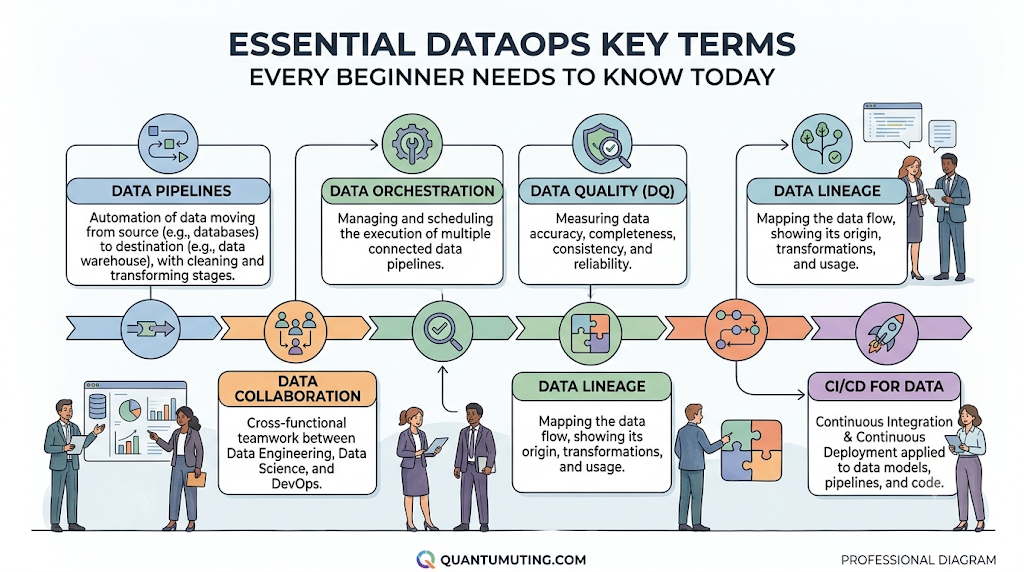
The modern world runs entirely on data. Every time you stream a movie, tap your credit card, or check a weather app, massive amounts of information move behind the scenes. For businesses to make smart decisions, this data must travel safely and quickly from its source to an analyst’s dashboard. This is where DataOps comes into play. For beginners entering the world of Data Engineering, cloud computing, or analytics, the sheer volume of jargon can feel overwhelming. You might hear engineers argue about ETL versus ELT, or complain about data drift and pipeline failures. Understanding this terminology is not just about memorizing words; it is about building the foundation required to design, manage, and fix modern data systems. This comprehensive guide breaks down the essential DataOps terms into simple, everyday language. By mastering these core concepts, you will gain a clear picture of how data flows across organizations and how modern teams keep those pipelines running smoothly. Visit DataOpsSchool.com to explore more foundational tutorials.
What Is DataOps?
Definition
DataOps, short for Data Operations, is a collaborative data management practice focused on improving the communication, integration, and automation of data flows between data managers and data consumers across an organization.
Core Principles
DataOps is built on a few simple ideas:
- Automation: Reduce human error by letting software handle repetitive tasks.
- Collaboration: Break down the walls between data engineers, data scientists, and business analysts.
- Quality Assurance: Constantly test data at every stage to ensure it is accurate and trustworthy.
- Continuous Improvement: Constantly monitor processes to make data delivery faster and more reliable.
Why DataOps Matters
Imagine a restaurant where the kitchen staff never talks to the waiters. The food might be excellent, but it will arrive cold, late, or at the wrong table. DataOps acts as the manager of that restaurant. It ensures that data is fresh, arrives on time, and goes exactly where it is needed without breaking along the way. Without DataOps, companies waste time fixing broken pipelines and making decisions based on bad or outdated information.
Relationship with DevOps and Data Engineering
To understand DataOps, it helps to look at its older sibling: DevOps. DevOps revolutionized software development by combining development (Dev) and operations (Ops) to ship apps faster using automation.
DataOps applies these exact same ideas—like continuous testing and automation—to the world of data. While Data Engineering focuses on building the roads and bridges (pipelines) for data, DataOps focuses on the traffic control, maintenance, and safety rules that keep the cars moving without crashing.
Essential DataOps Terms Every Beginner Should Know
1. Data Pipeline
- Definition: A series of automated steps that move data from one system to another.
- Why it matters: It eliminates the need to manually export and import files between systems.
- Practical example: Automatically pulling daily sales figures from a cash register app and sending them to an Excel dashboard.
- Commonly used: E-commerce stores syncing web traffic logs to analytical databases.
2. ETL (Extract, Transform, Load)
- Definition: A traditional data integration process where data is collected, cleaned/changed, and then saved into a final destination.
- Why it matters: It ensures data is perfectly formatted before it hits a storage system.
- Practical example: Taking a list of customer names, converting them all to uppercase, and saving them into a database.
- Commonly used: Legacy banking systems consolidating financial records overnight.
3. ELT (Extract, Load, Transform)
- Definition: A modern alternative to ETL where raw data is collected and saved immediately into a powerful cloud storage system, and transformed later.
- Why it matters: It takes advantage of modern, ultra-fast cloud computing power to process huge amounts of data quickly.
- Practical example: Dumping raw social media comments directly into a cloud server and sorting them by sentiment later.
- Commonly used: Fast-growing tech startups using modern cloud warehouses.
4. Data Lake
- Definition: A massive, central storage repository that holds vast amounts of raw data in its native, unstructured format until it is needed.
- Why it matters: It is cheap to store everything now and figure out what to do with it later.
- Practical example: A digital photo album filled with unorganized, raw images, videos, and scanned receipts.
- Commonly used: Storing raw sensor data from IoT devices.
5. Data Warehouse
- Definition: A highly structured digital storage system optimized for analyzing and querying cleaned, organized data.
- Why it matters: It allows business analysts to run complex reports quickly without slowing down live apps.
- Practical example: A neat, organized physical library where books are perfectly indexed by genre and author.
- Commonly used: Corporate finance teams running quarterly profitability reports.
6. Data Mart
- Definition: A small, specific subsection of a data warehouse focused entirely on a single department or business line.
- Why it matters: It keeps things simple for specific teams so they do not have to sift through the company’s entire database.
- Practical example: Giving the marketing team access to a single shelf of books containing only advertising metrics.
- Commonly used: HR departments tracking employee turnover rates.
7. Data Integration
- Definition: The process of combining data from several different sources into a single, unified view.
- Why it matters: It prevents different departments from looking at conflicting numbers.
- Practical example: Merging your website analytics data with your email marketing tool data to see the true cost of a customer click.
- Commonly used: Creating comprehensive customer profiles for support agents.
8. Data Transformation
- Definition: The act of changing the structure, format, or values of data to make it usable.
- Why it matters: Raw data is often messy, full of typos, or formatted incorrectly.
- Practical example: Changing phone numbers from “123-4567” to “(555) 123-4567” so they look uniform.
- Commonly used: Converting currency from Euros to Dollars during accounting audits.
9. Data Validation
- Definition: The practice of checking incoming data against a set of rules to ensure it is correct and sensible.
- Why it matters: It stops corrupt or broken information from entering your clean database.
- Practical example: Rejecting a user signup form if the user types a negative number into the “Age” box.
- Commonly used: Checking that every email address entered on a website contains an “@” symbol.
10. Data Quality
- Definition: The measure of how accurate, complete, consistent, and reliable a dataset is for its intended use.
- Why it matters: Making business decisions based on low-quality data leads to costly mistakes.
- Practical example: Ensuring a mailing list does not contain missing zip codes or duplicate home addresses.
- Commonly used: Customer Relationship Management (CRM) cleanup projects.
11. Data Governance
- Definition: A collection of rules, policies, and internal standards that dictate how an organization manages and protects its data.
- Why it matters: It keeps companies compliant with laws and ensures data is handled ethically.
- Practical example: Deciding that only senior managers are allowed to look at employee salary data.
- Commonly used: Maintaining legal compliance in corporate environments.
12. Metadata
- Definition: Information that describes other data, often simplified as “data about data.”
- Why it matters: It helps users find, organize, and understand what a dataset represents without opening the file.
- Practical example: A digital camera file showing the date, time, and GPS coordinates of a photo.
- Commonly used: Organizing vast digital catalogs and search indexes.
13. Data Lineage
- Definition: A visual map or trail that shows the exact journey data took from its absolute origin to its final destination.
- Why it matters: If a chart looks wrong, lineage helps you trace steps backward to find the exact point where the error happened.
- Practical example: A family tree showing exactly where a specific trait or piece of information came from.
- Commonly used: Debugging broken reports and answering compliance audits.
14. Data Catalog
- Definition: An organized inventory of all data assets within an organization, complete with search capabilities and descriptions.
- Why it matters: It prevents employees from wasting hours trying to find out if a specific spreadsheet already exists.
- Practical example: An online store catalog where you can search for products by tag, price, or category.
- Commonly used: Helping new data analysts find relevant tables during onboarding.
15. Data Observability
- Definition: The ability to understand the health and internal state of a data system by looking at its outputs, logs, and metrics.
- Why it matters: It goes beyond simple monitoring by helping you understand why a system failed, not just that it failed.
- Practical example: A car dashboard that tells you your tire pressure is dropping and explains it is due to an outdoor temperature drop.
- Commonly used: Modern DevOps-style management of enterprise data architectures.
16. Data Monitoring
- Definition: The passive, continuous tracking of a data system to alert teams when something breaks or stops working.
- Why it matters: It lets you know a problem exists before your users or customers complain.
- Practical example: A smoke detector that sounds an alarm the moment it senses smoke in the kitchen.
- Commonly used: Setting up automated email alerts when a server goes down.
17. Workflow Orchestration
- Definition: The automated coordination and scheduling of multiple independent data tasks to ensure they run in the correct order.
- Why it matters: Task B cannot start until Task A finishes successfully; orchestration manages this timing perfectly.
- Practical example: An assembly line conveyor belt that moves a car chassis forward only after the wheels are bolted on.
- Commonly used: Managing complex nightly pipelines that involve dozens of dependencies.
18. CI/CD for Data (Continuous Integration / Continuous Delivery)
- Definition: The practice of automatically testing, building, and deploying changes to data code (like SQL queries or schemas) through automated pipelines.
- Why it matters: It ensures updates to your data system do not accidentally break existing charts or dashboards.
- Practical example: Running a spellcheck and grammar check automatically before a blog post is published online.
- Commonly used: Engineering teams deploying updates to live database code safely.
19. Batch Processing
- Definition: Processing large volumes of collected data all at once at a specific, scheduled time.
- Why it matters: It is highly efficient for processing massive datasets where real-time speed is not required.
- Practical example: A company processing employee timesheets and paying everyone once every two weeks.
- Commonly used: Generating end-of-month financial statements.
20. Stream Processing
- Definition: The continuous, real-time ingestion and processing of data pieces individually as they happen.
- Why it matters: It allows businesses to react instantly to live events.
- Practical example: A GPS app recalculating your route the exact second you miss a highway exit.
- Commonly used: Fraud detection systems checking credit card transactions instantly.
21. Data Freshness
- Definition: A metric that describes how old or up-to-date a specific piece of data is.
- Why it matters: Old data can lead to outdated business strategies.
- Practical example: Looking at a news website and checking if the top headline was written five minutes ago or five days ago.
- Commonly used: Monitoring dashboard latency to ensure business leaders see live metrics.
22. Schema
- Definition: The blueprint or structural design that defines how a database is organized, including its tables, columns, and data types.
- Why it matters: It forces data to stay organized so users know exactly where to find specific fields.
- Practical example: A blank fill-in-the-blank form that dictates exactly where your first name, last name, and birthday must go.
- Commonly used: Designing a new relational database from scratch.
23. Data Drift
- Definition: The unexpected, gradual change in the properties or structure of incoming data over time.
- Why it matters: If the structure changes without notice, downstream applications or machine learning models can break.
- Practical example: A supplier suddenly changing their product codes from numbers to letters, causing your inventory system to glitch.
- Commonly used: Maintaining machine learning model accuracy over long periods.
24. Pipeline Failure
- Definition: An event where a data pipeline stops working completely due to bugs, server outages, or unexpected formatting changes.
- Why it matters: It stalls business operations because dashboards stop updating.
- Practical example: A water main break that stops water from reaching houses in a neighborhood.
- Commonly used: Incident response tracking for operational engineering teams.
25. Data Reliability
- Definition: The organizational trust score regarding whether data is complete, accurate, and ready to use when needed.
- Why it matters: High reliability means teams confidently build products without constantly double-checking numbers manually.
- Practical example: A wristwatch that consistently tells the absolute correct time day after day.
- Commonly used: Defining Service Level Agreements (SLAs) for enterprise data delivery.
26. Data Versioning
- Definition: The practice of saving historical snapshots of datasets or database code so you can return to an older version if needed.
- Why it matters: It allows teams to safely undo mistakes without permanently losing historical work.
- Practical example: Using the “Undo” button or checking the revision history in a shared Google Doc.
- Commonly used: Managing training datasets for artificial intelligence applications.
27. Automation
- Definition: Using software tools to perform data tasks automatically without requiring human intervention.
- Why it matters: It saves thousands of hours of manual labor and removes human typing errors.
- Practical example: Setting an alarm clock to ring every morning instead of hiring someone to wake you up.
- Commonly used: Running automated cleanup scripts every night at midnight.
28. API (Application Programming Interface)
- Definition: A digital bridge or translator that allows two completely different software applications to talk to each other and share data.
- Why it matters: It makes it easy to securely pull data from external web services.
- Practical example: A restaurant waiter taking your order to the kitchen and bringing your food back to the table.
- Commonly used: Pulling local weather data into a custom smartphone app.
29. SQL (Structured Query Language)
- Definition: The universal programming language used to communicate with, manage, and extract data from traditional relational databases.
- Why it matters: It is the most fundamental skill needed to work with structured data tables.
- Practical example: Asking a library filing system to show you a list of every book checked out in the last 24 hours.
- Commonly used: Writing analytical queries to calculate monthly business revenue.
30. NoSQL
- Definition: A category of database systems built to store flexible, unstructured, or rapidly changing data that doesn’t fit neatly into traditional rows and columns.
- Why it matters: It scales easily across massive clouds and handles messier web data effortlessly.
- Practical example: A giant folder where you throw miscellaneous notes, chat transcripts, and audio recordings without sorting them into spreadsheets.
- Commonly used: Storing user profile configurations for modern mobile applications.
31. Machine Learning Pipeline
- Definition: A specialized, automated sequence of steps designed to feed raw data into an artificial intelligence model to train it or get predictions.
- Why it matters: It makes the process of maintaining AI systems repeatable and scalable.
- Practical example: An automated factory line that sorts raw fruit, grades its quality, and packages it using intelligent cameras.
- Commonly used: Updating product recommendations on streaming platforms daily.
32. Data Security
- Definition: The protective practices, tools, and strategies used to shield digital data from unauthorized access, theft, or corruption.
- Why it matters: It prevents devastating corporate data breaches and protects customer privacy.
- Practical example: Locking your valuable personal documents inside a fireproof, heavy-duty home safe with a strong combination code.
- Commonly used: Encrypting sensitive data files before sending them over the internet.
33. Compliance
- Definition: The act of adhering to official legal and industry regulations regarding data handling, such as GDPR or HIPAA.
- Why it matters: Non-compliance can result in massive corporate fines and permanent loss of public trust.
- Practical example: Wearing a seatbelt and obeying speed limits to avoid getting a traffic ticket from the police.
- Commonly used: Ensuring user data deletion requests are completely honored within 30 days.
34. Data Mesh
- Definition: A modern architectural approach where individual business departments manage and own their own data products, rather than relying on a single centralized data team.
- Why it matters: It removes operational bottlenecks by empowering individual teams to work independently.
- Practical example: A food court where each independent stall cooks and manages its own unique menu, rather than one massive central kitchen cooking everything.
- Commonly used: Decentralizing data management strategies within large global enterprises.
35. Data Fabric
- Definition: An integrated layer of data and connecting processes that uses metadata to automatically find, connect, and analyze data spread across multiple locations.
- Why it matters: It acts as a smart layer that ties all scattered storage locations together so they feel like one cohesive system.
- Practical example: A smart universal remote control that controls your TV, sound system, and streaming stick seamlessly from one screen.
- Commonly used: Linking physical on-premise servers with multiple cloud providers.
36. DataOps Lifecycle
- Definition: The continuous, cyclical journey that data management projects follow, consisting of planning, development, testing, deployment, monitoring, and refinement.
- Why it matters: It ensures data systems are constantly evolving and improving rather than remaining static and decaying.
- Practical example: The continuous cycle of a gardener planting seeds, watering crops, weeding the soil, harvesting produce, and preparing the ground for the next season.
- Commonly used: Planning development roadmaps for data engineering departments.
Why Learning These Terms Is Important
Mastering this foundational vocabulary changes the way you interact with technology teams. Here is why investing time into learning these terms pays off:
- Better Communication: You will no longer feel lost during technical sprint planning or engineering meetings. You can confidently explain operational problems using accurate industry language.
- Faster Learning: Every advanced concept in data engineering builds on these fundamentals. Knowing what a schema or pipeline is makes learning complex tools like Apache Airflow or dbt vastly easier.
- Easier Troubleshooting: When a report stops working, understanding the difference between a pipeline failure, data drift, and data validation errors helps you isolate and resolve the issue much faster.
- Better Collaboration: DataOps aims to break down company silos. Speaking a shared language bridges the gap between software engineers, database administrators, and business stakeholders.
- Career Growth: Employers look for professionals who understand the big picture. Demonstrating a strong grasp of data reliability, observability, and testing principles makes you stand out in interviews.
- Improved Technical Understanding: Instead of viewing data systems as magic black boxes, you will see them as engineered assembly lines with clear inputs, processes, and outputs.
How These Terms Connect in a Typical DataOps Workflow
To truly understand these concepts, let us look at how they connect step-by-step during a standard data lifecycle.
[Collection] ➔ [Ingestion (ETL/ELT)] ➔ [Storage (Lake/Warehouse)] ➔ [Orchestration/Monitoring] ➔ [Analytics/Reporting]
- Data Collection & Ingestion: The journey begins when an API tracks customer actions on a website. This raw info represents the input layer. Automation tools step in to execute either an ETL or ELT process to move this information along.
- Processing & Transformation: As data travels through the automated Data Pipeline, it undergoes Data Transformation to convert messy formats into clean tables. Next, Data Validation checks take place to ensure no corrupt lines enter the system.
- Storage & Cataloging: The cleaned data lands in a structured Data Warehouse, while the unorganized raw logs are kept safely inside a massive Data Lake. A Data Catalog updates its index, utilizing Metadata to log exactly what new data is available and maps its journey using Data Lineage.
- Orchestration & Monitoring: Throughout this process, Workflow Orchestration tools make sure tasks run in perfect chronological sequence. Meanwhile, Data Observability and Data Monitoring frameworks watch for signs of Data Drift or sudden Pipeline Failures.
- Analytics & Value Delivery: Finally, with Data Quality verified and Data Security rules enforced by corporate Data Governance, business analysts access their targeted Data Mart to build clean, dependable executive dashboards and business reports.
Commonly Confused DataOps Terms
| Term 1 | Term 2 | Key Difference | Example |
| ETL | ELT | ETL cleans data before saving it; ELT saves raw data first and cleans it afterward. | ETL is great for secure, traditional bank data; ELT is perfect for high-speed cloud apps. |
| Data Lake | Data Warehouse | A lake holds raw, unorganized files; a warehouse stores cleaned, perfectly structured tables. | A lake holds raw security camera footage; a warehouse holds clean daily sales totals. |
| Batch Processing | Stream Processing | Batch processes data in large chunks later; Stream processes data instantly as it arrives. | Batch processes company payroll every two weeks; Stream processes live credit card fraud alerts. |
| Metadata | Data Lineage | Metadata describes what the data is; Lineage shows where the data came from and where it went. | Metadata shows a file size and author; Lineage shows which database table created that file. |
| Monitoring | Observability | Monitoring alerts you that something broke; Observability helps you figure out why it broke. | Monitoring rings a fire alarm; Observability checks the temperature sensors to find the fire’s origin. |
Essential DataOps Terms at a Glance
| Term | Definition | Importance | Common Use Case |
| Data Pipeline | An automated path that moves data between systems. | Eliminates slow manual data transfers. | Syncing online store sales to a central database. |
| Data Quality | The measure of accuracy and completeness of data. | Prevents bad data from causing poor decisions. | Cleaning phone number columns before a sales campaign. |
| Data Governance | Internal rules for data safety and access management. | Ensures legal compliance and privacy protection. | Restricting medical records to authorized doctors only. |
| Data Automation | Using software to handle repetitive data tasks. | Saves hours of human effort and avoids typos. | Scheduling daily automated report updates at midnight. |
| Schema | The formal structural blueprint of a database. | Keeps information organized and easily searchable. | Setting clear text and date formats for a signup form. |
| Data Drift | Gradual, unexpected changes in incoming data. | Alerts engineers before structural updates break apps. | A vendor updating their API to use new location codes. |
Common Mistakes Beginners Make
- Confusing ETL and ELT: Many beginners use these terms interchangeably. Remember the order of letters matters. It dictates whether computing power is spent outside or inside your storage system.
- Mixing Up Data Lakes and Data Warehouses: Storing clean reporting data directly in a raw data lake creates an unorganized mess. Conversely, dumping unstructured video files into a warehouse wastes expensive database resources.
- Ignoring Metadata: Beginners often focus entirely on the core data records while ignoring the metadata tags. Without metadata, finding relevant files in large systems later becomes almost impossible.
- Misunderstanding Data Quality: Assuming that because a pipeline finishes running successfully, the data inside it must be accurate. A pipeline can perfectly deliver broken, missing, or zeroed-out numbers if you lack validation rules.
- Skipping Monitoring: Building a pipeline and assuming it will run forever without maintenance. Systems change, servers crash, and external APIs update without warning.
- Misusing DataOps Terminology: Using advanced buzzwords like “Data Mesh” or “Data Fabric” without understanding the underlying architectural principles they represent.
Best Practices for Learning and Remembering These Terms
- Build Real Analogies: Relate abstract data concepts to everyday physical systems. Think of pipelines like water plumbing networks, data warehouses like libraries, and orchestration like a factory assembly conveyor belt.
- Start a Personal Tech Glossary: Keep a running digital notepad where you write down new terms in your own words. Adding a sentence about how you encountered the term makes it stick.
- Explore Visual Tools: Look at graphical user interfaces of open-source workflow orchestration or data lineage tools. Seeing visual boxes and lines connect makes pipeline concepts much easier to digest than looking at code.
- Practice Explaining to Non-Techies: Try explaining the difference between a data lake and a data warehouse to a family member or friend who doesn’t work in tech. If you can make them understand it, you truly understand it yourself.
Real-World Examples
Banking
A major retail bank tracks thousands of debit card transactions every second. They use Stream Processing to instantly feed transaction logs into a fraud detection engine. If the system notices a sudden spike in spending matching a profile of Data Drift, the engine immediately flags the account for Data Governance review.
Healthcare
A hospital system pulls electronic health records from various regional clinics. They use automated Data Integration pipelines to compile patient charts. Strict Data Validation rules ensure that allergy fields are never left blank, satisfying healthcare regulatory Compliance frameworks.
Retail & E-commerce
An international clothing retailer relies on a centralized Data Warehouse to handle supply chain logistics. Every night, a Batch Processing job updates inventory metrics across stores globally. Managers use a Data Catalog to search for relevant inventory tables to plan their seasonal promotions safely.
Future Trends in DataOps
- AI-Powered DataOps: Artificial intelligence tools are increasingly integrated directly into monitoring stacks to automatically detect operational anomalies, predict pipeline failures, and fix broken schemas without human intervention.
- Intelligent Automation: The shift from simple scheduled batch tasks toward event-driven pipelines that automatically scale up cloud computing resources only when new data lands.
- Real-Time Observability: As business speeds increase, modern systems move away from simple passive monitoring toward deeply integrated observability frameworks that provide instant health diagnostics.
- Data Mesh Adoption: More enterprises are adopting decentralized organizational structures, allowing independent product teams to control their own localized data infrastructure safely.
FAQs
Q: What is the main difference between DevOps and DataOps?
A: DevOps focuses on automating software development and application code updates. DataOps applies similar automation principles specifically to managing, testing, and delivering reliable data streams.
Q: Can a complete beginner learn DataOps?
A: Yes. Starting with basic terms, understanding how data moves through pipelines, and learning foundational languages like SQL provides an ideal path for any beginner.
Q: Is a Data Lake better than a Data Warehouse?
A: Neither is better; they serve different purposes. A Data Lake is built to store raw, unstructured data cheaply. A Data Warehouse is optimized for fast business reporting on clean, structured tables.
Q: What does an orchestration tool actually do?
A: An orchestration tool acts as a manager that schedules and triggers data tasks in a specific sequence, ensuring step two only starts after step one finishes successfully.
Q: Why does data drift happen?
A: Data drift occurs when external factors change how data is created, such as a mobile app update that modifies how user location data or timestamps are recorded.
Q: What happens if a data pipeline fails?
A: When a pipeline fails, data stops flowing to its destination. This causes connected dashboards to show stale or missing information until engineers fix the underlying problem.
Q: Why is SQL so important in DataOps?
A: SQL is the universal language used to talk to and manipulate data within relational databases. It forms the backbone of most data transformation and analysis jobs.
Q: What is an example of metadata?
A: For a digital document, metadata includes items like the file author, date created, file size, and the file type extension (.csv, .xlsx, or .pdf).
Q: Who works with DataOps tools daily?
A: Data Engineers, DataOps Engineers, Analytics Engineers, and Cloud Infrastructure Architects regularly build and maintain these systems.
Q: How does data governance protect privacy?
A: Data governance sets strict access controls, masking sensitive customer details like credit card numbers so only authorized personnel can view them.
Conclusion
Learning the foundational vocabulary of DataOps is the definitive first step toward mastering the worlds of modern data engineering, cloud analytics, and pipeline automation. By understanding how raw information transforms into clear, reliable enterprise insights, you build the core technical mindset needed to navigate complex production environments. As you continue your learning journey, focus on how these individual pieces connect to form complete, automated systems. Once you feel comfortable with these fundamental concepts, you will be well-prepared to dive deeper into advanced architectures, cloud tools, and live engineering frameworks. Building a strong conceptual foundation now guarantees smoother learning down the road. Keep exploring tutorials on DataOpsSchool.com to grow your practical data skills.
