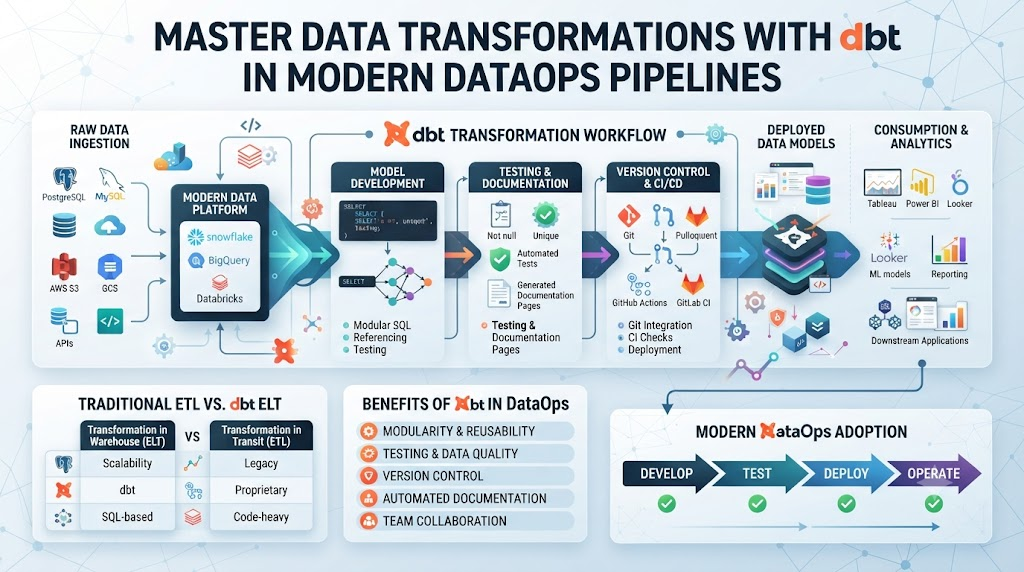
Every data team knows the pain of messy SQL scripts scattered across random folders. When a pipeline breaks at midnight, you waste hours tracking down which view depends on which table. That chaos stops the moment you adopt a modular approach to data building.
You can solve this exact problem by adopting standard software engineering practices for your analytics engineering workflows. To learn more about building robust team processes, you can explore expert resources at DataOpsSchool.com. When you treat your data models like production code, you eliminate guesswork and build pipelines you can trust.
Why Modern Data Pipelines Need Modular Transformations
Traditional data workflows often rely on monolithic SQL scripts that run inside legacy databases. These massive scripts try to do too much at once. They ingest data, clean it, aggregate it, and format it for dashboards all in one giant step. When something fails, finding the root cause feels like searching for a needle in a haystack.
Modular transformations change how you build data products. Instead of one giant script, you break your logic down into small, manageable SQL select statements. Each file builds one specific table or view. Your database handles the heavy lifting of figuring out the order of operations. You gain total clarity into every single step of your data journey.
Understanding the Core Philosophy of dbt
At its heart, dbt focuses exclusively on the transform step in extract, load, and transform pipelines. You do not need to write boilerplate code to manage database connections or table creation. You just write the select statement that defines your business logic, and the tool compiles it into proper SQL for your warehouse.
This separation of concerns lets your team work faster. Analytics engineers can focus entirely on data definitions and business rules. Meanwhile, your data platform engineers manage the underlying infrastructure and performance tuning. Everyone stays in their lane, and the entire pipeline runs smoothly without stepping on anyone’s toes.
Version Control and Collaboration for SQL
SQL code has historically lagged behind software engineering when it comes to collaboration. Different team members often overwrite each other’s queries or deploy untested changes directly to production. This leads to broken dashboards and angry stakeholders asking why their metrics look wrong.
Using git-based workflows with your transformation layer fixes this issue completely. Every change goes through pull requests, code reviews, and automated testing before touching production data. You can trace every single line of business logic back to a specific commit and author. Collaboration becomes safe, structured, and transparent across your entire organization.
Built-in Testing for Data Quality
Data quality issues usually hide quietly until a business leader points out a glaring error in a morning meeting. By then, bad data has already contaminated downstream reports and automated models. Catching these problems requires proactive validation at every single stage of your pipeline.
Modern transformation tools let you define tests directly alongside your models. You can test for uniqueness, null values, accepted ranges, and referential integrity with simple configurations. These tests run automatically every time your models update. If a test fails, you catch the bad data before anyone else sees it.
Automated Documentation That Stays Fresh
Documentation is the chore that every data engineer avoids. Manual wikis become outdated within weeks as table structures change and column names shift. Outdated documentation leads to confusion, duplicate work, and mistrust in data assets.
Your transformation workflow generates living documentation automatically from your codebase. It parses your SQL files, extracts your column descriptions, and builds a searchable lineage graph. When you update a model description in your code, the documentation updates instantly. Your stakeholders always see the most accurate definitions for every metric.
10 Real-World Stories About Data Pipelines and Server Crashes
- The Midnight Outage: A massive daily script failed because a source table changed its schema, waking up the on-call engineer at 3 AM to manually rewrite raw queries.
- The Missing Column: A marketing dashboard showed zero revenue because a single upstream table dropped a key field without any warning or validation check.
- The Infinite Loop: Two dependent views accidentally referenced each other in a circular loop, causing the data warehouse to freeze during peak business hours.
- The Duplicate Metrics: Two different teams wrote separate SQL queries for active users, resulting in conflicting numbers presented to the executive board.
- The Storage Bill Shock: A poorly optimized query created millions of temporary tables overnight, blowing past the monthly cloud budget in a single run.
- The Ghost Deletion: A developer ran an un-versioned drop statement on a staging database, wiping out three weeks of experimental data models instantly.
- The Timezone Trap: A global sales report miscalculated daily totals because different tables stored timestamps in UTC, local time, and custom formats.
- The Slow Refresh: A monolithic transformation script grew so large that it took six hours to run, delaying morning reports until well past noon.
- The Permission Lockdown: An accidental permission change locked the analytics team out of core production tables right before a crucial investor presentation.
- The Stale Cache: An old dashboard kept serving cached data from two days ago because the underlying incremental refresh logic failed silently.
Comparing Monolithic SQL vs. Modular Transformations
| Feature | Monolithic SQL Scripts | Modular Transformations with dbt |
| Code Structure | One massive, complex SQL file | Small, focused, single-purpose select statements |
| Testing | Manual spot-checks and ad-hoc queries | Automated schema and data quality tests |
| Collaboration | High risk of conflicts and accidental overwrites | Git-based branching, pull requests, and code reviews |
| Documentation | Outdated spreadsheets and manual wikis | Auto-generated lineage graphs and living docs |
| Debugging | Extremely difficult to isolate root causes | Clear step-by-step lineage tracking for every error |
10 Common Mistakes and Pitfalls in Data Transformation
- Mistake: Writing business logic inside raw ingestion tools.Solution: Keep ingestion lightweight and handle all cleaning and formatting inside your dedicated transformation layer.
- Mistake: Skipping automated data tests to save time.Solution: Always add basic uniqueness and non-null tests to every primary key in your core tables.
- Mistake: Building overly complex macro spaghetti code.Solution: Keep your SQL as simple and readable as possible before turning to advanced macros or templating.
- Mistake: Hardcoding database and schema names in every model.Solution: Use built-in resolution functions to reference other models dynamically across environments.
- Mistake: Ignoring incremental load optimization on massive datasets.Solution: Implement incremental build strategies for high-volume event tables to save compute costs and time.
- Mistake: Failing to review the auto-generated lineage graph before merging code.Solution: Check the visual dependency tree in your pull requests to spot unexpected circular references early.
- Mistake: Treating staging models as final reporting tables.Solution: Build a clear architectural flow moving from raw staging models to intermediate cleaning and final mart tables.
- Mistake: Neglecting descriptive comments on critical business metrics.Solution: Document every column definition directly in your schema YAML files so your entire team stays aligned.
- Mistake: Running full refreshes on massive tables during peak business hours.Solution: Schedule heavy data builds during off-peak windows to protect warehouse concurrency and user performance.
- Mistake: Mixing raw data cleaning with final business aggregation in the same file.Solution: Separate your cleaning logic into intermediate models before performing final joins and aggregations.
Step-by-Step Implementation Roadmap
- Audit Your Current Pipelines: Review your existing SQL scripts and identify pain points, broken views, and undocumented tables in your data warehouse.
- Set Up Your Version Control Repository: Create a dedicated git repository for your transformation project with protected main branches and code review rules.
- Connect Your Data Warehouse: Configure your project connection profile to securely link your transformation workspace to your cloud data warehouse.
- Build Your Staging Layer: Write simple staging models that pull directly from your raw source tables, renaming columns and casting data types correctly.
- Create Intermediate Cleaning Models: Group related staging models together, apply business logic, and handle complex joins in clear intermediate files.
- Design Your Final Data Marts: Construct aggregated, business-ready tables and views tailored specifically for your reporting tools and stakeholders.
- Add Automated Data Tests: Write schema tests for primary keys, foreign keys, and expected value ranges to protect your pipeline from bad data.
- Generate and Share Documentation: Build and publish your project documentation so every team member can explore table relationships and column definitions.
- Schedule Automated Runs: Set up your orchestration tool to run your transformations on a regular schedule with proper alert notifications for failures.
- Review and Refine Performance: Monitor your warehouse query history, optimize slow-running models, and adjust incremental strategies to keep costs low.
Frequently Asked Questions
1. What is the main purpose of dbt in a data pipeline?
dbt focuses entirely on the transformation step of your data workflow. It lets you write modular select statements that turn raw warehouse data into clean, tested analytics assets.
2. Do I need to know software engineering to use dbt?
Basic familiarity with git version control and command-line tools helps a lot. However, if you know standard SQL, you can start writing and organizing models right away.
3. How does dbt handle data quality testing?
You define tests like unique, not_null, and accepted_values inside your project YAML files. The tool runs these tests automatically and flags any failing records.
4. Can dbt ingest data from external sources?
No, dbt does not handle data ingestion. Tools like Airbyte or Fivetran load raw data into your warehouse, and dbt transforms that raw data into usable models.
5. What is data lineage in the context of transformations?
Data lineage is a visual map showing how data flows from raw sources through various intermediate models down to your final reporting tables and dashboards.
6. How do incremental models save warehouse compute costs?
Instead of rebuilding an entire table every time, incremental models only process and append new records that arrived since the last successful run.
7. Where are transformation queries actually executed?
All queries compile and execute directly inside your cloud data warehouse, such as Snowflake, BigQuery, or Databricks, ensuring maximum performance and security.
8. How does auto-generated documentation work?
The tool reads your SQL files and YAML configurations to build an interactive website that displays table structures, column descriptions, and dependency graphs.
9. Can multiple developers work on the same project simultaneously?
Yes, git-based branching allows every team member to write, test, and review code in isolated development environments before merging into production.
10. How do I transition my team from legacy SQL scripts?
Begin by moving one simple reporting pipeline into a modular project. Show your team how easy testing and lineage tracking are, then gradually migrate larger workflows.
Final Recommendation and Next Steps
Start small by migrating just one core reporting pipeline to a modular transformation workflow. Do not try to rewrite your entire data warehouse in a single weekend. Pick a high-visibility dashboard that frequently suffers from bad data or slow refresh times.
Once your pilot project proves its value through cleaner code and automated tests, expand your scope to other teams. Train your analysts on basic version control and modular query design. You will quickly see higher trust in your data, faster delivery cycles, and much happier stakeholders across your entire organization.
