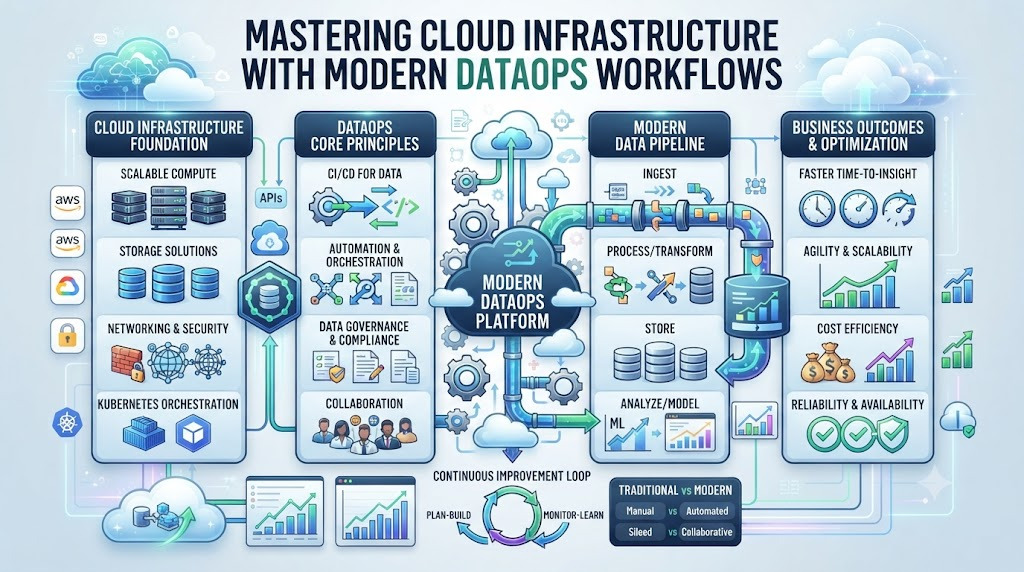
Imagine logging into your cloud console on a Monday morning. Your dashboard shows a blank screen because your core data pipeline crashed overnight. Your downstream business reports are completely empty. You spend the next four hours hunting through scattered logs across three different cloud services. This stressful situation happens when your data tools and cloud platforms do not talk to each other properly.
Modern data teams manage massive workloads spread across complex cloud environments. If your orchestration, testing, and deployment tools live in silos, errors slip through unnoticed. You need a unified strategy to connect your DataOps stack directly to your cloud infrastructure.
To master this modern shift, many teams turn to expert resources like DataOpsSchool.com for guidance. These platforms give you the practical blueprints you need to unify your data pipelines and cloud services. By building tight integrations, you turn chaotic cloud environments into smooth, automated systems. Let us explore how you can connect your data tools to the cloud today.
What Is Cloud DataOps Integration?
Cloud dataops integration means connecting your data tools directly to your cloud infrastructure. It brings code testing, automated deployment, and monitoring into one single workflow.
Instead of moving data by hand, you write code that runs in the cloud. Your orchestration tool triggers your cloud warehouse to build tables automatically.
Think of it like an assembly line in a car factory. Every machine works together seamlessly to build the final product without human pauses.
Why Siloed Cloud Platforms Break Data Pipelines
Many teams build their data stack using disconnected tools spread across different servers. Your storage lives in one cloud, your compute runs in another, and your tests happen locally.
When one piece updates its software version, the entire pipeline breaks instantly. You get confusing error messages that do not point to the real problem.
Fixing these breaks requires manual detective work across multiple vendor dashboards. This wasted time slows down product shipping and frustrates your engineering team.
The Core Pillars of Modern DataOps Tooling
Successful cloud integration rests on three main technical pillars. First, you need reliable version control to track every change you make to your code.
Second, you need automated testing tools that check data quality before it hits production. Third, you need continuous delivery pipelines that push updates to the cloud safely.
When these three pillars work together, your data quality improves dramatically. You catch broken schemas and missing rows before your business users ever see them.
Connecting Storage Layers to Compute Engines
Your cloud storage layer holds raw files, logs, and historical business records. Your compute engine processes this raw data into clean, usable analytical tables.
Connecting these two layers requires fast network paths and smart resource management. You want your compute jobs to spin up only when new data arrives.
This setup keeps your cloud bills low while delivering fast query results. You stop paying for idle servers that sit around doing nothing all night.
Managing Secrets and Security Credentials Safely
Security is the biggest risk when connecting third-party data tools to cloud providers. Hardcoding database passwords inside your pipeline configuration files is a dangerous mistake.
Instead, you must use centralized secret managers provided by your cloud vendor. Your data tools fetch temporary tokens securely right before a job runs.
This practice keeps your corporate credentials safe from malicious actors and accidental leaks. You sleep better knowing your company data remains locked down tight.
Automating CI/CD Workflows for Cloud Deployments
Continuous integration and continuous deployment mean pushing code changes to production safely. You write your data transformation logic and test it on your local machine.
When you push your code to git, automated checks run in the cloud. These checks build temporary databases to test your new SQL code before merging.
If a test fails, the deployment stops immediately and alerts the author. Only clean, verified code makes it into your production cloud environment.
Monitoring Resource Costs and Cloud Spend
Cloud computing bills can spiral out of control if you do not watch them. A poorly written query can scan terabytes of data and cost hundreds of dollars instantly.
Integrating cost monitoring tools into your DataOps workflow keeps spending transparent. You can set budget alerts that trigger when a specific pipeline uses too many resources.
This visibility helps engineering teams optimize slow queries before bills arrive. You deliver high-performance data pipelines without breaking your monthly operating budget.
Handling Schema Drift Across Distributed Environments
Schema drift happens when upstream source systems change their column names or data types unexpectedly. A sudden change breaks downstream reports and ruins your clean analytical models.
Smart DataOps tools watch for these schema changes in real time. They pause the pipeline safely and send a warning message to your Slack channel.
You review the change and update your mapping code before bad data spreads. This proactive defense saves your analytics team from endless data cleanup tasks.
Scaling Orchestration Engines for Enterprise Loads
As your company grows, your data volume multiplies across multiple cloud regions. Running every pipeline on a single server will quickly crash your system.
You need distributed orchestration engines that scale up dynamically in the cloud. These engines split large data jobs across many worker nodes simultaneously.
This parallel processing cuts your overnight batch run times down from hours to minutes. Your business users get fresh data early every single morning.
Ensuring Data Governance and Compliance in the Cloud
Regulatory laws require strict control over how you store and process customer data. You must know where every piece of personal information lives in your cloud storage.
Integrating governance tools helps you tag sensitive columns and track data lineage automatically. You can trace any analytical table back to its original raw source file.
This complete visibility makes passing security audits smooth and stress-free. You protect customer privacy while keeping your engineering workflows fast and flexible.
Comparative Analysis: Isolated Tools Versus Integrated Cloud DataOps
| Feature | Isolated Data Tools | Integrated Cloud DataOps |
| Deployment Speed | Manual file uploads taking hours | Automated CI/CD pipelines running in minutes |
| Error Detection | Discovered by business users downstream | Caught by automated tests before production |
| Security Handling | Hardcoded passwords in config files | Centralized secret managers with temporary tokens |
| Cost Visibility | Surprise bills at the end of the month | Real-time budget alerts and query optimization |
| Maintenance Effort | High manual upkeep across broken silos | Self-healing pipelines with automated logging |
Real-World Stories and Case Studies
- Scenario one: A retail brand lost forty thousand dollars when a cloud permission update broke their daily sales sync. Their isolated tools failed to log the auth error. Moving to an integrated DataOps pipeline caught the permission drop instantly.
- Scenario two: A streaming startup suffered daily pipeline crashes because compute clusters ran out of memory. Engineers spent weeks guessing memory limits without success. Automated cloud monitoring pinned the exact bad query in two minutes.
- Scenario three: A fintech firm burned out engineers with manual code deployments every Friday evening. Adopting a cloud CI/CD workflow reduced deployment times from three hours down to five minutes.
- Scenario four: A healthcare provider faced strict compliance audits on data lineage tracking. Integrated governance tools mapped every patient record from raw storage to final dashboard automatically.
- Scenario five: A logistics firm processed millions of GPS pings from delivery trucks worldwide. Network latency spikes triggered false panic alarms across twenty separate cloud widgets every morning. Integrated baseline learning stopped the morning noise completely.
- Scenario six: A travel booking app experienced a silent pricing data corruption bug over a weekend. Traditional checks showed green lights because the server returned valid status codes. Cloud anomaly detection caught the pricing variance within ten minutes.
- Scenario seven: A media publisher struggled with runaway cloud compute bills from rogue ETL jobs. A cost anomaly detector flagged the runaway spark cluster before billing got out of hand.
- Scenario eight: A SaaS provider had junior engineers afraid to touch production cloud pipelines alone. Automated runbook suggestions provided by the integration platform guided them safely through incident recovery steps.
- Scenario nine: An educational platform migrated massive student databases to a new cloud warehouse. Hidden schema mismatches caused silent reporting errors across historical analytics. Automated schema drift detection highlighted the exact field mismatches immediately.
- Scenario ten: A global energy company needed real-time pipeline visibility across remote field sensors. Implementing edge cloud integration kept critical data flowing even during intermittent satellite connection drops.
Common Mistakes and Pitfalls in Cloud Integration
- Mistake one: Hardcoding database passwords inside your pipeline configuration files. Fix this by using centralized cloud secret managers to handle credentials securely.
- Mistake two: Skipping automated tests before pushing code changes to your production cloud warehouse. Fix this by setting up a staging environment that runs tests on every git push.
- Mistake three: Ignoring cloud compute costs until you receive a massive monthly bill. Fix this by setting up real-time budget alerts and tracking query expenses closely.
- Mistake four: Building overly complex orchestration workflows that no junior engineer can understand. Fix this by keeping your pipeline code modular, clean, and well-documented.
- Mistake five: Failing to plan for schema changes from upstream third-party data providers. Fix this by adding automated schema drift detection to your ingestion pipeline.
- Mistake six: Leaving debug logging enabled permanently in production cloud environments. Fix this by setting log levels to warning or error to save storage space.
- Mistake seven: Treating cloud security as an afterthought rather than a core design requirement. Fix this by enforcing role-based access control from day one of your project.
- Mistake eight: Relying on a single cloud region without planning for disaster recovery. Fix this by replicating critical data storage across multiple geographic zones.
- Mistake nine: Forgetting to clean up temporary staging tables after your ETL jobs finish running. Fix this by adding automated cleanup tasks to the end of your pipeline.
- Mistake ten: Failing to train your team on new cloud integration tools and monitoring platforms. Fix this by running hands-on workshops and writing clear internal guides.
Step-by-Step Implementation Roadmap
- Audit your current cloud infrastructure to map every data source and destination tool.
- Set up a secure version control repository to store all your data pipeline code.
- Configure centralized secret management to handle your database credentials safely.
- Choose your cloud orchestration engine and connect it to your data warehouse.
- Build a staging environment that mirrors your production cloud setup.
- Write automated data quality tests to check row counts and missing values.
- Set up a CI/CD pipeline to deploy code changes automatically upon git merge.
- Configure real-time cost alerts to monitor your daily cloud compute spending.
- Run a controlled chaos test by breaking a staging pipeline to verify alert routing.
- Roll out the integrated pipeline to production and schedule monthly performance reviews.
Frequently Asked Questions
1. What is the main benefit of integrating DataOps tools with cloud platforms?
The main benefit is automating your code deployments and catching data errors before they reach production.
2. How do I keep my database credentials secure in the cloud?
You use centralized cloud secret managers instead of hardcoding passwords inside your configuration files.
3. Do I need a separate staging environment for my data pipelines?
Yes, a staging environment lets you test code changes safely without breaking your live production reports.
4. How long does it take to set up an automated CI/CD pipeline?
Most teams can build a basic automated deployment workflow in about one to two weeks.
5. Will cloud integration completely eliminate all my data pipeline errors?
No, but it helps you catch and fix errors much faster before downstream users notice them.
6. How do I stop my cloud computing bills from getting too high?
You set up real-time budget alerts and optimize slow queries that scan too much data.
7. What should I do when an upstream data source changes its schema?
You use automated schema drift detection tools to pause the pipeline and alert your team instantly.
8. Is cloud integration suitable for small startup teams with limited budgets?
Yes, lightweight cloud tools help startups automate deployments without requiring massive infrastructure costs.
9. How do I prove the return on investment of cloud DataOps to leaders?
Track metrics like faster deployment times, lower cloud waste, and fewer production data bugs.
10. Can I connect multiple cloud storage providers to a single orchestration tool?
Yes, modern orchestration engines support multi-cloud setups and connect to various storage layers easily.
Final Recommendation and Next Steps
Start your cloud integration journey today by auditing your current tool stack. Pick one messy data pipeline that causes the most deployment stress for your team. Connect your version control repository to a staging cloud environment to test automated updates. Measure how much time you save during your first automated code deployment. Share those quick wins with your engineering leaders to build momentum for a full cloud rollout.
