1. Introduction & Overview
What is a Lakehouse?
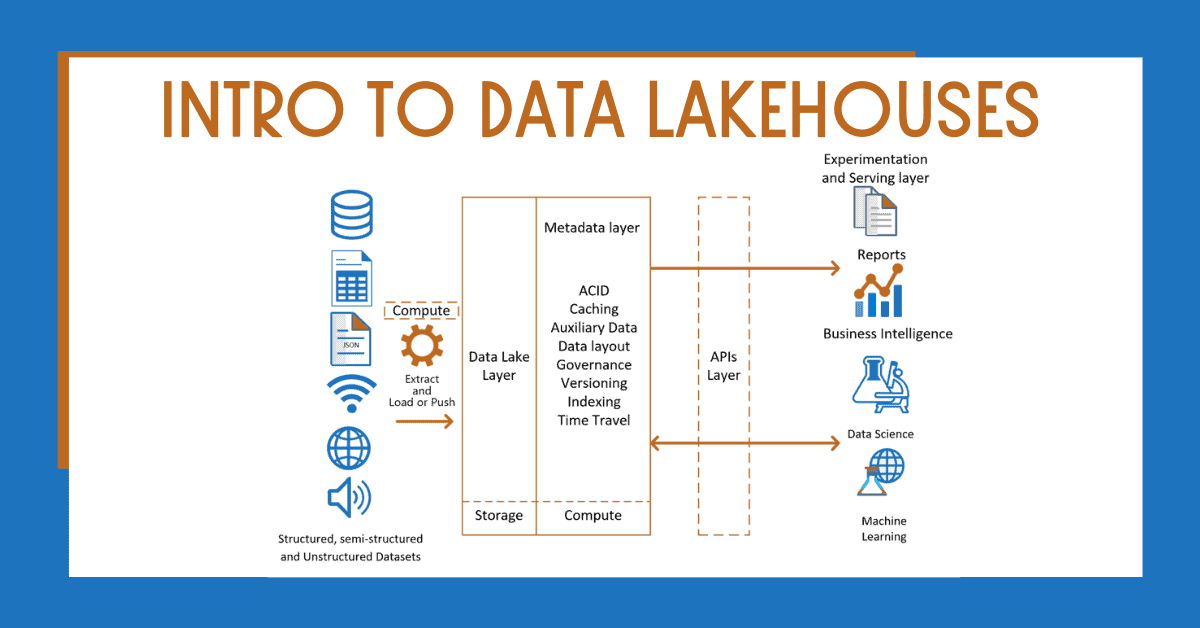
A Lakehouse is a modern data management architecture that combines the best features of data lakes (cost-efficient storage for raw data) and data warehouses (structured, performant querying). It enables unified access to structured, semi-structured, and unstructured data using a single platform.

History or Background
- Data Lakes emerged to store massive volumes of raw data cost-effectively, but lacked schema enforcement and query optimization.
- Data Warehouses provided fast queries but were expensive and required strict schema definitions.
- Lakehouse Architecture, popularized by Databricks, merges these two paradigms by introducing ACID transactions, schema enforcement, and unified governance on top of data lakes.
Why is it Relevant in DevSecOps?
In DevSecOps, managing security, telemetry, compliance, and performance data is crucial. Lakehouses enable:
- Unified Data Governance: Ensures consistency and security across various types of data sources.
- Security Analytics: Supports advanced threat detection using large-scale telemetry.
- Automation: Streamlines CI/CD pipelines with integrated data workflows for auditing, monitoring, and compliance.
- Scalability: Handles petabytes of DevSecOps telemetry data efficiently.
2. Core Concepts & Terminology
Key Terms and Definitions
| Term | Definition |
|---|---|
| Data Lake | A centralized repository for raw, unstructured data. |
| Data Warehouse | Structured system optimized for analytical queries. |
| Delta Lake | An open-source storage layer bringing ACID transactions to data lakes. |
| ACID Transactions | Guarantee Atomicity, Consistency, Isolation, and Durability of data ops. |
| Medallion Architecture | A data modeling technique: Bronze (raw), Silver (cleaned), Gold (business-ready). |
How It Fits into the DevSecOps Lifecycle
| DevSecOps Phase | Lakehouse Role |
|---|---|
| Plan | Analyze historical data for threat modeling and compliance planning. |
| Develop | Enable secure data versioning for ML and testing artifacts. |
| Build/Test | Store logs, test results, security scans for audit and analysis. |
| Release/Deploy | Validate compliance checkpoints using structured metadata. |
| Operate/Monitor | Real-time telemetry ingestion and anomaly detection. |
| Secure | Integrate with SIEMs, detect misconfigurations, enforce policies. |
3. Architecture & How It Works
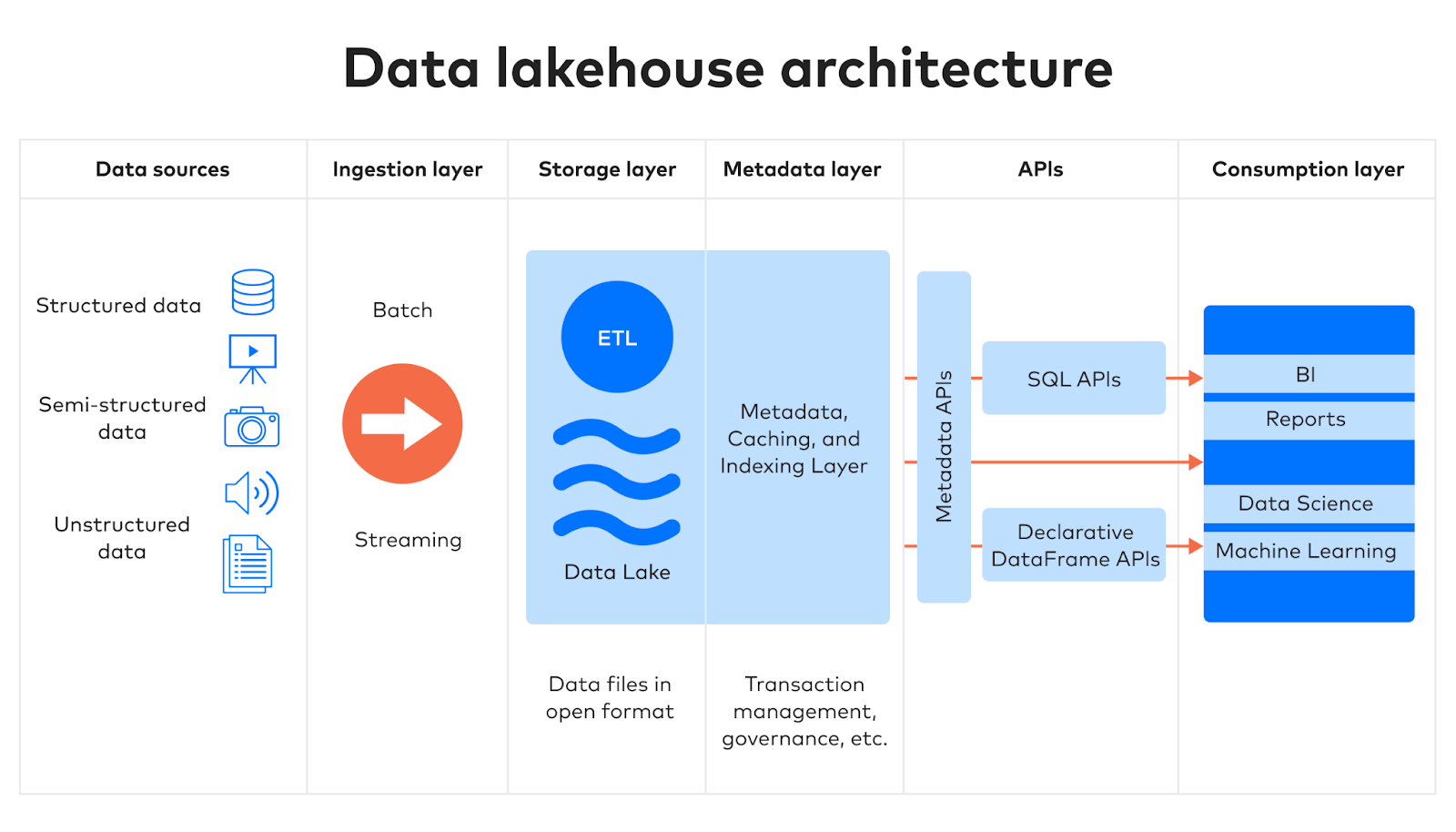
Components
- Storage Layer (e.g., AWS S3, Azure Data Lake, GCS)
- Delta Engine or Apache Iceberg/Hudi (for ACID and schema enforcement)
- Query Layer (Databricks SQL, Presto, Trino, Spark SQL)
- Governance & Security (Unity Catalog, Ranger, Lake Formation)
- Streaming Support (Kafka, Apache Spark Structured Streaming)
Internal Workflow
- Data Ingestion:
- Pull data from CI/CD tools (e.g., Jenkins, GitHub Actions), scanners (e.g., SonarQube), cloud logs (e.g., CloudTrail).
- Data Storage:
- Use bronze → silver → gold layered architecture for processing raw to refined data.
- Query and Analytics:
- Use SQL or notebooks to run security analytics or compliance audits.
- Access Control:
- Apply row/column level security and data masking via catalogs.
Architecture Diagram Description
[ CI/CD Tools ]        [ Security Tools ]        [ Monitoring Tools ]
     |                        |                         |
     v                        v                         v
[ Data Ingestion Layer (Kafka, Flink, Spark Streaming) ]
                          |
                          v
            [ Lakehouse Storage (Delta Lake, S3, HDFS) ]
                          |
         ---------------------------------------------
         |                      |                    |
 [ Bronze Layer ]      [ Silver Layer ]      [ Gold Layer ]
 (Raw logs, scans)     (Cleaned schema)     (Enriched metrics)

                          |
                          v
                 [ Query & Analytics Engine ]
             (Spark SQL, Trino, BI Dashboards, Jupyter)
Integration Points with CI/CD or Cloud Tools
| Tool | Integration Method |
|---|---|
| Jenkins/GitHub Actions | Push logs/tests to Lakehouse via API or file drop. |
| AWS CloudTrail | Stream to Lakehouse using AWS Glue/Kinesis. |
| Kubernetes | Store audit logs or Falco alerts. |
| SIEM Tools | Export curated data from Lakehouse to SIEMs. |
4. Installation & Getting Started
Basic Setup or Prerequisites
- Cloud account (AWS/GCP/Azure)
- Python 3.x, Spark, or Databricks access
- Tools: Delta Lake, MinIO (local S3), Apache Spark
Hands-on: Step-by-Step Setup
Step 1: Setup Delta Lake Environment (Local or Cloud)
# Install PySpark
pip install pyspark delta-spark
Step 2: Initialize Delta Table
from delta import *
from pyspark.sql import SparkSession

builder = SparkSession.builder.appName("DevSecOpsLakehouse") \
    .config("spark.sql.extensions", "io.delta.sql.DeltaSparkSessionExtension") \
    .config("spark.sql.catalog.spark_catalog", "org.apache.spark.sql.delta.catalog.DeltaCatalog")

spark = builder.getOrCreate()

# Sample data
df = spark.createDataFrame([("2025-06-20", "scan_passed", "repo-A")], ["date", "status", "repository"])
df.write.format("delta").save("/tmp/devsecops_logs")
Step 3: Query the Table
df = spark.read.format("delta").load("/tmp/devsecops_logs")
df.show()
5. Real-World Use Cases
1. Security Scan Aggregation
- Collect and store outputs from SonarQube, Trivy, and Snyk in a structured format.
- Generate periodic compliance dashboards.
2. Audit Logging and Monitoring
- Store Kubernetes audit logs, CloudTrail, or Git events in a Lakehouse.
- Query logs to detect unauthorized access or drift.
3. Threat Detection Pipeline
- Integrate with Falco alerts, normalize in silver layer, apply ML models on gold layer.
- Alert on suspicious behavior in real time.
4. CI/CD Pipeline Traceability
- Capture build metadata, test reports, artifact versions.
- Enable forensic analysis on build failures or incidents.
6. Benefits & Limitations
Key Advantages
- Unified Security & Data Strategy
- Low-Cost Storage with High Performance
- Data Versioning & Lineage
- Fine-Grained Access Control
- Real-Time + Batch Processing
Limitations
- Complex Setup for small teams without cloud expertise.
- Requires Data Engineering skills.
- Governance Models vary between platforms.
- Tooling Ecosystem still maturing for some open-source options.
7. Best Practices & Recommendations
Security Tips
- Encrypt data at rest and in transit.
- Use role-based access control (RBAC) and attribute-based access control (ABAC).
- Audit data access frequently.
Performance & Maintenance
- Compact Delta files regularly using OPTIMIZE.
- Use ZORDER for indexing.
- Archive old logs to colder storage tiers.
Compliance & Automation
- Automate metadata tagging (PII, compliance labels).
- Integrate with policy-as-code tools like OPA for governance.
- Run scheduled quality checks using Great Expectations or dbt.
8. Comparison with Alternatives
| Feature | Data Lake | Data Warehouse | Lakehouse |
|---|---|---|---|
| Cost | Low | High | Medium |
| Query Performance | Low | High | High |
| Schema Enforcement | None | Strong | Strong |
| Data Types | Any | Structured | Any |
| Real-time Support | Limited | Moderate | Strong |
| DevSecOps Integration | Manual | Complex | Seamless |
When to Choose Lakehouse
- You need security + scalability without sacrificing performance.
- You manage heterogeneous data sources (logs, metrics, binaries).
- You require auditable and queryable historical data for compliance.
9. Conclusion
The Lakehouse architecture offers a compelling solution for unifying security telemetry, CI/CD logs, and operational data in a scalable, secure, and performant manner—crucial for DevSecOps success. By blending the flexibility of data lakes with the reliability of data warehouses, it helps teams maintain visibility, compliance, and control over their software delivery pipeline.
🔗 Official Documentation & Communities
- Databricks Lakehouse Docs
- Delta Lake GitHub
- Apache Hudi
- Apache Iceberg
- Great Expectations
