Introduction
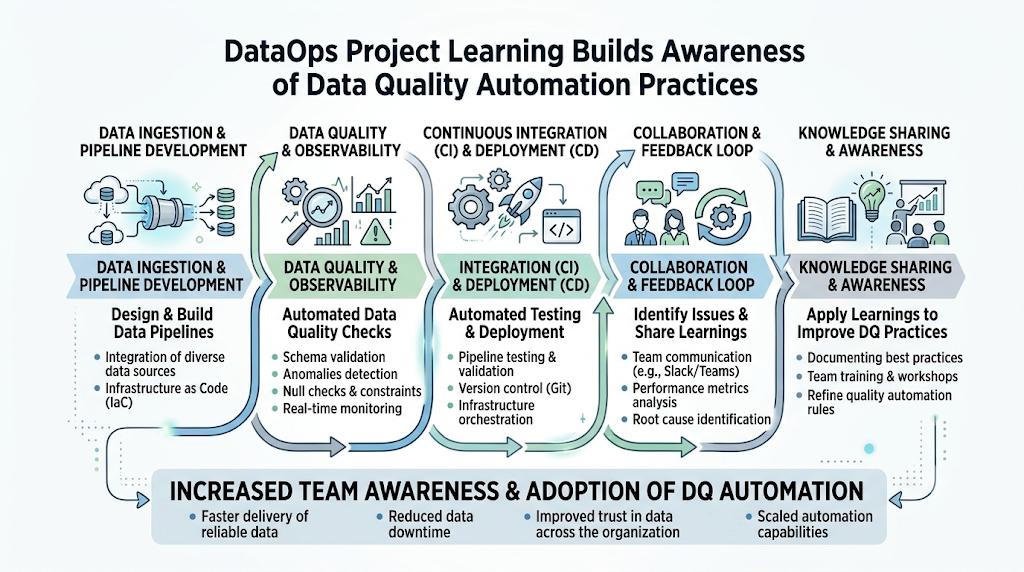
Learning DataOps only through theory is not enough. Beginners must work on practical projects to understand how data pipelines are designed, tested, automated, monitored, and improved in real business environments. DataOps skills are becoming important because organizations depend on clean, trusted, and timely data for reporting, analytics, machine learning, and business decisions. Data teams now need faster delivery, better collaboration, automated workflows, and reliable data quality. For beginners, a DataOps project is the best way to connect data engineering concepts with real implementation. It helps you understand how raw data moves from source systems to storage, transformation, validation, dashboards, and decision-making. DataOpsSchool.com is an educational learning resource for students and professionals who want to build practical DataOps, data engineering, automation, and analytics skills.
What Is a DataOps Project?
A DataOps project is a practical data workflow that uses automation, collaboration, testing, monitoring, and continuous improvement to deliver reliable data from source systems to users.
In simple words, it is not just about moving data from one place to another. It is about building a repeatable and trusted data process that teams can improve over time.
Objectives of a DataOps Project
A good DataOps project helps you:
- Collect data from different sources
- Clean and transform data
- Validate data quality
- Automate pipeline execution
- Track changes using version control
- Monitor failures and performance
- Deliver usable data for reports, dashboards, or analytics
Key Components of a DataOps Project
Most beginner DataOps projects include:
- Data source
- Data ingestion process
- Storage layer
- Transformation logic
- Data validation rules
- Automation workflow
- Monitoring and logs
- Documentation
- Final output such as a table, file, dashboard, or report
Importance in Modern Data Engineering
Modern companies handle large volumes of data from applications, websites, cloud platforms, customer systems, and business tools. Without DataOps, data workflows can become slow, manual, error-prone, and difficult to maintain.
DataOps makes data engineering more reliable by applying software engineering practices like version control, testing, automation, and continuous improvement.
DataOps Fundamentals Every Beginner Should Learn
Before starting DataOps projects, beginners should understand the basic building blocks. You do not need to master everything before starting, but you should know how each part fits into the complete workflow.
Data Pipelines
A data pipeline is a process that moves data from one system to another.
For example, a pipeline may collect customer order data from a CSV file, clean missing values, transform the data into a structured format, and load it into a database for reporting.
A simple DataOps pipeline usually includes:
- Source data
- Data extraction
- Data cleaning
- Data transformation
- Data validation
- Data loading
- Monitoring
ETL and ELT
ETL means Extract, Transform, Load.
In ETL, data is first extracted from the source, transformed into the required format, and then loaded into the target system.
ELT means Extract, Load, Transform.
In ELT, data is first loaded into a storage system, and transformation happens later inside the database, warehouse, or analytics platform.
Beginners should understand both approaches because different projects may use different patterns depending on data size, tools, and business needs.
Version Control
Version control helps you track changes in your project files.
Git is commonly used for version control. It allows data teams to manage pipeline scripts, SQL queries, configuration files, documentation, and automation workflows.
In DataOps, version control is important because it supports collaboration, rollback, code review, and project history.
Data Quality
Data quality means checking whether data is accurate, complete, consistent, and usable.
A DataOps project should include quality checks such as:
- Missing value checks
- Duplicate record checks
- Data type checks
- Range checks
- Format checks
- Row count checks
- Business rule validation
Without data quality checks, pipelines may run successfully but still produce wrong results.
Automation
Automation reduces manual work in data pipelines.
Instead of manually running scripts every day, you can schedule workflows to run automatically. Automation helps teams save time, reduce mistakes, and maintain consistent delivery.
Common automation examples include:
- Scheduled data extraction
- Automated transformation jobs
- Automated validation checks
- Automated notifications for failures
- Automated report refresh
Monitoring
Monitoring helps you understand whether your data pipeline is working properly.
A monitored pipeline can show:
- Job success or failure
- Execution time
- Data volume processed
- Error messages
- Failed validation checks
- Delayed data delivery
Monitoring is one of the most important parts of DataOps because it helps teams detect issues early.
Preparing Your DataOps Learning Environment
A good learning environment helps beginners practice DataOps concepts in a structured way. You do not need an expensive setup. You can start with free tools, sample datasets, and local development.
Choosing Programming Languages
Python is one of the best programming languages for beginner DataOps projects.
It is useful for:
- Reading files
- Cleaning data
- Writing automation scripts
- Connecting to APIs
- Validating data
- Building simple pipelines
SQL is also essential because most data projects involve databases, tables, queries, joins, filters, aggregations, and reporting.
For beginners, the best starting combination is:
- Python for automation and data processing
- SQL for querying and transformation
- Bash basics for command-line work
Setting Up Development Tools
Your basic setup can include:
- Code editor
- Python environment
- Git
- Local database
- Spreadsheet tool
- Command-line terminal
- Docker for container practice
- Sample datasets
Start simple. Your first goal is to build a working project, not a complex enterprise platform.
Understanding Cloud Platforms
Cloud platforms are widely used in DataOps because they provide scalable storage, computing, databases, and analytics services.
Beginners should understand basic cloud concepts such as:
- Cloud storage
- Virtual machines
- Managed databases
- Data warehouses
- Access permissions
- Cost awareness
- Backup and recovery
You can begin with cloud storage concepts before moving to advanced services.
Learning SQL
SQL is a must-have skill for DataOps.
You should practice:
- SELECT queries
- WHERE conditions
- JOIN operations
- GROUP BY
- ORDER BY
- Aggregations
- Subqueries
- Table creation
- Data insertion
- Data updates
- Basic performance understanding
Many DataOps projects fail because users know tools but do not understand data logic. SQL helps you understand how data is structured and transformed.
Working with Git
Git should be used from the beginning of your DataOps journey.
You can store:
- Python scripts
- SQL files
- Pipeline configuration
- Documentation
- Testing rules
- Project notes
A beginner should learn:
- git init
- git add
- git commit
- git status
- git branch
- git checkout
- git push
- git pull
Using Git early helps you build professional habits.
DataOpsSchool.com Guide to Starting DataOps Projects
DataOpsSchool.com focuses on helping learners understand DataOps from both a practical and professional point of view. Beginners should not start by trying to build a large enterprise pipeline immediately. The better approach is to move step by step.
Building Strong Foundations
Start with the basics of data handling.
You should understand how to read data, clean it, transform it, validate it, and store it. These small skills become the foundation for larger DataOps projects.
Focus first on:
- Data pipeline basics
- SQL fundamentals
- Python scripting
- Git workflows
- Data validation
- Automation concepts
- Monitoring basics
Learning Through Small Projects
Small projects help beginners learn faster because they are easier to complete, debug, and explain.
For example, instead of building a complete enterprise data platform, start with a CSV processing pipeline. Then add validation. Then add scheduling. Then add reporting.
This step-by-step method builds confidence.
Practicing Pipeline Automation
Once you can run a pipeline manually, the next step is automation.
You can automate:
- File reading
- Data cleaning
- Transformation
- Validation
- Output generation
- Job scheduling
- Failure logging
Automation is a key part of DataOps because it makes workflows repeatable and reliable.
Improving Data Quality
Every DataOps project should include data quality checks.
Even a simple beginner project should check whether:
- Required columns exist
- Values are missing
- Duplicates are present
- Data types are correct
- Output record counts are expected
- Business rules are followed
This habit prepares you for real enterprise work.
Preparing for Real Enterprise Projects
After completing small projects, beginners can slowly move toward production-style practices.
These include:
- Modular pipeline design
- Reusable scripts
- Configuration files
- Logging
- Error handling
- Documentation
- Version control
- Testing
- Deployment planning
- Monitoring dashboards
This is how a beginner project becomes a professional portfolio project.
Step-by-Step Beginner DataOps Projects
The best way to learn DataOps is by building projects that increase in difficulty. Start small and add more features as your skills improve.
CSV Data Processing Pipeline
This is one of the easiest beginner DataOps projects.
In this project, you take a CSV file, process it, clean it, and create a final output file or database table.
Implementation concept:
- Take a sample CSV file such as sales data or customer data
- Read the file using Python
- Check for missing values
- Remove duplicate records
- Standardize column names
- Convert date formats
- Save the cleaned file
- Write a short project README
Skills learned:
- File handling
- Basic data cleaning
- Data validation
- Python scripting
- Documentation
This project teaches the foundation of pipeline thinking.
Automated ETL Workflow
In this project, you build a simple ETL workflow.
Implementation concept:
- Extract data from a CSV, JSON, or database table
- Transform the data using Python or SQL
- Load the final data into another table or output file
- Add logs to track success or failure
- Create a simple folder structure for scripts, data, logs, and documentation
Skills learned:
- ETL design
- Transformation logic
- Basic logging
- Structured project organization
- Repeatable workflow creation
This project helps you understand how real data workflows are built.
Cloud Storage Integration
This project introduces cloud-style data handling.
Implementation concept:
- Store input files in a cloud storage service or simulated storage folder
- Build a script to read files from the storage location
- Process the files
- Save output files into a processed folder
- Maintain separate folders for raw, cleaned, and final data
Skills learned:
- Cloud storage concepts
- Data lake structure
- Raw and processed zones
- File movement
- Storage organization
Even if you practice locally, you can follow the same structure used in cloud data platforms.
Data Validation Pipeline
This project focuses on data quality.
Implementation concept:
- Use a dataset with possible errors
- Define validation rules
- Check missing values
- Check duplicate records
- Validate data types
- Validate value ranges
- Create a validation report
- Stop the pipeline if major errors are found
Skills learned:
- Data quality checks
- Rule-based validation
- Error reporting
- Pipeline control
- Quality-first thinking
This project is very useful for building a strong DataOps mindset.
Dashboard Reporting Pipeline
This project connects data pipelines with reporting.
Implementation concept:
- Process raw business data
- Create a final summary table
- Calculate metrics such as total sales, average order value, or customer count
- Export the result to a reporting file or database
- Connect it to a dashboard tool
- Refresh the report after every pipeline run
Skills learned:
- Analytics preparation
- Metric calculation
- Reporting pipeline design
- Business-friendly data output
- Dashboard readiness
This project helps learners understand how DataOps supports decision-making.
Scheduled Data Processing
This project teaches automation and scheduling.
Implementation concept:
- Create a pipeline script
- Schedule it to run daily or at fixed intervals
- Generate logs after every run
- Save output files with timestamps
- Add basic failure handling
- Send or store status messages
Skills learned:
- Scheduling
- Automation
- Monitoring basics
- Logging
- Repeatable execution
- Operational thinking
This is one of the most important steps toward production-ready DataOps projects.
Common Tools Used in DataOps Projects
Beginners do not need to learn every tool at once. Start with the basics, then add tools as your projects become more advanced.
Apache Airflow
Apache Airflow is used for workflow orchestration.
It helps schedule, manage, and monitor data pipelines. In Airflow, workflows are usually designed as DAGs, which define task order and dependencies.
Beginners can use Airflow to practice:
- Scheduling pipelines
- Managing task dependencies
- Retrying failed jobs
- Viewing workflow status
- Monitoring pipeline execution
dbt
dbt is commonly used for data transformation.
It allows teams to write SQL-based transformations, test data models, document workflows, and manage analytics logic.
Beginners can use dbt to learn:
- SQL transformations
- Data modeling
- Testing
- Documentation
- Analytics engineering practices
Apache Spark
Apache Spark is used for large-scale data processing.
Beginners may not need Spark in their first project, but it is useful when learning big data workflows.
Spark helps with:
- Processing large datasets
- Distributed computing
- Batch processing
- Data transformation
- Scalable analytics
Docker
Docker helps package applications and pipeline environments into containers.
In DataOps projects, Docker is useful because it makes workflows easier to run across different machines.
Beginners can use Docker to understand:
- Containerized environments
- Reproducible setups
- Tool dependencies
- Local development consistency
Git
Git is essential for version control.
In DataOps projects, Git helps teams manage code, track changes, collaborate, and maintain project history.
Use Git for:
- Pipeline scripts
- SQL files
- Configuration files
- Test rules
- Documentation
- Workflow updates
Cloud Storage Services
Cloud storage services are commonly used to store raw, processed, and final data.
A beginner should understand how cloud storage supports:
- Data lakes
- File organization
- Scalable storage
- Backup
- Access control
- Data sharing
Benefits of Working on DataOps Projects
Practical Experience
Projects help you move beyond theory.
You learn how real data problems appear, how pipelines fail, how data quality issues happen, and how automation improves delivery.
Better Problem-Solving Skills
When you build DataOps projects, you face practical issues such as missing files, bad data, failed scripts, incorrect formats, and slow queries.
Solving these problems improves your technical confidence.
Portfolio Development
A good DataOps portfolio can show employers that you understand practical implementation.
Your portfolio may include:
- Project overview
- Architecture diagram
- Source code
- Data validation rules
- Pipeline workflow
- Logs or screenshots
- Documentation
- Final output
Improved Collaboration
DataOps is not only technical. It also supports teamwork between data engineers, analysts, developers, operations teams, and business users.
Projects teach you how to write clean documentation, use Git, explain workflows, and create maintainable pipelines.
Career Readiness
Hands-on projects prepare you for real job responsibilities.
You become comfortable with pipeline development, automation, testing, monitoring, and data quality practices. These skills are useful for data engineering and analytics roles.
Beginner Mistakes to Avoid
Skipping Data Quality Checks
Many beginners focus only on moving data. This is a mistake.
A pipeline is not successful just because it runs. It must also produce correct and trusted data.
Ignoring Documentation
Documentation is part of a professional DataOps project.
Write what the project does, how to run it, what tools are used, what inputs are required, and what outputs are produced.
Building Large Projects Too Early
Large projects can become confusing for beginners.
Start with small datasets and simple workflows. Add automation, validation, and monitoring gradually.
Not Using Version Control
Avoid keeping scripts only on your local machine without Git.
Version control helps you track changes, recover old versions, and work professionally.
Forgetting Pipeline Monitoring
A pipeline may work today and fail tomorrow.
Monitoring helps you identify problems early. Even simple logs can make a project more reliable.
Project Workflow: Traditional Data Engineering vs DataOps
| Stage | Traditional Data Engineering | DataOps Approach |
|---|---|---|
| Development | Manual and isolated | Collaborative and iterative |
| Testing | Late-stage | Continuous |
| Deployment | Infrequent | Automated |
| Monitoring | Reactive | Continuous |
| Improvement | Occasional | Continuous optimization |
Traditional data engineering often focuses on building pipelines first and fixing issues later. DataOps focuses on continuous improvement from the beginning.
This difference is important for beginners. A DataOps mindset means you design your project for quality, automation, testing, and monitoring from day one.
Best Practices for Successful DataOps Projects
To build better DataOps projects, follow these practical best practices:
- Start with simple datasets
- Automate repetitive tasks
- Validate data regularly
- Document every workflow
- Monitor pipeline performance
- Continuously improve project design
Start with Simple Datasets
Use small datasets first. This makes it easier to understand the pipeline logic.
Once your workflow is stable, you can use larger datasets.
Automate Repetitive Tasks
If you repeat a step often, automate it.
Automation saves time and reduces manual errors.
Validate Data Regularly
Data validation should not be optional.
Add checks at important stages of your pipeline.
Document Every Workflow
Documentation helps others understand your work.
It also helps you remember your own project structure later.
Monitor Pipeline Performance
Track whether the pipeline runs successfully, how long it takes, and whether data output is correct.
Continuously Improve Project Design
Your first version does not need to be perfect.
Improve your project step by step by adding better structure, reusable code, logging, testing, and automation.
Career Opportunities
Learning DataOps projects can support several career paths.
DataOps Engineer
A DataOps Engineer focuses on building reliable, automated, and monitored data workflows.
This role combines data engineering, automation, cloud, DevOps practices, and data quality.
Data Engineer
A Data Engineer builds data pipelines, storage systems, transformation workflows, and data platforms.
DataOps skills help Data Engineers deliver better and more reliable pipelines.
Analytics Engineer
An Analytics Engineer works between data engineering and business analytics.
This role often focuses on SQL transformations, data modeling, testing, documentation, and reporting-ready datasets.
Cloud Data Engineer
A Cloud Data Engineer builds data systems using cloud storage, cloud databases, data warehouses, and cloud processing services.
DataOps skills are useful for automation, monitoring, and scalable pipeline design.
BI Developer
A BI Developer creates dashboards, reports, and business intelligence solutions.
DataOps helps BI Developers work with cleaner, more reliable, and better-documented data.
Data Platform Engineer
A Data Platform Engineer builds and manages platforms that support data teams.
This role often includes infrastructure, automation, access control, monitoring, and platform reliability.
Future of DataOps Projects
DataOps projects are becoming more intelligent, automated, and cloud-native. Beginners who learn the fundamentals now can adapt more easily to advanced data practices later.
AI-Assisted Data Pipelines
AI can help teams detect data issues, suggest transformations, generate documentation, and improve pipeline efficiency.
However, AI does not replace strong fundamentals. Beginners still need to understand data logic, quality rules, and workflow design.
Real-Time Data Processing
Many businesses want faster data processing.
Real-time pipelines help teams process data quickly for fraud detection, live dashboards, customer activity tracking, and operational alerts.
Cloud-Native Data Platforms
Cloud-native platforms make it easier to store, process, scale, and manage data workflows.
DataOps projects will continue to use cloud storage, cloud warehouses, managed orchestration, and automated deployment practices.
Intelligent Workflow Automation
Future DataOps workflows will use smarter automation.
This may include auto-retry logic, anomaly detection, intelligent alerts, and self-healing pipeline patterns.
Unified Data Operations
DataOps is moving toward unified operations where engineering, analytics, governance, quality, and monitoring work together.
This helps organizations manage data more consistently across teams.
Common Misconceptions
DataOps Is Only for Large Enterprises
DataOps is useful for all types of teams.
Even a student project can use DataOps principles such as version control, validation, automation, and documentation.
Beginners Need Every Tool Before Starting
You do not need to learn every tool before starting.
Begin with Python, SQL, Git, and simple datasets. Add tools like Airflow, dbt, Docker, and cloud platforms later.
Automation Removes the Need for Testing
Automation does not replace testing.
In fact, automated pipelines need stronger testing because errors can spread quickly if not detected early.
DataOps Is the Same as ETL Development
ETL is only one part of DataOps.
DataOps also includes collaboration, quality checks, automation, monitoring, version control, documentation, and continuous improvement.
FAQ Section
- What is the easiest DataOps project for beginners?
The easiest project is a CSV data processing pipeline. You can read a CSV file, clean missing values, remove duplicates, transform columns, and save the final output. - Do I need coding skills to start DataOps projects?
Basic coding skills are helpful. Beginners should start with Python and SQL because they are widely used in data processing, automation, and analytics workflows. - Is DataOps only for data engineers?
No. DataOps is useful for data analysts, analytics engineers, BI developers, cloud engineers, ETL developers, and students who work with data workflows. - Which tool should I learn first for DataOps projects?
Start with Git, SQL, and Python. After that, you can learn workflow orchestration tools, transformation tools, cloud storage, and monitoring practices. - How can I make my DataOps project portfolio stronger?
Include a clear project goal, pipeline diagram, source code, validation rules, automation steps, monitoring approach, documentation, and final output examples. - What is the difference between DataOps and data engineering?
Data engineering focuses on building data systems and pipelines. DataOps improves those workflows through automation, testing, collaboration, monitoring, and continuous improvement. - Can beginners learn DataOps without cloud experience?
Yes. You can start locally using files, Python, SQL, and Git. Later, you can move the same project structure to cloud storage and cloud databases. - Why is data quality important in DataOps projects?
Data quality ensures that pipeline output is accurate, complete, consistent, and useful. Without quality checks, wrong data can lead to poor business decisions. - How long does it take to build a beginner DataOps project?
A simple project can be built in a few focused practice sessions. More advanced projects with automation, validation, scheduling, and monitoring take longer. - What should I learn after completing beginner DataOps projects?
After beginner projects, learn orchestration, dbt transformations, Docker, cloud storage, pipeline monitoring, CI/CD concepts, and production-style documentation.
Final Summary
Getting started with DataOps projects is one of the best ways to learn modern data engineering practices. Instead of only reading concepts, beginners should build small practical workflows that include data ingestion, cleaning, transformation, validation, automation, monitoring, and documentation. Start with simple projects such as CSV processing, automated ETL workflows, data validation pipelines, dashboard reporting pipelines, and scheduled data processing. These projects help you understand the real DataOps lifecycle. The most important lesson is to think beyond just moving data. A good DataOps project should be reliable, repeatable, tested, documented, and continuously improved.
