BigQuery in DevSecOps

1. Introduction & Overview
What is BigQuery?
BigQuery is a fully managed, serverless, and highly scalable enterprise data warehouse provided by Google Cloud Platform (GCP). It allows for real-time and ad-hoc querying of massive datasets using Standard SQL syntax.

- Product type: Data warehouse-as-a-service
- Query language: ANSI SQL
- Key strengths: Scalability, speed, serverless architecture, and built-in ML & analytics
History or Background
- Launched: 2010 (public beta), General Availability in 2011
- Developed as part of Google’s Dremel project for large-scale interactive analysis.
- Evolved to support data lakes, machine learning, and integrated security.
Why Is It Relevant in DevSecOps?
BigQuery plays a critical role in data-driven DevSecOps by enabling teams to:
- Monitor and analyze large-scale security logs.
- Automate compliance audits.
- Detect anomalies using ML models.
- Centralize performance and security metrics across distributed systems.
It enhances visibility, promotes continuous monitoring, and strengthens proactive security across CI/CD pipelines.
2. Core Concepts & Terminology
Key Terms and Definitions
| Term | Definition |
|---|---|
| Dataset | A container for tables and views. |
| Table | Organized unit of structured data. |
| Schema | Definition of table structure (column names, types). |
| Partitioning | Table optimization method using date/time or integer columns. |
| Clustering | Optimizes query performance by grouping data based on column values. |
| UDF (User-Defined Functions) | Custom SQL-based logic for advanced data processing. |
| IAM (Identity & Access Management) | Controls access to BigQuery datasets and resources. |
| Audit Logs | Logs capturing user and service activity, accessible via BigQuery queries. |
How It Fits Into the DevSecOps Lifecycle
| DevSecOps Stage | BigQuery Role |
|---|---|
| Plan | Analyze historical performance and security data. |
| Develop | Validate code quality through log and metric analysis. |
| Build | Query build logs for security misconfigurations. |
| Test | Aggregate and analyze automated test results. |
| Release | Audit trail analysis for release validation. |
| Deploy | Compliance and anomaly checks during deployment. |
| Operate/Monitor | Centralized log ingestion, real-time monitoring. |
| Compliance & Audit | Run automated SQL audits against GCP Audit Logs or SIEM data. |
3. Architecture & How It Works
Components & Internal Workflow
- Client Interface (UI/API/CLI)
Users run SQL queries via web UI, REST API, or command-line tools. - Query Execution Engine (Dremel)
Converts SQL into a tree of computation and runs it in parallel across thousands of nodes. - Storage Layer (Colossus)
Columnar, distributed, and optimized for fast I/O operations. - Security & Access Layer
IAM integration, VPC Service Controls, encryption at rest & in transit. - Integration Points
GCP tools like Cloud Logging, Pub/Sub, Cloud Functions, Cloud Composer.
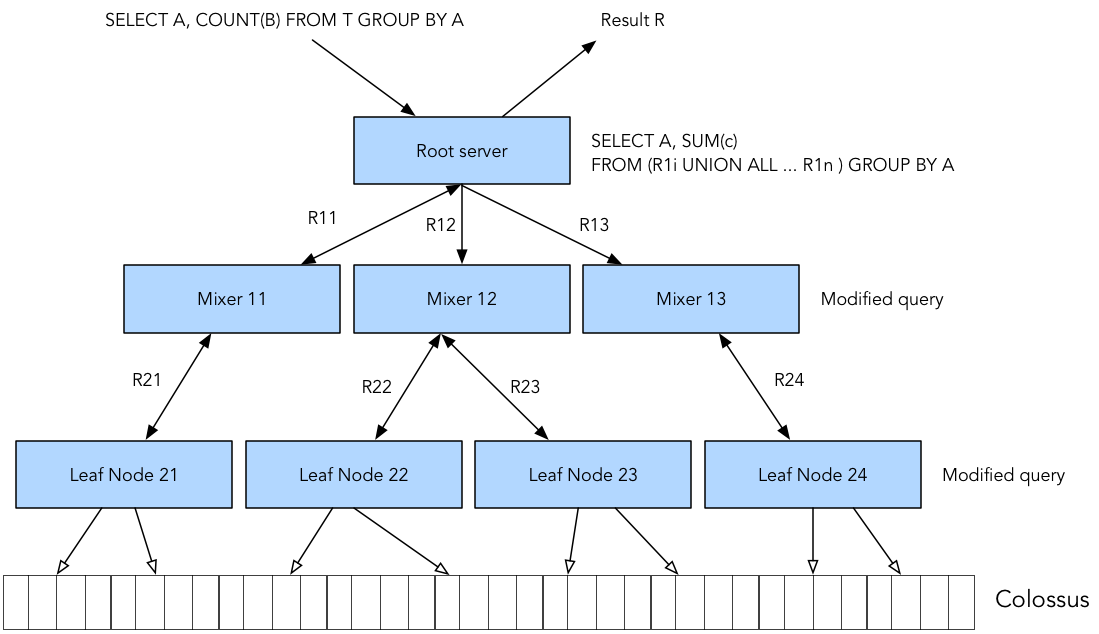
Architecture Diagram (Descriptive)
User → [BigQuery Interface (UI/CLI/API)]
           ↓
   → [Query Execution Engine (Dremel)]
           ↓
   → [Distributed Storage Layer (Colossus)]
           ↓
   → [IAM + Audit Logs + Encryption Layer]
           ↓
   → [External Tools: Looker, Cloud Functions, CI/CD Pipelines]
Integration Points with CI/CD or Cloud Tools
- Cloud Build: Stream logs to BigQuery for audit analysis.
- GitHub Actions: Push test results and coverage data to BigQuery.
- Cloud Logging + Pub/Sub: Real-time security telemetry ingestion.
- Terraform: Manage datasets, IAM bindings, and scheduled queries as code.
4. Installation & Getting Started
Basic Setup or Prerequisites
- GCP account and project.
- Billing enabled.
- BigQuery API enabled.
- IAM permissions:
roles/bigquery.adminor finer-grained custom roles.
Step-by-Step Beginner Setup
# Step 1: Authenticate (CLI)
gcloud auth login
gcloud config set project your-project-id

# Step 2: Create a dataset
bq mk --dataset your-project-id:devsecops_logs

# Step 3: Upload a sample security log table
bq load \
  --source_format=CSV \
  devsecops_logs.security_audit_logs \
  ./audit_logs.csv \
  schema.json

# Step 4: Run a query
bq query --use_legacy_sql=false \
  'SELECT user_email, action FROM `your-project-id.devsecops_logs.security_audit_logs` WHERE action = "DELETE"'
5. Real-World Use Cases
1. Security Audit Trail Aggregation
- Ingest logs from multiple GCP services (IAM, Cloud Build, GKE) into BigQuery.
- Query for unauthorized access, permission changes, or misconfigurations.
2. CI/CD Log Monitoring
- Store build logs from GitLab or Jenkins for long-term retention.
- Identify build anomalies or security regression patterns.
3. Anomaly Detection using SQL + ML
- Use BigQuery ML to train logistic regression on past intrusion events.
- Alert based on prediction of risky activity during deployments.
4. Compliance Reporting (e.g., SOC2, GDPR)
- Use scheduled queries to auto-generate reports on access logs, encryption key usage, or data deletion events.
6. Benefits & Limitations
Key Advantages
- ✅ Serverless: No infrastructure management required.
- ✅ Scalable & Fast: Designed for petabyte-scale analytics.
- ✅ Secure: Integrated with GCP IAM, encryption, VPC Service Controls.
- ✅ Cost-Effective: Pay-per-query or flat-rate pricing models.
- ✅ Seamless Integration: Works well with GCP tools, SIEMs, and DevOps pipelines.
Common Limitations
- ⚠️ Latency: Not ideal for sub-second real-time analytics (use BigQuery + Pub/Sub carefully).
- ⚠️ Cost Complexity: Poorly optimized queries can get expensive.
- ⚠️ Learning Curve: Requires familiarity with SQL, GCP IAM, partitioning strategies.
7. Best Practices & Recommendations
Security
- Use row-level security to control data visibility.
- Enable VPC Service Controls for boundary protection.
- Turn on Customer Managed Encryption Keys (CMEK) for sensitive data.
Performance
- Partition tables by timestamp or logical keys.
- Cluster by frequently filtered columns.
- Avoid SELECT * in production queries.
Maintenance & Automation
- Set data retention policies for regulatory compliance.
- Use scheduled queries for continuous data processing.
- Automate via Terraform, Cloud Functions, or Cloud Composer.
Compliance & Governance
- Use Data Catalog for metadata and classification.
- Enable Audit Logs and monitor access using BigQuery itself.
8. Comparison with Alternatives
| Feature | BigQuery | Amazon Redshift | Azure Synapse | Snowflake |
|---|---|---|---|---|
| Serverless | ✅ | ❌ | ❌ | ✅ |
| Integrated IAM | ✅ (GCP IAM) | ✅ (IAM Roles) | ✅ (AAD) | ✅ |
| Built-in ML | ✅ (BQ ML) | ❌ | ❌ | ✅ (limited) |
| Real-time Ingestion | ✅ (via Pub/Sub) | Limited | Moderate | ✅ |
| DevSecOps Integration Ease | ✅ Native (GCP) | Moderate | Moderate | Moderate |
When to Choose BigQuery:
- You’re heavily invested in GCP.
- You need serverless scale with integrated ML.
- You want tight IAM & audit log integration with minimal setup.
9. Conclusion
BigQuery is a powerful asset in the DevSecOps toolbox—enabling fast, scalable, and secure analytics on massive operational and security datasets. Its serverless nature and tight integration with GCP services make it ideal for DevSecOps teams looking to centralize monitoring, enforce compliance, and detect anomalies with minimal overhead.
As cloud-native security becomes more data-driven, BigQuery’s relevance will continue to grow.
🔗 Resources
- Official Docs: https://cloud.google.com/bigquery/docs
- BigQuery GitHub Samples: https://github.com/GoogleCloudPlatform/bigquery-samples
- Communities:
- GCP Slack: https://gcp-slack.com/
- Stack Overflow: bigquery tag
- Reddit: r/googlecloud
