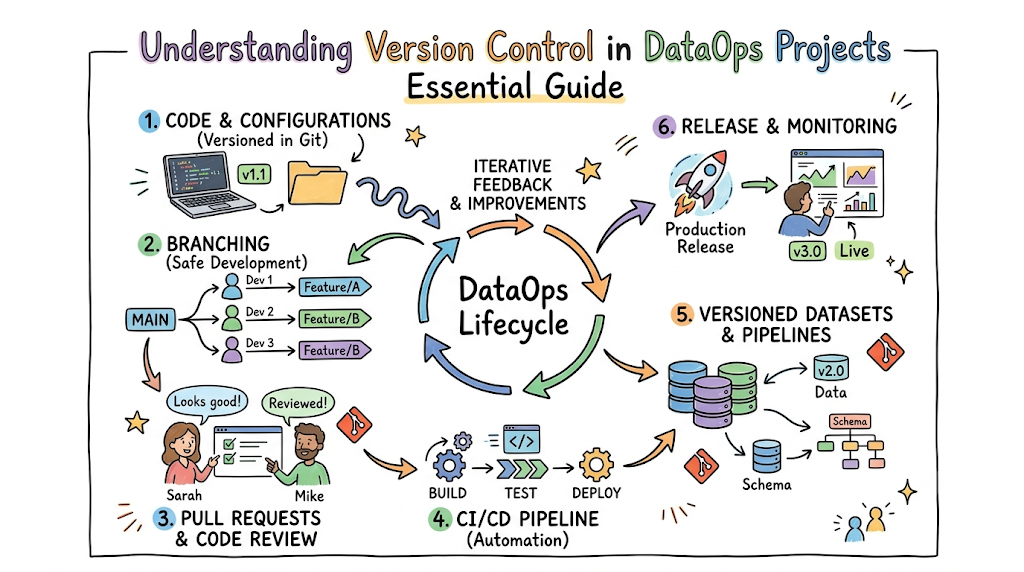
Managing modern data systems feels like working on a high-speed train while laying down the tracks at the same time. Business demands shift by the hour. New data sources arrive without notice, database schemas change unexpectedly, and multiple data engineers frequently modify the exact same transformation scripts simultaneously. DataOps addresses these specific challenges by introducing engineering discipline to the data lifecycle. At the very core of this methodology sits version control. Version control acts as the structural foundation that enables continuous integration, automated testing, and reliable deployments. If you are looking to master these foundational skills and build resilient data platforms, DataOpsSchool provides hands-on training built specifically for modern data professionals.
Understanding Version Control
What Is Version Control?
Version control is a systematic infrastructure that records changes made to files over time. It allows individuals and teams to track modifications, review the historical progression of a codebase, and recall specific historical versions of any file at any given moment.
Why Version Control Was Created
In the early days of development, tracking changes meant manually duplicating files and appending timestamps or initials to the filenames. This approach caused massive confusion, fragmented codebases, and catastrophic data loss when team members accidentally overwrote each other’s work. Version control systems were engineered to automate change tracking, enforce accountability, and provide a single source of truth for complex projects.
Evolution from Manual Tracking to Modern Git-Based Systems
The industry transitioned from unmanaged local files to Centralized Version Control Systems, where a single server held all versions of the code. While this was an improvement, it created a single point of failure and required constant network connectivity.
This limitation sparked the rise of Distributed Version Control Systems like Git. In a distributed architecture, every team member retains a complete clone of the entire repository, including its full history, on their local machine. This shift dramatically accelerated development speed and introduced sophisticated branch-based collaboration.
How Version Control Works
When a file is modified within a version-controlled workspace, the system does not simply overwrite the original data. Instead, it tracks the specific lines of text that were added, modified, or deleted.
These changes are bundled into a snapshot known as a commit. Each commit receives a unique cryptographic identifier, creating an unalterable, chronological audit trail of the entire project lifecycle.
[Initial Commit] ---> [Commit 2: Added Schema] ---> [Commit 3: Fixed ETL Bug]
Every Concept Explained in 5 Layers
- Definition: Version control is a software system that tracks, logs, and manages incremental changes made to a collection of files.
- Why it matters: It prevents the loss of historical work, removes the risk of shared-file overwrites, and provides an immediate recovery mechanism when production systems fail.
- Real-world example: A data engineer uses Git to track changes across twenty distinct SQL transformation files within a dbt project.
- Common problem when ignored: A team stores all production SQL views inside a live database without file backups. A developer accidentally deletes a complex 500-line analytical query, forcing the team to spend days rewrite-engineering the lost business logic from memory.
- DataOps solution: Storing all SQL definitions as text files inside a Git repository managed by DataOpsSchool principles ensures every historic iteration is preserved and instantly restorable.
Everyday Analogy
Think of version control as the automated “Version History” feature inside Google Docs, but scaled up to handle thousands of interconnected files across an entire enterprise data platform.
In Simple Terms
In Simple Terms: Version control is an automatic digital notebook that records every single change you make to your project files. It remembers who made the change, when it happened, and what exactly was modified, allowing you to jump back in time to an older version if something breaks.
Key Takeaways
- Version control removes reliance on manual file backups and chaotic naming conventions.
- Distributed systems like Git provide every engineer with a full backup of the project history.
- Every change is saved as an immutable snapshot, ensuring complete transparency across the data lifecycle.
Why Version Control Matters in DataOps
Managing Rapid Data Changes
Data pipelines are highly dynamic systems. Schema updates, API alterations, and changing business definitions require constant modifications to underlying code. Version control provides a controlled framework to test and deploy these rapid updates without endangering active production workloads.
Supporting Team Collaboration
Modern data organizations employ data engineers, data scientists, analytics engineers, and BI analysts simultaneously. Version control allows dozens of professionals to safely work on the exact same codebase by isolating their individual updates inside independent, virtual workspaces.
Preventing Data Pipeline Failures
By routing all pipeline updates through a formal version control structure, modifications can be verified prior to production integration. Automated validation engines can parse the code to catch syntax errors, circular dependencies, or schema mismatches before they enter the live orchestration environment.
Improving Governance and Compliance
Enterprise environments demand strict operational visibility. Version control automatically generates a permanent, chronological audit log. Compliance officers can easily see exactly who authorized a specific logic change, why it was made, and when it went live in production.
Enabling Faster Recovery
When a production data pipeline fails at midnight due to an unforeseen logic edge case, debugging line-by-line is too slow. Version control allows operations teams to execute a single command to instantly revert the entire data engine back to its last known stable state, minimizing downstream business impact.
Every Concept Explained in 5 Layers
- Definition: Version control in DataOps is the practice of managing data code, configurations, and pipeline schemas through automated change-tracking repositories.
- Why it matters: It shifts data management away from fragile, ad-hoc live updates toward stable, repeatable, and easily auditable software processes.
- Real-world example: An enterprise financial team tracks all regulatory reporting logic changes within a secure GitHub repository.
- Common problem when ignored: A developer modifies an orchestration script directly on a live production Airflow server. The script fails mid-run, leaving corrupted tables in the cloud data warehouse and stalling corporate reporting for an entire business day.
- DataOps solution: The script is modified locally, committed to Git, thoroughly reviewed by a peer, and deployed automatically via a continuous integration pipeline.
Everyday Analogy
Git branching is like building an exact digital replica of a live restaurant kitchen in a separate room so a chef can test a brand-new recipe without getting in the way of the dinner rush.
In Simple Terms
In Simple Terms: Version control keeps your data pipelines running smoothly by ensuring no one can make blind edits to live production systems. It creates a safe zone to build and test changes, keeping your business dashboards clean and accurate.
Key Takeaways
- Version control stabilizes data operations by removing unmanaged live code edits.
- It serves as the foundation for automated data governance, compliance testing, and audit trails.
- Mean Time to Resolution drops from hours to seconds by leveraging instant code rollbacks.
Version Control vs. Traditional Data Management
Traditional data management relied heavily on graphical user interfaces, shared folders, and manual storage processes. The table below highlights how a modern, version-controlled DataOps methodology solves the intrinsic limitations of legacy workflows.
Legacy vs. DataOps Comparison
| Area | Traditional Approach | Version-Controlled DataOps Approach |
| Code Storage | Stored inside database servers or local directories. | Maintained in a central, secure Git repository. |
| Change Tracking | Manual file naming like etl_v2_final_backup.sql. | Automatic cryptographic commits with explicit messages. |
| Team Collaboration | Overwriting files on shared network drives. | Concurrent development via isolated Git branches. |
| Error Recovery | Manually commenting out lines or restoring DB backups. | Instant, single-command rollbacks to stable commits. |
| Code Validation | Testing code directly against live production tables. | Automated testing in isolated sandbox environments. |
| Audit Visibility | Relies on manual logs or database administrator memory. | Immutable, permanent history of all authorship and approvals. |
Manual File Sharing and Shared Drive Challenges
When data teams share code through shared drives or email threads, visibility is lost instantly. There is no clear way to determine which file is truly the latest version, leading to situations where outdated logic is accidentally deployed back into production environments.
Spreadsheet-Based Tracking Problems
Attempting to track complex database migrations or schema alterations using a central spreadsheet requires flawless manual compliance. If an engineer forgets to log an update, the spreadsheet becomes inaccurate, leading to severe configuration drift and mysterious pipeline failures down the road.
Modern DataOps Approach
The modern DataOps strategy mandates that every single piece of logic, infrastructure definition, and orchestration schedule must live as text files inside a version control system. This approach brings the absolute predictability of software engineering to the traditionally unpredictable world of data management.
Key Takeaways
- Traditional data workflows create systemic operational silos and high risks of data corruption.
- DataOps treats data infrastructure, pipelines, and transformation rules purely as software code.
- Transitioning to version control eliminates configuration drift across multi-cloud environments.
What Should Be Version Controlled in DataOps?
Data Pipeline Code
All orchestration scripts that control the flow of information across your enterprise must be versioned. Whether you utilize Apache Airflow DAGs, Prefect flows, or Dagster deployments, these code assets dictate execution order and must be explicitly tracked.
ETL and ELT Workflows
The precise instructions used to extract, load, and transform raw operational data into structured business tables belong under strict version management. This includes your daily processing scripts, data cleaning jobs, and aggregation routines.
SQL Scripts
SQL forms the core of enterprise analytics engineering. All views, stored procedures, materialization logic, and complex analytical queries must live in structured files within a repository rather than solely inside database engines.
Configuration Files
Environment variables, database connection limits, API thresholds, and scheduling parameters are typically stored in YAML, JSON, or TOML files. Versioning these configurations ensures that changes to system behavior are documented and clear.
Infrastructure as Code
Modern data platforms rely heavily on cloud infrastructure. Tools like Terraform or AWS CloudFormation allow teams to define storage buckets, compute clusters, and access permissions as code. Keeping these definitions in Git guarantees environment consistency.
Data Transformation Logic
Analytical engineering frameworks like dbt rely completely on version control. Storing your dbt models, testing conditions, and semantic layer schemas in Git ensures that metrics remain accurate and consistent across all corporate reports.
Analytics Models
Machine learning feature stores, training configurations, and statistical scoring models must be tracked. Versioning these definitions ensures data scientists can replicate exact model outputs across historical runs.
Documentation
Data dictionaries, system architectures, and onboarding runbooks should live directly alongside the code in Markdown files. This ensures that as your data pipeline changes, its corresponding documentation is updated in the exact same step.
📁 Repository Root
├── 📁 workflows/        # Airflow DAGs & Pipeline Code
├── 📁 transformations/  # dbt Models & SQL Scripts
├── 📁 config/           # YAML Configuration Files
├── 📁 terraform/        # Infrastructure as Code
└── 📄 README.md         # Internal System Documentation
In Simple Terms
In Simple Terms: If you have to type it out to build, configure, run, or document your data platform, it needs to live inside your version control system. Never leave your critical logic hiding inside a database GUI or sitting on someone’s desktop.
Key Takeaways
- Pipelines, configurations, database schemas, and infrastructure definitions must be stored as code.
- Separating code from the physical data engine ensures flexibility and platform resilience.
- Co-locating code and documentation ensures internal system guides never fall out of date.
Git Fundamentals for DataOps Professionals
Repositories
A repository, or “repo,” is the digital filing cabinet for your project. It stores every file, folder, configuration, and the complete historical record of every single change made since the project was initiated.
- Example: A central repository named
finance-data-platformcontains all dbt transformations, orchestration schedules, and pipeline deployment scripts for the finance department. - DataOps Relevance: Serves as the authoritative single source of truth for the entire team’s engineering efforts.
Commits
A commit represents a saved snapshot of specific changes made to files within the repository. Each commit requires an explicit message describing the technical reasoning behind the adjustment.
- Example: Committing a modification to a SQL file with the descriptive log message:
Fix user lookup query to filter out deleted test accounts. - DataOps Relevance: Constructs a permanent, easily searchable audit trail for every single line of pipeline code.
Branches
A branch is an independent, isolated line of development created from the main codebase. It allows developers to write code without modifying the stable production system directly.
- Example: A data engineer creates a branch named
feature/add-revenue-forecastto build a new pipeline without disrupting daily executive reporting. - DataOps Relevance: Facilitates parallel development, allowing multiple team members to build features simultaneously without interference.
Merging
Merging is the technical process of taking changes from one independent branch and integrating them back into another branch, typically combining development work into the main codebase.
- Example: Merging
feature/add-revenue-forecastinto themainbranch after ensuring the new pipeline runs successfully in a development environment. - DataOps Relevance: Unifies team contributions back into the primary production stream cleanly and efficiently.
Pull Requests
A Pull Request, or PR, is a formal proposal to merge code from a development branch into production. It acts as an interactive platform for code reviews, discussions, and automated system testing.
- Example: An engineer submits a PR to update an ETL schedule, which automatically triggers a test suite to verify the code runs without syntax errors.
- DataOps Relevance: Serves as a vital quality gateway that blocks unreviewed or broken code from reaching production data tables.
Tags and Releases
Tags are permanent markers assigned to specific commits in a repository’s history, usually indicating a stable production release point.
- Example: Labeling a specific, fully-vetted commit as
v3.1.0-stableright before launching a new cloud data warehouse architecture. - DataOps Relevance: Allows operations teams to immediately identify, track, and refer back to exact historical release milestones.
Rollbacks
A rollback is the process of instantly reverting the active project codebase to a previous stable commit when a production error occurs.
- Example: Using a single Git command to undo a broken schema migration that caused the morning data ingestion jobs to fail.
- DataOps Relevance: Restores broken operational workflows immediately, moving debugging out of production to protect downstream data consumers.
Key Takeaways
- Repositories serve as the definitive single source of truth for all data engineering assets.
- Branches enable team members to safely experiment without crashing production systems.
- Pull requests function as mandatory quality gateways, ensuring code is peer-reviewed and fully tested.
Version Control Workflow in DataOps Projects
Implementing a predictable, step-by-step workflow ensures that every code change is fully developed, validated, and deployed without introducing instability into production systems.
[Main Branch] ──> (Create Feature Branch) ──> [Write & Test Code] ──> [Submit Pull Request] ──> [Automated CI Validation] ──> [Peer Code Review] ──> (Merge to Main) ──> [Production Deployment]
1. Development Environment Setup
Engineers begin by pulling the latest production code from the central repository down to their local machine or isolated cloud sandbox. This guarantees that all new development starts from a clean, up-to-date baseline.
2. Feature Branch Creation
The engineer creates a dedicated feature branch for their specific task using a strict naming convention, such as feature/invoice-pipeline-optimization. This isolates all upcoming file updates from the live production codebase.
3. Testing and Validation
The data professional writes code, runs transformations locally, and tests the output against small sandboxed development datasets. This step catches structural design flaws early before any code leaves their local machine.
4. Code Reviews via Pull Requests
Once local testing passes, the engineer pushes their branch to the central repository and opens a pull request. Senior team members review the logic, verify adherence to internal style guides, and check for potential performance bottlenecks.
5. Deployment Process
After receiving formal peer approval and passing all automated test suites, the branch is merged into the main production line. An automated deployment pipeline picks up the change and pushes the updated assets to the live orchestration engine.
6. Monitoring and Feedback
The newly updated pipeline is monitored closely during its initial production runs. Data quality metrics, processing speeds, and log outputs are checked to confirm the change behaves exactly as intended.
Everyday Analogy
This structured process is exactly like an architectural firm drafting, reviewing, stress-testing, and approving blueprinted design updates on a model computer system before sending construction crews to renovate an active building.
In Simple Terms
In Simple Terms: A standard Git workflow means you never edit live production pipelines directly. You copy the project files to a private workspace, make and test your changes, have a teammate double-check your work, and then safely merge it into the main production system.
Key Takeaways
- Feature branching ensures development isolation, preventing unvetted code from breaking live runs.
- Peer code reviews distribute technical knowledge across the data team and enforce uniform engineering standards.
- Automated deployment pipelines remove manual friction points, leading to more predictable system updates.
Versioning Data Pipelines
Pipeline Development Lifecycle
Data pipelines progress through explicit phases: ideation, development, testing, staging, and active production. Version control tracks the state of the entire pipeline definition through this multi-stage lifecycle, ensuring clear segregation between experimental and operational states.
Change Tracking
When pipeline logic requires updates—such as modifying an API endpoint or adding an extraction step—version control records the exact modification down to the line number. This deep visibility removes ambiguity regarding when a pipeline’s structural mechanics were modified.
Pipeline Rollbacks
If a newly deployed pipeline patch exhibits a hidden memory leak under heavy production data volumes, recovery must be fast. Utilizing version control allows teams to roll back the orchestration definition to its previous state in seconds, bypassing complex manual troubleshooting during high-severity outages.
Dependency Management
Data pipelines often depend heavily on external libraries, database drivers, and Python packages. Storing exact configuration files, like requirements.txt or Pipfile.lock, within your version control repository ensures your data pipelines always build using matching software dependencies across every environment.
Release Management
By using version control tags, teams can group collections of verified pipeline changes into official platform releases. This structural alignment allows the business to roll out platform enhancements in highly predictable blocks.
📦 Release v2.0.0
 ├── 🚀 Optimized Salesforce Ingestion Job
 ├── 🔧 Patched Customer Dimension Schema
 └── 📈 Upgraded Cloud Compute Driver
Key Takeaways
- Tracking pipeline updates continuously ensures that teams can easily audit the evolution of their data architectures.
- Managing package dependencies inside Git ensures uniform execution environments across all stages.
- Structured release management gives stakeholders full visibility into ongoing platform improvements.
Version Control for Datasets
Challenges of Dataset Versioning
Unlike standard software code, datasets can scale to petabytes in volume, making traditional Git versioning completely impractical for raw data storage. Saving huge CSV files or massive database backups directly inside a Git repository causes performance slowdowns and repository corruption.
Structured Data Versioning
To handle data volumes effectively, modern DataOps workflows utilize specialized tools like DVC (Data Version Control), LakeFS, or Delta Lake. These systems separate the data storage layer from the metadata layer. They version control the tiny, lightweight metadata pointer files inside Git while storing the actual massive datasets in scalable cloud object storage.
📁 Git Repository (Metadata Pointers) ───────> 📁 Cloud Object Storage (Actual Data)
   ├── 📄 train_data.dvc [Hash: a1b2c3d...] ─────────> 📦 Large Parquet/CSV Objects
   └── 📄 test_data.dvc  [Hash: e5f6g7h...] ─────────> 📦 Multi-Gigabyte Datasets
Data Snapshots
Data snapshotting creates immutable, time-stamped copies of tables at specific points in time. This enables teams to access historical data records exactly as they appeared on a specific date, which is crucial for financial audits and model debugging.
Data Lineage Tracking
By linking specific code versions with corresponding data versions, teams can map full data lineage. This allows an engineer to trace downstream reporting metrics back through every transformation script and raw data source file in the pipeline.
Data Reproducibility
Data reproducibility allows a data scientist to rerun a machine learning model months down the road and achieve identical results. This is done by checking out the exact code version and corresponding dataset version used during the original training run.
Everyday Analogy
Dataset versioning is like a security system taking a clear photo of an entire warehouse inventory every single midnight, allowing managers to see exactly where items sat on any historical day without duplicating the warehouse structure.
In Simple Terms
In Simple Terms: You can’t put giant data files directly into Git without slowing it down. Instead, you use specialized tools that save lightweight digital bookmarks in Git, while the actual massive data files sit safely inside cloud storage buckets.
Key Takeaways
- Massive datasets require specialized tools that separate metadata tracking from physical file storage.
- Data snapshotting enables deep audits, allowing teams to view table states from months ago.
- Combining code and data versioning provides reproducible machine learning workflows.
Version Control for Analytics and BI Projects
Dashboard Definitions
Modern Business Intelligence platforms like Looker, Tableau, and Power BI allow teams to define dashboards using text-based configuration files, such as LookML or semantic models. Storing these files in Git ensures dashboard edits can be tracked, reviewed, and versioned just like backend code.
Reporting Logic
Business requirements evolve, and definition rules for key metrics like active users change over time. Keeping reporting logic inside a version-controlled semantic layer protects your business metrics from unmanaged edits, keeping numbers uniform across all corporate dashboards.
KPI Calculations
When critical performance metrics are coded directly into individual dashboards, discrepancies inevitably occur. Moving these definitions into version-controlled repositories ensures that calculations are computed once globally and shared reliably across all departments.
Business Rules
Complex business rules, such as regional tax structures or corporate fiscal schedules, change periodically. Keeping these rules in version-controlled config files makes it easy to track how definitions have shifted over the life of the business.
Analytics Workflows
Version control streamlines teamwork for analytics engineers. Multiple analysts can work on dashboard definitions simultaneously, resolve structural conflicts via PRs, and publish clean, approved dashboard updates without disrupting live executive reports.
Key Takeaways
- Treating business intelligence dashboards as code brings software reliability to reporting layers.
- Centralizing KPI calculations inside version-controlled repositories eliminates conflicting metrics.
- Analysts can build dashboard enhancements concurrently without disrupting production reporting.
DataOps and CI/CD Integration
Version control does not operate in a vacuum; it serves as the essential trigger mechanism for Continuous Integration (CI) and Continuous Delivery (CD) engines within modern data platforms.
[Git Commit / PR] ──> 🛠️ Trigger CI Pipeline ──> 🧪 Automated Testing ──> 🚀 Trigger CD Pipeline ──> 🌐 Production Deployment
Continuous Integration
Continuous Integration automatically checks code every time an engineer saves a commit to the repository. The moment a PR is submitted, the CI server builds the workspace and runs tests to find syntax errors or broken references immediately.
Automated Testing
DataOps CI suites run comprehensive data validation checks. These automated tests check SQL logic for formatting errors, assert null-value constraints, and run data quality checks against staging tables to prevent bad data from reaching production.
Continuous Delivery
Continuous Delivery automates the process of moving verified code changes out into staging or production environments. Once a pull request passes all manual reviews and automated test steps, the CD engine updates the live system.
Deployment Automation
Manual deployments via command-line terminals introduce human error risks. A continuous delivery setup removes this friction by automating infrastructure updates, schema migrations, and scheduling changes through code.
Release Governance
Integrating version control with CI/CD provides strong operational control. Guardrails can be set up to block code deployments unless the PR has passed all automated quality tests and received explicit sign-offs from designated data team leads.
In Simple Terms
In Simple Terms: Version control is the brain, and CI/CD is the muscle. When you save your code in Git, the CI/CD system automatically runs tests to check for errors, and then safely deploys the updates to production without you having to move files manually.
Key Takeaways
- Version control provides the core event triggers that launch automated CI/CD validation paths.
- Automated testing blocks bad formatting and invalid data models long before they hit production tables.
- CI/CD automation removes manual deployment steps, reducing human error risks for the platform team.
Collaboration Benefits of Version Control
Team Coordination
When data teams scale past a few engineers, coordinating updates becomes difficult without a clear framework. Version control provides an organized collaboration system, allowing dozens of developers to work on the shared codebase cleanly.
Code Reviews
Pull requests encourage open discussion around code changes. Team members can suggest performance optimizations, identify edge cases, and catch logic flaws early, which helps keep production code clean and robust.
Knowledge Sharing
A version control system serves as a transparent library of engineering knowledge. Junior team members can browse historical pull requests and read commit notes to understand the architectural choices made by senior engineers.
Audit Trails
Regulatory standards require full operational visibility into enterprise data modifications. Version control provides a permanent record showing exactly who authored a change, who approved it, and why it was introduced.
Reduced Operational Risk
Isolating development tasks on feature branches reduces the risk of accidental updates breaking production code. This approach gives engineers the freedom to build and experiment safely without worrying about disrupting active business operations.
Key Takeaways
- Git structures how data teams collaborate, keeping developers aligned on shared projects.
- Code reviews improve code quality while helping team members learn from each other.
- Permanent audit trails satisfy enterprise compliance and regulatory security standards.
Common Version Control Challenges and Solutions
While version control offers significant advantages, data teams often face specific challenges during implementation. Below are practical strategies for managing these common hurdles.
Merge Conflicts
- The Challenge: A merge conflict happens when two engineers modify the exact same line of code in the same file simultaneously. Git stops the merge process until the conflict is manually resolved.
- The DataOps Solution: Break massive SQL files down into small, modular models, and encourage team members to sync their branches with the main codebase frequently to avoid overlapping updates.
Poor Branching Strategies
- The Challenge: Teams often create overly complex branching patterns with long-lived feature branches, which makes final code integration difficult and painful.
- The DataOps Solution: Adopt a lightweight, trunk-based development strategy where engineers work on short-lived branches that are merged back into the main line within a few days.
Missing Documentation
- The Challenge: Engineers often update data structures or orchestration scripts without updating the associated documentation, creating an informational gap for the rest of the team.
- The DataOps Solution: Enforce a team standard where documentation updates must be submitted in the same pull request as the code changes.
Large File Management
- The Challenge: Accidentally tracking multi-gigabyte CSV, Parquet, or log files inside Git slows down repository performance and blocks smooth code pushes.
- The DataOps Solution: Set up a robust
.gitignorefile to block large files, and use specialized tools like DVC to manage heavy data assets safely.
Inconsistent Commit Practices
- The Challenge: Commits labeled with unhelpful messages like
fixed stufforupdatemake it difficult to search the repository history or understand past choices. - The DataOps Solution: Implement commit linting tools and use structured templates to ensure all log messages clearly explain the technical reason for the change.
Key Takeaways
- Frequent code syncs and modular code design prevent painful merge conflicts.
- Trunk-based development workflows simplify code integration for busy teams.
- Using automated tools protects your code repositories from being slowed down by large data files.
Best Practices for Version Control in DataOps
Following clear engineering standards ensures your version control system remains organized, reliable, and easy to maintain as your data platform grows.
- Write Meaningful Commit Messages: Use clear, action-oriented descriptions for all commit messages, such as
feat: Add fraud detection filter to banking pipeline. This makes the project history easy to read and search. - Make Small, Incremental Changes: Avoid bundled pull requests that modify dozens of files at once. Focus on small, single-purpose updates that are easy to review, test, and roll back if something goes wrong.
- Enforce Branch Protection Rules: Set up rules on your main production branches to prevent anyone from pushing code directly without a passing CI test suite and a formal peer review sign-off.
- Run Automated Testing Early: Configure your CI pipelines to run syntax checks and data model validations automatically the moment a pull request is opened, catching errors before manual review begins.
- Standardize Documentation: Keep your internal runbooks, schema maps, and setup guides directly inside the repository as Markdown files, ensuring they evolve alongside the code.
- Plan for Recovery: Test your rollback workflows regularly. Ensure the operations team knows how to quickly revert production pipelines to a previous commit during a critical system outage.
Key Takeaways
- Descriptive commit logs and small updates keep your engineering history clear and auditable.
- Branch protection guardrails keep unvetted code from breaking stable production systems.
- Regular rollback drills give your operations team confidence during production outages.
Popular Version Control Tools Used in DataOps
Choosing the right ecosystem tools depends on your current data architecture, cloud provider preferences, and team size. The tables below compare the core version control engines and hosting platforms used across modern enterprises.
Core Engine vs. Hosting Platforms
| Platform | Primary Use | Strengths | Best For |
| Git | Local change tracking engine. | Fast, open-source, runs offline. | Every modern data professional. |
| GitHub | Cloud hosting and team collaboration. | Large ecosystem, excellent CI/CD tools. | Modern cloud data teams. |
| GitLab | All-in-one DevOps platform. | Deeply integrated CI/CD setup. | Enterprise hybrid-cloud platforms. |
| Bitbucket | Enterprise code management. | Smooth integration with Jira. | Teams deeply embedded in Atlassian tools. |
| Azure DevOps | Cloud application lifecycle tools. | Perfect integration with Microsoft Azure. | Large enterprise Microsoft data platforms. |
Specialized Data Versioning Tools
| Tool | Primary Use | Strengths | Best For |
| DVC | Data and machine learning model versioning. | Git-compatible, works with standard object storage. | Data science and ML teams. |
| LakeFS | Git-like operations for data lakes. | Zero-copy cloning for petabyte-scale lakes. | Large object storage data lakes. |
| Delta Lake | Storage layer management. | Full ACID transactions and time-travel queries. | Lakehouse architectures using Spark. |
Key Takeaways
- Git serves as the standard local tracking engine across almost all modern data ecosystems.
- Cloud platforms like GitHub and GitLab provide the collaboration spaces and CI/CD tools needed for data teams.
- Specialized tools like DVC and LakeFS allow teams to bring version control principles to petabyte-scale data lakes.
Real-World DataOps Use Cases
Enterprise Data Warehousing
- The Challenge: A large retail bank had a team of forty data analysts writing SQL views directly inside a production Snowflake warehouse, leading to conflicting metric definitions and broken downstream reports.
- The Strategy: The team moved all SQL query logic into a dbt project hosted on GitHub, applied strict branch protection rules, and required automated SQL Fluff syntax checks on every pull request.
- The Outcome: Metric conflicts vanished, production report errors dropped by 85%, and new analysts could deploy verified code safely within their first week on the job.
Cloud Data Platforms
- The Challenge: A media streaming company experienced frequent data lake downtime because team members made manual configuration changes directly inside the AWS cloud console.
- The Strategy: The engineering team used Terraform to define all cloud storage buckets, access controls, and compute nodes as code, managing the entire setup within a GitLab repository.
- The Outcome: Configuration drift disappeared completely, and the team could spin up identical, isolated testing environments in minutes rather than days.
Machine Learning Pipelines
- The Challenge: A healthcare artificial intelligence startup struggled to reproduce model metrics because training data files changed constantly between experiment runs.
- The Strategy: The data science team introduced DVC to version control training files, saving small pointer metadata files in Git while storing the actual large datasets in secure cloud storage.
- The Outcome: Complete auditability was achieved, allowing scientists to reliably replicate historical model runs for regulatory compliance reviews.
Key Takeaways
- Moving SQL structures into Git eliminates metric discrepancies across enterprise analytics platforms.
- Managing cloud environments via Infrastructure as Code ensures configurations remain stable and consistent.
- Using data versioning tools provides reliable audit capabilities for advanced machine learning systems.
Common Beginner Mistakes and Corrections
- Working Directly in Production: Beginners often edit SQL code or orchestration scripts directly inside live servers because it seems faster than following a full git workflow. The Correction: De-authorize direct write permissions on production systems, forcing all code modifications to pass through a formal feature branch and code review path.
- Not Creating Branches: New engineers sometimes make all their changes directly on the local
mainbranch, which leads to messy conflicts when trying to sync with the team repository. The Correction: Enforce a rule where every new task requires a dedicated feature branch created with a clear naming convention. - Skipping Code Reviews: Teams short on time may bypass peer reviews to ship hotfixes quickly, which often introduces hidden syntax errors or performance bottlenecks into production. The Correction: Set up your repository tool to mechanically block merges unless the pull request has received an explicit sign-off from an authorized teammate.
- Writing Vague Commit Messages: Using lazy commit summaries like
updateorbugfixmakes it impossible to search project history when troubleshooting a pipeline issue. The Correction: Use clear, structured commit formats that explain both what was changed and why it matters. - Ignoring Internal Documentation: Developers frequently change data schemas or pipeline architectures without updating the corresponding setup documentation. The Correction: Reject pull requests unless the associated data dictionaries and markdown setup guides are updated in the exact same step.
Key Takeaways
- Bypassing code workflows to deploy directly to production introduces high operational risks.
- Branch protection rules protect production systems by requiring peer reviews and passing automated tests.
- Keeping documentation updated alongside code changes reduces technical debt for the entire team.
The Future of Version Control in DataOps
Data Versioning Platforms
As data volumes grow, version control tools will integrate more deeply with storage architectures. Future platforms will offer native Git-like capabilities directly inside object storage, making zero-copy cloning and instant data branching standard for multi-petabyte environments.
GitOps for Data Platforms
The practice of GitOps—where the state of production systems is driven completely by declarative code files in Git—is expanding rapidly into data platforms. Changes to data configurations, access controls, and orchestration schedules will be managed entirely through code updates, making manual adjustments obsolete.
AI-Assisted Change Management
Artificial intelligence utilities will integrate into pull request workflows to automate initial code reviews. These tools will parse incoming SQL transformations to flag performance issues, estimate cloud compute costs, and highlight potential data quality risks before an engineer ever looks at the code.
Automated Governance
Future version control setups will automatically enforce compliance and data privacy rules. Automated validation engines will screen code changes to ensure sensitive customer data is masked correctly, helping teams maintain compliance without manual overhead.
End-to-End Data Lineage Integration
Version control metadata will link directly into data observability platforms. This tight integration will allow teams to click on a broken dashboard element and trace the error back through code changes, data modifications, and cloud infrastructure adjustments instantly.
Key Takeaways
- Modern storage engines are building Git-like data branching directly into the storage layer.
- GitOps workflows are replacing manual administrative tasks across enterprise data platforms.
- AI integration will accelerate code reviews by predicting performance and cost impacts automatically.
FAQ Section
1. What is version control in DataOps?
Version control in DataOps is the practice of tracking, logging, and managing all changes to data pipeline code, configurations, transformations, and schemas inside a secure, centralized repository. It brings the discipline of software engineering to data platform operations.
2. Why do DataOps teams use Git?
DataOps teams use Git to collaborate safely without overwriting each other’s work. It isolates development tasks on branches, creates clear audit logs, and allows teams to instantly roll back production systems to a previous stable state if a pipeline fails.
3. Can massive datasets be version controlled directly in Git?
No, tracking large data files directly in Git slows down repository performance. DataOps teams use specialized tools like DVC, LakeFS, or Delta Lake to save lightweight metadata pointer files in Git, while the actual heavy data files sit in cloud object storage.
4. What is a branch in Git?
A branch is an isolated development space created from the main project codebase. It allows an engineer to build features, edit SQL queries, or update configuration parameters safely without changing or disrupting the live production environment.
5. How does version control improve data quality?
Version control improves data quality by acting as a gateway. It forces all code updates through automated CI/CD pipelines where tests check for syntax errors, null values, and structural logic flaws before the code can run against production tables.
6. What is a merge conflict in a data project?
A merge conflict happens when two team members modify the exact same line of code in a shared file at the same time. Git pauses the integration process until someone reviews the code and decides which version should be kept.
7. Should data documentation be version controlled?
Yes, keeping data dictionaries, system architectures, and onboarding runbooks as Markdown files right inside the code repository ensures that documentation updates are reviewed and deployed alongside the pipeline modifications.
8. What does rolling back a data pipeline mean?
Rolling back means using a single command to immediately revert your data platform’s code and configuration back to a previous stable commit in Git, which instantly fixes production errors while you debug the root cause offline.
9. What is a pull request in a data engineering workflow?
A pull request is a formal proposal to merge new code changes into the main production line. It provides a shared space for teammates to review logic, discuss optimizations, and verify automated test results before updating live systems.
10. How does version control help with regulatory compliance?
Version control creates a permanent, immutable log of every modification made to your data workflows. Compliance auditors can easily see who authorized a change, when it went live, and what specific calculation rules were modified over time.
Final Summary
Version control is the structural core of successful DataOps practices. Treating data pipelines, transformation logic, schema structures, and cloud infrastructure as code shifts teams away from chaotic manual processes toward stable, reliable software development patterns. When version control is integrated with automated CI/CD tools, teams can catch data quality issues early, keeping production environments clean and dependable. Adopting these standards ensures data organizations can scale efficiently, maintain complete compliance visibility, and recover instantly from unexpected production failures.
